Magento is a powerhouse in the e-commerce world, offering unparalleled flexibility and scalability. However, that very flexibility often leads store owners to integrate numerous third-party tools—from advanced analytics and live chats to heatmaps and social media feeds. While these tools provide valuable business data and enhance user experience, they come with a hidden cost: SEO issues that harm performance.
Third-party scripts are one of the most common silent killers of Magento rankings. Because Magento is already a resource-intensive platform, the addition of unoptimized external JavaScript can push load times past the breaking point, frustrate mobile users, and prevent search engines from accurately indexing your product catalog.
Nội dung bài viết
- 1 What are Third-Party Scripts and Where Do They Come From in Magento?
- 2 How to Identify Problematic Scripts in Your Magento Store
- 3 Magento-specific Solutions to Reduce SEO Impact
- 3.1 Defer or Async Non-critical Magento Scripts
- 3.2 Load Third-party Scripts Conditionally
- 3.3 Using Magento SEO Extensions
- 3.4 Use Magento + GTM for Asynchronous Tag Management
- 3.5 Audit and Minimize Third-party Magento Extensions
- 3.6 Prioritize Magento SEO-critical Content
- 3.7 Monitor Magento Core Web Vitals Regularly
- 4 Final Thoughts
What are Third-Party Scripts and Where Do They Come From in Magento?
In the context of a Magento store, third-party scripts are snippets of JavaScript code injected into your website that originate from external servers rather than your own Magento core or local server. While Magento provides a robust framework for e-commerce, store owners often rely on these external scripts to add specialized features, track marketing performance, or enhance customer engagement without building these tools from scratch.
Because Magento is a complex, modular platform, these scripts find their way into your store through several common channels. Understanding these sources is the first step in auditing how they impact your SEO.
When these external scripts are poorly managed, they create a “bottleneck” effect. For a Magento store, this results in:
- Lower Search Rankings: Google prioritizes fast, stable sites. If scripts cause slow LCP or high CLS, your rankings will drop.
- Crawl Failures: If a script takes too long to load, Googlebot may stop waiting and move on, meaning your latest products or price changes won’t be indexed.
- Increased Bounce Rate: Slow-loading widgets frustrate users, leading them to leave your site before they even see your products, signaling to search engines that your site is not a “quality” result.
Common Sources of Third-Party Scripts in Magento Stores
- Magento Extensions and Modules
- Definition: Many store owners use the Magento Marketplace to add functionality like live chat widgets, AI-driven recommendation engines, exit-intent pop-ups, or dynamic marketing banners. These tools are often essential for modern storefronts to compete in the digital marketplace.
- Impact: However, these extensions are often poorly optimized and automatically inject heavy JS and CSS files into every single page of your store, even on pages where the feature isn’t visible. This “blanket loading” significantly drags down load speeds and increases the browser’s execution time for every visitor.
- Analytics and Tracking Tools
- Definition: Tools such as Google Analytics 4 (GA4), Facebook Pixel, Hotjar, and Yandex Metrica are standard requirements for understanding customer behavior and ROI. They rely on constant communication between the user’s browser and the provider’s server to log events.
- Impact: Despite their importance, each of these tools adds additional HTTP requests. If they are not configured to load asynchronously, they can block the browser from rendering your product content. This leads to a “blank screen” effect for users and search crawlers, resulting in partial indexing or high bounce rates.
- Advertising and Affiliate Scripts
- Definition: To drive traffic and monetize visibility, Magento stores often implement banner networks, retargeting pixels, and affiliate tracking scripts. These scripts monitor user sessions to ensure proper attribution for sales and ad impressions.
- Impact: These scripts frequently load sitewide, increasing your Time to First Byte (TTFB) and delaying the Largest Contentful Paint (LCP). Because these scripts often wait for external ad servers to respond, they are a primary cause of slow “above-the-fold” rendering, which is a critical ranking factor for Google.
- Widgets and Third-Party Integrations
- Definition: External integrations like social media feeds, customer review widgets (e.g., Trustpilot or Yotpo), and payment gateways provide trust signals and functional utility. They often pull dynamic content from the provider to show the most recent reviews or social posts.
- Impact: These elements are notorious for causing “layout shifts.” As the widget loads late, it pushes text or buttons down the page, negatively impacting your Cumulative Layout Shift (CLS) score. High CLS scores directly harm mobile SEO and frustrate users who may accidentally click the wrong button.
- Tag Managers and Custom Scripts
- Definition: Tools like Google Tag Manager (GTM) or Adobe Launch act as containers for various marketing and functional scripts. They allow non-developers to add code to the Magento storefront without modifying the backend templates.
- Impact: If not managed carefully, these containers become a “dumping ground” for unoptimized or redundant code. Multiple overlapping scripts executing simultaneously can paralyze the browser’s main thread, causing the Magento site to feel “frozen” and preventing search engines from fully interacting with the page content.
How to Identify Problematic Scripts in Your Magento Store
Before you can fix the problem, you need to identify which scripts are causing the most damage. You don’t need to be a developer to run these initial audits.
Google PageSpeed Insights (PSI) and Lighthouse
This should be your first stop. When you run a report for a Magento product page, look specifically at the “Reduce the impact of third-party code” section. PSI will give you a breakdown of exactly how many milliseconds each external script is adding to your “Blocking Time.”
Chrome DevTools → Network Tab
Open your Magento store in a Chrome browser, right-click, and select “Inspect.” Go to the Network tab and refresh the page.
- Filter by JS.
- Look at the “Time” and “Waterfall” columns.
- Identify any domain that isn’t yours (e.g., connect.facebook.net, googletagmanager.com, hotjar.com).
- Check the “Total Byte Weight” to see which scripts are unnecessarily large.
Magento Profiler and New Relic
For a deeper dive, your development team can enable the Magento Profiler. This helps determine if a third-party extension is slowing down the server-side execution (TTFB) before the script even reaches the browser. New Relic is an excellent enterprise-level tool for Magento that monitors real-time performance and can isolate script-related slowdowns during high-traffic periods.
Google Search Console → Core Web Vitals
Check the “Core Web Vitals” report in your Search Console. If you see a sudden spike in “LCP issues” or “CLS issues” across many product pages, cross-reference that date with when you last installed a new third-party extension or marketing tag.
Magento-specific Solutions to Reduce SEO Impact
Fixing third-party script issues in Magento requires a surgical approach. You want to keep the functionality of the tools while neutralizing their negative impact on SEO.
Defer or Async Non-critical Magento Scripts
By default, you should change how external scripts are loaded. Use the defer or async attributes in your Magento templates or layout XML files.
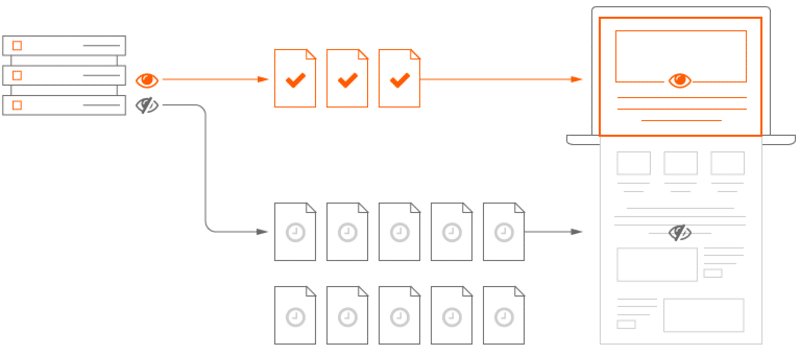
- Async: The script is downloaded in the background and executed as soon as it’s ready. This is good for scripts that don’t depend on other elements (like basic tracking).
- Defer: The script is downloaded in the background but only executed after the entire HTML document has been parsed. This is almost always the better choice for Magento SEO as it ensures the product content is “seen” by the browser first.
$$\text{Script Attribute Strategy: } \text{Critical (Direct)} \rightarrow \text{Non-Critical (Defer)} \rightarrow \text{Low Priority (Idle Callback)}$$
Load Third-party Scripts Conditionally
One of the biggest mistakes Magento admins make is loading every script on every page. Why load a “Live Chat” script on a checkout page where it might distract the user, or load a “Product Review” script on the homepage?
In Magento, you can use Layout XML to target specific handles. For example, ensure your review scripts only load on catalog_product_view and your contact forms only load on the contact_index_index page. This keeps the rest of your site lean.
Using Magento SEO Extensions
Magento SEO extensions are a direct solution that helps store owners optimize their SEO while simultaneously reducing the negative impacts caused by third-party scripts. Rather than relying on multiple scattered scripts, these extensions centralize essential SEO tasks.
The core functions of these extensions include:
- Automated Metadata: Automatically optimizing meta titles, meta descriptions, and canonical tags across thousands of product and category pages without needing external JS tools.
- Advanced Sitemaps and Schema: Creating and managing XML sitemaps and structured data (JSON-LD) that meet the latest search engine standards.
- Rendering Priority: They help ensure that the most important SEO content of your Magento store renders before any external third-party scripts execute. This reduces the risk of Googlebot “timing out” and ignoring your content.
When combined with defer/async methods and conditional loading, a robust Magento SEO extension makes your store faster, provides a better mobile UX, and leads to sustainable improvements in search rankings.
Explore Now: List of Magento 2 modules to reduce SEO risks caused by third-party scripts
Use Magento + GTM for Asynchronous Tag Management
Instead of hardcoding scripts into your head.phtml, move everything into Google Tag Manager (GTM). GTM loads asynchronously, meaning it won’t block the rendering of your Magento store. Furthermore, GTM allows you to set “Triggers” that delay the loading of scripts until after the page has fully loaded (the Window Loaded event), which is a huge win for LCP scores.
Audit and Minimize Third-party Magento Extensions
Every extension you install from the Magento Marketplace likely adds at least one (if not five) new JavaScript files.
- Audit: List every extension installed.
- Evaluate: Is this extension actually generating revenue or providing essential data?
- Consolidate: If you have three different extensions for “Social Sharing,” “Exit Intent Popups,” and “Analytics,” see if you can find one high-quality extension that does all three or move those functions to GTM.
- Remove: Completely uninstall (don’t just disable) unused extensions to prevent them from injecting code.
Prioritize Magento SEO-critical Content
Ensure your Magento theme follows a “Content First” approach. This means your H1 tags, product images, and schema markup should be visible in the source code as high as possible. You can use Resource Hints to tell the browser which scripts are important:
- rel=”preconnect”: For essential third-party domains (like your payment gateway).
- rel=”dns-prefetch”: For less critical external scripts to speed up the lookup process.
Monitor Magento Core Web Vitals Regularly
SEO is not a “set it and forget it” task. Every time your marketing team adds a new tracking pixel or your developers update a Magento module, your performance scores will shift. Establish a monthly performance audit specifically focusing on Core Web Vitals. If a new script drops your LCP score by more than 200ms, it’s time to re-evaluate its implementation.

Final Thoughts
For Magento stores, third-party scripts are a double-edged sword. They provide the features that drive conversions, but they can simultaneously erode the SEO foundation that brings users to the site in the first place. By shifting to a strategy of deferred loading, conditional execution, and aggressive auditing, you can ensure your Magento store remains fast, crawlable, and highly ranked in search results.
Key takeaway: High-ranking Magento stores prioritize the rendering of their own product data over the execution of third-party widgets. Manage your scripts, or they will manage your rankings.