Tracking the right SEO metrics is the difference between a high-performing e-commerce business and a store that fluctuates blindly with every search engine algorithm change.
For Magento merchants, the technical complexity of the platform—ranging from layered navigation and complex URL structures to heavy JavaScript execution—means that standard SEO metrics can often hide underlying performance issues.
While many store owners focus on total traffic, the key to success lies in granular analysis. Understanding how Google core updates and their impact with Magento stores affect your specific architecture is vital for long-term stability.
This guide explores the specific SEO metrics to track on Magento stores to ensure technical health and sustainable organic growth.
Nội dung bài viết
- 1 Organic visibility and traffic metrics to track on Magento stores
- 2 Keyword and category performance metrics
- 3 Indexation and crawl health metrics to track on Magento stores
- 4 Page experience and performance metrics
- 5 Content quality and thin page signals
- 6 Conversion and revenue-driven SEO metrics
- 7 Technical SEO stability metrics to track on Magento stores
- 8 Monitoring and prioritization framework
- 9 Common Magento SEO metric mistakes to avoid
- 10 Final Takeaway
Organic visibility and traffic metrics to track on Magento stores
Evaluating organic visibility is about more than just checking a total session count. It involves determining whether search engines are discovering and prioritizing your most valuable pages.
If a store has experienced a sudden downturn, analyzing these specific indicators is essential for identifying how a Magento store recovered from an SEO traffic drop.
Organic sessions by page type
Magento’s architecture is fundamentally built on category, product, and CMS pages. You should segment your organic traffic to see which “type” of page is driving the most value.
Often, category pages act as the primary traffic drivers for e-commerce.
If product pages are outperforming categories for high-volume terms, it may indicate a need to optimize your internal linking or category descriptions. Integrating a Magento 2 Google Analytics 4 extension can help automate this segmentation and provide deeper insights into user journeys.
Search impressions and clicks
Using Google Search Console data, monitor the relationship between impressions (how often you appear) and clicks.
A high impression count with low clicks suggests that while your technical SEO is allowing you to rank, your meta titles or descriptions are not compelling enough to win the user’s click.
Average position for core keywords
Focus on the average position of your “hero” categories. Since Magento stores often have thousands of SKUs, tracking every single keyword is impossible.
Instead, group your tracking by core category keywords and high-margin product keywords to spot trends before they become site-wide problems.
Click-through rate (CTR) for high-impression pages
Identifying pages with high impressions but below-average CTR allows you to optimize your snippets. In the competitive Magento landscape, utilizing structured data to show price and availability can significantly boost these metrics.
Keyword and category performance metrics
Magento’s category-driven structure requires a unique approach to keyword tracking, as the platform’s layered navigation can often create competing URLs.
Ranking distribution for category vs product keywords
Category pages should ideally rank for broad, “head” terms (e.g., “leather boots”), while product pages should rank for specific models or long-tail queries (e.g., “brown waterproof leather boots size 10”).
If these roles are reversed, search engines may be confused about your site hierarchy.
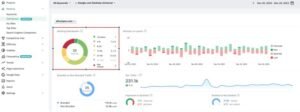
One of the biggest SEO risks in Magento is layered navigation.
Filters for color, size, or price can generate unique URLs that compete with your main category page for the same keywords. Monitoring for cannibalization ensures that your primary “money” pages remain the authoritative source in Google’s index.
Performance of long-tail, transactional queries
High-intent users often search for very specific terms. Tracking the performance of these long-tail queries can reveal gaps in your product data or attribute management.
Search demand vs indexed page alignment
Ensure that the pages you have indexed actually correspond to terms people are searching for. Large-scale Magento sites often suffer from “index bloat,” where thousands of pages are indexed but receive zero search demand, diluting the store’s overall authority.
Indexation and crawl health metrics to track on Magento stores
If search engines cannot efficiently crawl or index your store, no amount of content optimization will help.
Total indexed pages vs intended indexable pages
Compare the number of pages in your XML sitemap to the number of pages Google has actually indexed. A massive discrepancy usually points to technical barriers, such as excessive noindex tags or crawl traps.
Crawl errors and server response issues
Magento is resource-intensive. Monitoring 5xx server errors and 4xx “not found” errors is critical. High server response times can lead Googlebot to reduce its crawl frequency, meaning your new products or price updates take longer to appear in search results.
Duplicate URLs created by filters and parameters
Check your “Excluded” reports in Search Console. If you see an explosion of URLs with parameters like ?price=10-20 or ?dir=asc, your robots.txt or “parameter handling” settings need adjustment to prevent duplicate content issues.
Canonical coverage accuracy
Verify that your canonical tags are pointing to the correct “source” URL. In Magento 2, it is common for a product to exist in multiple categories. Without a strong canonical strategy, Google may struggle to decide which URL version to rank.
Page experience and performance metrics
Google’s emphasis on user experience means that technical speed is now a direct ranking factor.
Core Web Vitals (LCP, INP, CLS)
Magento stores often struggle with Largest Contentful Paint (LCP) due to heavy images and Interaction to Next Paint (INP) due to complex JavaScript.
Tracking these through a Magento 2 Google Analytics 4 extension or Search Console is mandatory for maintaining competitive rankings.
Page load time for category and product pages
Beyond the “Vitals,” the actual time it takes for a user to see a functional page affects bounce rates. Category pages with dozens of products and “Quick View” features often require specific optimization to maintain speed.
Mobile usability errors
With the majority of e-commerce traffic coming from mobile devices, any “clickable elements too close together” or “content wider than screen” errors in Magento’s responsive themes can lead to immediate ranking drops.
JavaScript and render-blocking impact
Magento’s use of RequireJS and heavy layout XML files can lead to render-blocking issues. Monitor the “Time to Interactive” to ensure users aren’t staring at a blank screen while the browser processes scripts.
Content quality and thin page signals
Content quality at scale is a common challenge for Magento merchants managing thousands of attributes.
Pages with low or no organic impressions
Regularly audit your store for “zombie pages.” These are pages that have been indexed for months but have generated zero impressions. These pages often suggest “thin content” that may be dragging down your site’s overall quality score.
Thin category descriptions and duplicate product content
Many Magento stores use manufacturer descriptions for products. Monitoring for duplicate content across your own site and the wider web is essential to avoid being filtered out of search results.
Indexed filter pages with no search demand
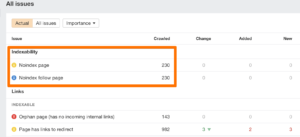
While some filtered pages (e.g., “Black Nike Shoes”) have high search volume, others (e.g., “Shoes under $15.99”) do not. Tracking the performance of these “attribute-based” pages helps you decide which should be set to noindex.
Engagement signals by page type
High bounce rates or low time-on-page for specific categories can signal that the content doesn’t match user intent. For example, if a user lands on a category page expecting a guide but finds only a list of products, they may bounce immediately.
Conversion and revenue-driven SEO metrics
Ultimately, SEO must drive business growth. Tracking revenue metrics ensures your SEO strategy is aligned with your bottom line.
Organic conversion rate
Compare your organic conversion rate to other channels. If organic traffic converts at a significantly lower rate, you might be ranking for keywords that are too informational rather than transactional.
Revenue from organic search
Using a properly configured Magento 2 Google Analytics 4 extension, you can attribute specific revenue amounts to your organic efforts. This is the most important metric for justifying SEO spend to stakeholders.
Assisted conversions from SEO traffic
SEO often acts as the “top of the funnel” discovery channel. A user might find you via organic search, leave, and then return via a direct or paid link to purchase. Tracking assisted conversions gives a truer picture of SEO’s value.
Category-level organic revenue contribution
Analyze which categories are your “breadwinners.” This allows you to prioritize SEO resources toward high-revenue areas rather than spending time on low-margin products.
Technical SEO stability metrics to track on Magento stores
Technical stability metrics act as an early warning system for potential site-wide failures.
Sudden index spikes or drops
A sudden spike in indexed pages often indicates a crawl trap or a security breach (such as a Japanese keyword hack). A sudden drop usually suggests a site-wide “noindex” error or a critical server failure.
URL growth rate over time
Monitor how many new URLs your Magento store creates weekly. If your product count is stable but your URL count is growing exponentially, you likely have an issue with layered navigation or session IDs being indexed.
404 and redirect volume
Magento’s URL rewrite table can become bloated or corrupted. High volumes of 404 errors or redirect chains (A -> B -> C) slow down crawlers and frustrate users. Regularly audit your url_rewrite table to keep things lean.
Structured data error trends
Google frequently updates requirements for Schema.org. Monitoring errors in your Product, Review, and Breadcrumb schema ensures you don’t lose your rich snippets, which are vital for e-commerce CTR.
Monitoring and prioritization framework
Not all metrics require the same level of attention. A structured review cadence is essential.
Daily vs weekly vs monthly SEO metrics
- Daily: Monitor server health (5xx errors) and sudden traffic drops.
- Weekly: Review keyword rankings for top categories and Search Console “Index” reports.
- Monthly: Analyze revenue, conversion rates, and Core Web Vitals trends.
Leading vs lagging indicators
Leading indicators, such as crawl rate and technical health, predict future performance. Lagging indicators, like revenue and total traffic, tell you how your past efforts performed. A healthy SEO strategy balances both.
Metrics that signal technical risk vs growth opportunity
Errors in your 404 logs signal risk. High impressions for keywords where you rank on page two signal a growth opportunity. Knowing the difference helps you prioritize your Magento developer’s backlog.
Common Magento SEO metric mistakes to avoid
Avoiding common pitfalls is as important as tracking the right data.
Tracking rankings without indexation context
A keyword might drop in ranking simply because the page was accidentally de-indexed. Always check indexation status before panicking over a rank change.
Ignoring category-level performance
Focusing only on the homepage or specific high-margin products can blind you to broader issues within your category structure, which is the “backbone” of Magento SEO.
Over-focusing on traffic without revenue impact
It is easy to get “vanity traffic” from blog posts that don’t lead to sales. Always weigh traffic against conversion rates to ensure you are attracting the right audience.
Treating Magento like a small CMS site
Magento is a complex database-driven application. Treating it like a simple WordPress site—by ignoring URL parameters, attribute management, and cache states—will lead to inaccurate data and poor SEO results.
Final Takeaway
Effective SEO metrics to track on Magento stores are those that provide clarity amidst the platform’s inherent complexity.
By focusing on indexation health, category performance, and revenue attribution, merchants can move beyond vanity metrics and focus on what truly drives growth. If your store has suffered a decline, analyzing these metrics is the first step in learning how a Magento store recovered from an SEO traffic drop.
Consistent monitoring ensures that your store remains resilient against algorithm changes and technical regressions, paving the way for long-term e-commerce success.