Migrating a Magento store, whether upgrading from Magento 1 to 2 or moving from a different platform altogether, is a high-stakes technical operation. Without a rigorous strategy, businesses risk losing years of accumulated organic visibility and search engine authority.
This guide provides a comprehensive roadmap of pre and post-migration SEO tips for Magento websites to ensure your transition preserves rankings, maintains traffic, and leverages the technical strengths of the Magento architecture.
Nội dung bài viết
- 1 Common SEO issues during Magento version or platform migrations
- 2 Pre-migration SEO tips for Magento websites
- 2.1 Conduct a full SEO audit before migration
- 2.2 Create a URL and redirect mapping plan
- 2.3 Preserve on-page SEO elements
- 2.4 Review technical SEO configurations
- 2.5 Prepare tracking and analytics
- 2.6 Implement 301 redirects correctly
- 2.7 Maintain internal linking structure
- 2.8 Optimize XML sitemaps and robots directives
- 3 Post-Migration SEO Checklist for Magento Websites
- 4 Performance and UX Optimization After Migration
- 5 Common Magento Migration SEO Mistakes to Avoid
- 6 Conclusion
Common SEO issues during Magento version or platform migrations
The most frequent complication during a Magento migration is the loss of “link equity” due to altered URL structures.
Search engines index specific paths, and if those paths change without clear instructions for bots, the site experiences a sharp decline in rankings. Another common issue is the accidental duplication of content, often triggered by Magento’s default faceted navigation and sorting parameters, which can create thousands of thin, competing pages.
Technical oversights frequently include broken redirect chains, missing metadata during database transfers, and incorrect robots.txt configurations that block crawlers from accessing the new site after launch. To mitigate these risks, implementing a robust Magento 2 SEO extension can automate several critical tasks, though it must be coupled with a manual, data-driven migration plan.
Pre-migration SEO tips for Magento websites
Success begins long before the new site goes live. The pre-migration phase is dedicated to capturing a “snapshot” of the current site’s health and building the infrastructure for the new environment.
Conduct a full SEO audit before migration
You cannot protect what you have not measured. A pre-migration audit defines the benchmark for success and helps identify existing issues that should not be carried over to the new store.
- Crawl existing URLs, indexation, and internal links
Use crawling tools like Screaming Frog or Sitebulb to map the entirety of your current site. This crawl should identify every live URL, its current HTTP status, and its depth within the site architecture. Pay close attention to internal linking patterns; these links distribute authority and must be replicated or improved in the new Magento instance.
- Export rankings, traffic, and top-performing pages
Use Google Search Console and Google Analytics to export a list of your top 20% of pages that drive 80% of your organic revenue. Knowing which pages are your “MVP” assets allows you to prioritize them during the migration process. Failing to identify these assets is one of the most frequent SEO migration mistakes made by e-commerce managers.
- Identify SEO-critical pages (categories, products, CMS pages)
Categorize your URLs into high-priority groups. In Magento, category pages often hold the most ranking power for “broad” terms, while product pages capture “long-tail” intent. Ensure all CMS pages (About Us, Shipping, FAQs) are also accounted for, as these often contain valuable backlinks.
Create a URL and redirect mapping plan
This is the most critical technical step in the entire migration process. A redirect map tells search engines where the old content has moved.
- Mapping old URLs to new Magento URLs
Magento 2 uses a specific URL structure (often ending in .html by default, though this can be changed). Create a spreadsheet with two columns: “Old URL” and “New URL.” Every single high-traffic URL from the old site must have a corresponding 301 redirect to its new location.
- When to keep URLs unchanged vs when to restructure
If your current URLs are clean and keyword-rich, try to maintain them. However, if you are moving from a platform with messy parameters to Magento, use this opportunity to implement SEO-friendly slugs.
Ensure you consider all SEO considerations when migrating to Magento 2 such as the removal of redundant categories or the implementation of a flatter site hierarchy.
- Avoiding redirect chains and soft 404s
Ensure your map goes directly from Point A to Point B. Redirecting from an old URL to another redirect (a chain) slows down crawlers and diminishes the “link juice” passed to the new page.
Furthermore, ensure that redirected pages actually exist; sending users to a “Search Results” page or a generic homepage instead of a specific product often results in a “soft 404” in Google’s eyes.
Preserve on-page SEO elements
Metadata and content are the primary signals used by search engines to understand page relevance.
- Meta titles and meta descriptions
If your current titles are performing well, do not change them during the migration. Use Magento’s bulk import tools to ensure that every product and category retains its specific meta title and description.
Magento 2 allows for “Product Fields Auto-Generation,” which can be useful for new items but should be overridden for existing high-value pages.
- Header structure and on-page content
Ensure that H1, H2, and H3 tags are preserved. Often, new Magento themes have different default heading settings (e.g., making the logo an H1). Audit your new theme code to ensure the product name remains the primary H1 tag on the page.
- Image alt text and media assets
Images are often overlooked. Ensure your image filenames and alt text are migrated. Magento’s media gallery handles assets differently than other platforms; verify that the “alt” attribute in the database is correctly mapped during the data transfer.
Review technical SEO configurations
Magento is a powerful but complex system. Its default settings are not always optimized for SEO out of the box.
- Canonical tags setup
Prevent duplicate content issues by ensuring canonical tags are correctly configured. In Magento, go to Stores > Configuration > Catalog > Catalog > Search Engine Optimization and ensure “Use Canonical Link Meta Tag For Categories” and “Products” are both set to “Yes.”
- Robots.txt and noindex rules
Your staging site should be set to “noindex, nofollow” to prevent Google from indexing your site before it is ready. However, you must have a final version of the robots.txt file ready for the live launch that allows access to essential paths while blocking internal search pages and account folders.
- Pagination and faceted navigation handling
Magento’s layered navigation can create an infinite number of URLs (e.g., filtering by color, size, and price simultaneously). Use the robots.txt file or the “Noindex” tag for specific filter combinations to prevent crawl waste and content dilution.
Prepare tracking and analytics
Data continuity is essential for diagnosing post-migration performance.
- Backup Google Analytics and Search Console data
Ensure you have a record of your historical performance. This includes bounce rates, conversion rates, and average session duration for your top 100 pages.
- Ensure tracking codes are ready for the new Magento site
If you are moving to GTM (Google Tag Manager), ensure all triggers and tags are tested on the staging environment. Magento 2 has native support for Google Analytics 4, but it requires precise configuration of the Measurement ID and API secrets for e-commerce event tracking.
- Set benchmark KPIs for post-migration comparison
Define what success looks like. Establish your current average position for core keywords and your current organic click-through rate (CTR).
Implement 301 redirects correctly
Redirects are the “forwarding address” for your website.
- Redirect rules at server or Magento level
For large sites with thousands of URLs, server-level redirects (via .htaccess or Nginx config) are faster and more efficient than using the Magento “URL Rewrites” table. However, Magento’s internal rewrite tool is excellent for managing individual product changes on the fly.
- Testing redirects before launch
Use a bulk header checker to test a sample of your redirect map on the staging server. Ensure the status code is a 301 (Permanent) and not a 302 (Temporary).
- Handling discontinued or merged pages
If products from the old site are not moving to the new site, do not let them 404. Redirect discontinued products to the most relevant parent category or a newer version of the product.
Maintain internal linking structure
Internal links are the “roads” that search bots use to navigate your store.
- Category and product internal links
Ensure that links within product descriptions or blog posts on the old site are updated to point to the new URL structure.
- Breadcrumb consistency
Magento 2 uses breadcrumbs to help users and bots understand hierarchy. Ensure your breadcrumb schema is correctly implemented so that search engines can display them in the SERPs.
- Avoiding broken internal links after migration
Run a final crawl of the staging site to identify any “internal 404s” where a link points to a page that was deleted during the culling process.
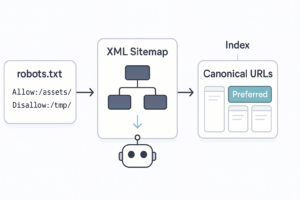
Optimize XML sitemaps and robots directives
- Generating new Magento XML sitemaps
Magento 2 has an automated sitemap generation tool. Configure it to update daily and include all product, category, and CMS pages.
- Updating sitemap references in robots.txt
Ensure your new robots.txt file points directly to the new XML sitemap URL.
- Preparing for Search Console submission
Have your Search Console account ready so you can “Ask for Recrawl” as soon as the DNS points to the new server.
Post-Migration SEO Checklist for Magento Websites
Once the site is live, the clock starts ticking. The first 48 hours are critical for identifying and fixing catastrophic errors.
Verify site indexation and crawlability
- Checking index status in Google Search Console
Use the “URL Inspection Tool” to see if Google can successfully access your new homepage and top category pages.
- Identifying blocked or excluded pages
Check the “Coverage” report. If you see a spike in “Excluded by ‘noindex’ tag,” ensure that you didn’t accidentally leave the staging meta tags live on the production site.
- Fixing crawl errors and server issues
Monitor your server logs for 5xx errors. Magento is resource-intensive; if the new server is underpowered, search bots may experience timeouts, leading to a drop in crawl frequency.
Monitor rankings and organic traffic
- Comparing pre- and post-migration performance
Annotate your Google Analytics with the migration date. Compare the “First Week Post-Launch” to the “Last Week Pre-Launch” to identify any immediate traffic gaps.
- Identifying priority pages with ranking drops
If a specific category drops from page 1 to page 3, investigate that page immediately. Check its canonical tag, its H1, and ensure the 301 redirect from the old site is still functioning.
- Expected short-term fluctuations vs real issues
It is normal to see a 5-10% fluctuation in the first two weeks as Google re-indexes the site. However, a drop of 30% or more usually indicates a technical failure, such as a broken redirect map or a “noindex” sitewide setting.
Audit redirects and broken links
- Finding redirect errors and 404 pages
Monitor the “404 Report” in Magento and Google Search Console. Users will inevitably find paths you missed; catch these early and create new 301 redirects.
- Fixing missing or incorrect redirects
If you see users hitting 404s on an old high-traffic URL, add it to your redirect list immediately.
- Monitoring crawl reports regularly
Use tools like Ahrefs or Semrush to monitor “Broken Backlinks.” If an external site is linking to an old URL that is now a 404, you are losing valuable authority.
Validate on-page and technical SEO elements
- Canonical, hreflang, and structured data checks
If your Magento store is multi-regional, verify that your hreflang tags are correctly pointing to the new URLs for each language version. Use the Rich Results Test tool to ensure that Product Schema (Price, Availability, Reviews) is still appearing correctly.
- Meta data duplication or loss
Perform a post-launch crawl to ensure that no metadata was corrupted during the final database “push” from staging to live.
- Mobile usability and Core Web Vitals review
Magento 2’s Luma theme or custom PWA frontends can be heavy. Use Google PageSpeed Insights to ensure your “Largest Contentful Paint” (LCP) and “Cumulative Layout Shift” (CLS) are within the “Good” threshold.
Re-submit and optimize XML sitemaps
- Submitting sitemaps to Google Search Console
Manually submit the new sitemap.xml to trigger a fresh crawl of the entire site.
- Monitoring sitemap coverage reports
Ensure the number of “Submitted and Indexed” URLs matches your expectations based on your pre-migration inventory.
- Removing non-indexable URLs from sitemaps
Check that your sitemap does not include URLs that are redirected or blocked by robots.txt, as this sends conflicting signals to Google.
Performance and UX Optimization After Migration
SEO is no longer just about keywords; it is about the user experience.
Page speed optimization in Magento
Enable all built-in Magento caching (FPC, Varnish) and consider a Content Delivery Network (CDN) like Cloudflare. Minify CSS and JavaScript to reduce the render-blocking time.
Core Web Vitals impact on SEO
Google uses Core Web Vitals as a ranking signal. A slow Magento site will eventually lose its position to faster competitors, even if the content is superior. Prioritize optimizing the “Time to First Byte” (TTFB).
Mobile-first considerations for Magento stores
Ensure your new theme is fully responsive. Check for “elements too close together” or “content wider than screen” errors in the Mobile Usability report of Search Console.
Common Magento Migration SEO Mistakes to Avoid
Launching without a redirect plan
This is the number one cause of e-commerce business failure during migration. Without redirects, you are effectively starting a new business with zero reputation in Google’s eyes.
Blocking important pages accidentally
It is common to leave Disallow: / in the robots.txt from the developer’s staging environment. Always double-check this file the moment the site goes live.
Ignoring post-launch monitoring
Many teams celebrate once the site is live and stop checking the data. Migration SEO is an ongoing process that lasts at least three months post-launch.
Assuming rankings will “auto-recover”
Rankings do not recover on their own if the underlying technical foundation is broken. If you see a decline, take proactive steps to audit your canonicals, redirects, and site speed immediately.
By following these pre and post-migration SEO tips for Magento websites, you can navigate the complexities of platform changes while protecting your most valuable digital asset: your organic search visibility.
Conclusion
Migrating a Magento store is a complex technical journey that requires a perfect balance between data preservation and system optimization.
Remember that a successful migration is not defined by the launch day alone, but by the continuous monitoring and iterative adjustments made in the weeks that follow. Protecting your organic traffic ensures that your new Magento environment becomes a foundation for growth rather than a recovery project.
With a rigorous redirect strategy, a clean technical audit, and a focus on Core Web Vitals, your Magento store will remain competitive and visible in an ever-evolving search landscape.