Search engine optimization (SEO) is a critical factor for the success of any Magento store. However, Magento’s flexibility and complex structure can create unique SEO challenges that may limit your store’s visibility, reduce organic traffic, and affect conversions. From duplicate content and poorly structured URLs to slow page load speed and missing meta tags, these issues can prevent your site from performing at its full potential.
In this guide, we will explore the most common Magento SEO issues, explain their impact on search rankings and user experience, and provide practical, step-by-step solutions. Whether you are a store owner or a developer, you will learn how to configure Magento settings, implement best practices, and use Magento SEO extension effectively to optimize your store for search engines.
Nội dung bài viết
- 1 Duplicate Content Issues Affecting Product and Category Pages
- 2 Magento URLs That Are Not SEO-Friendly
- 3 Missing Meta Tags and Structured Data
- 4 Broken Links and Crawl Errors Hindering Indexing
- 5 Weak Internal Linking Prevents Efficient Navigation and Page Authority
- 6 International SEO Challenges in Magento
- 7 Slow Loading Pages Causing Poor User Experience and Lower SEO
- 8 FAQs (Unique & Informative)
- 9 Conclusion
Duplicate Content Issues Affecting Product and Category Pages
Issue Description: Duplicate content occurs when multiple URLs on your Magento store display the same or very similar content. This commonly happens with product variations, category filters, and URL parameters. For example, the same product might be accessible via different category paths, or filtering a category by color or size may generate multiple URLs showing identical content. Such duplication makes it difficult for search engines to determine which version of a page should be indexed, potentially splitting ranking signals and reducing overall SEO effectiveness.
Impact: The presence of duplicate content can negatively affect your Magento store in several ways:
- Lower Search Rankings: Google may choose to rank only one version of a page or penalize duplicate pages, reducing visibility.
- Indexing Issues: Multiple URLs with the same content can confuse search engines, causing important pages not to be indexed properly.
- Traffic Dilution: When multiple URLs compete for the same keywords, your organic traffic may be spread thinly across duplicates instead of consolidating to a single authoritative page.
How to Fix This
The most effective way to resolve duplicate content issues in Magento is by implementing canonical URLs and configuring SEO settings properly. Canonical tags signal to search engines which version of a page should be considered the primary one, consolidating ranking signals and preventing indexing problems.
Step-by-Step (Magento Default):
- Implement canonical tags:
- Navigate to Admin > Stores > Configuration > Catalog > Search Engine Optimization.
- Set Use Canonical Link Meta Tag for Products = Yes.
- Set Use Canonical Link Meta Tag for Categories = Yes.
- Setting noindex for non-SEO URLs:
- Use noindex, follow on non-essential filter pages to prevent indexing of low-value URLs while preserving link equity.
- Review URL parameters in Admin > Stores > Configuration > Catalog > SEO to ensure unnecessary parameters are excluded from indexing.
- Test your canonical configuration using tools like Google Search Console or third-party SEO crawlers to confirm that only the primary URLs are being indexed.
To effectively resolve duplicate content issues, you can use the BSS Commerce Magento SEO extension, which allows you to easily set canonical tags across your Magento store. The module supports canonical tags for homepage, product pages, and category pages, and lets you add canonical URLs directly from the backend edit page. It also provides options to apply canonical tags for paginated category pages using Next/Previous tags, as well as for layered navigation with filtered results or sorting options—helping to consolidate SEO value and prevent duplicate content problems.
Magento URLs That Are Not SEO-Friendly
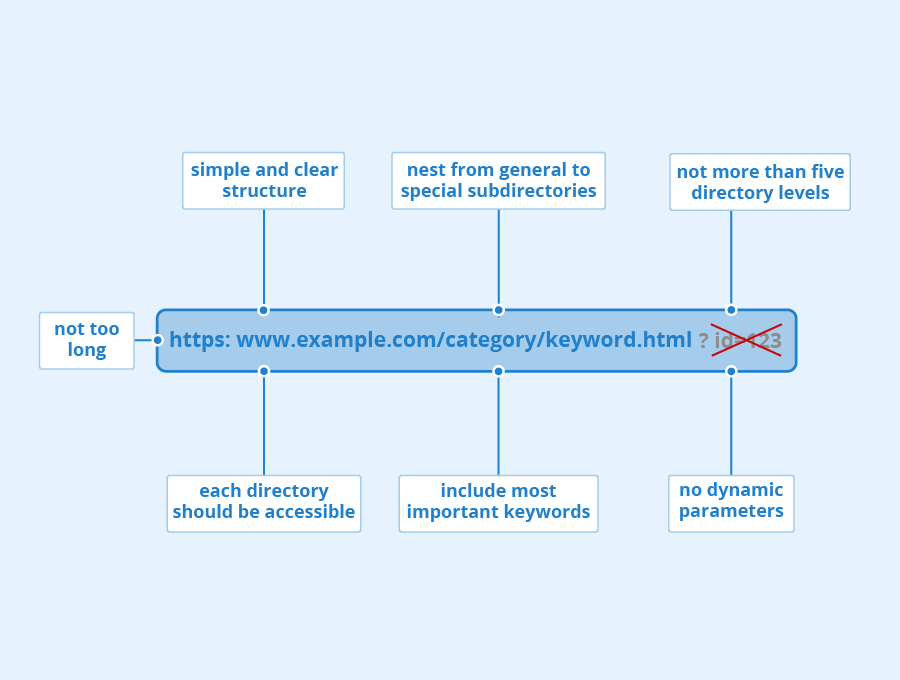
Magento’s default configuration often generates long and complex URLs that include query strings, session IDs, or unnecessary parameters. For example, a product page URL might look like www.example.com/catalog/product/view/id/1234?color=red&size=m, which is not user-friendly or optimized for search engines. Such URLs are difficult for visitors to read and remember, and they provide little information about the content of the page to search engines.
Impact: Poorly structured URLs can negatively affect your Magento store in several ways:
- Reduced Click-Through Rates (CTR): Long, complex URLs appear less trustworthy and may discourage users from clicking in search results.
- Indexing Challenges: Search engines may struggle to crawl and index pages efficiently, especially if multiple URLs point to similar content.
- Keyword Optimization Limitations: URLs that do not include relevant keywords miss an opportunity to reinforce SEO signals for targeted search terms.
How to Fix This
Optimizing URL structure involves creating short, clear, and descriptive URLs that contain primary keywords while avoiding unnecessary parameters. Well-structured URLs improve readability, enhance SEO, and help search engines understand page content more effectively.
Step-by-Step (Magento Default):
- Navigate to Admin > Stores > Configuration > Catalog > Search Engine Optimization.
- Set Use Web Server Rewrites = Yes to remove index.php from URLs and enable clean URL paths.
- Go to Admin > Marketing > SEO & Search > URL Rewrites to manually customize product and category URLs for clarity and keyword inclusion.
- Regularly review URLs after product imports or bulk updates to ensure they remain consistent and SEO-friendly.
For large Magento stores with frequent updates or extensive product catalogs, SEO URL manager extensions can automate URL creation and management. These tools help maintain standardized, keyword-rich URLs across products and categories, saving time and reducing errors.
Missing Meta Tags and Structured Data
Many Magento stores lack properly configured meta titles, meta descriptions, and structured data for products, categories, or CMS pages. Meta tags help search engines understand the content of a page, while structured data (such as JSON-LD) provides additional context that enables rich snippets to appear in search results. Without these elements, your pages may be displayed with generic or incomplete information in SERPs, which can reduce visibility and attractiveness to potential customers.
Impact
The absence of meta tags and structured data can negatively affect your Magento store in the following ways:
- Lower Click-Through Rate (CTR): Pages without compelling titles and descriptions are less likely to attract clicks from search results.
- Reduced Rich Snippet Visibility: Structured data is essential for displaying ratings, pricing, availability, and other rich features in SERPs. Without it, your listings may appear less informative and less appealing.
- SEO Misinterpretation: Search engines may struggle to understand the content and purpose of pages, potentially affecting rankings and indexing.
How to Fix This
To improve SEO and SERP presentation, ensure that all product, category, and CMS pages have unique meta titles and descriptions. Additionally, implement structured data across your site to enhance search listings with rich snippets.
Step-by-Step (Magento Default):
- For Products and Categories:
- Navigate to Admin > Catalog > Products/Category > Search Engine Optimization.
- Enter unique Meta Title and Meta Description for each product or category page.
- Navigate to Admin > Catalog > Products/Category > Search Engine Optimization.
- For CMS Pages:
- Go to Admin > Content > Pages > Meta Tags.
- Add relevant meta titles and descriptions for all CMS pages, including home, about, and blog pages.
- Go to Admin > Content > Pages > Meta Tags.
- Validate Structured Data:
- Use Google’s Rich Results Test or Schema Validator to ensure structured data is correctly implemented.
Broken Links and Crawl Errors Hindering Indexing
Issue Description
Broken links and crawl errors are common issues in Magento stores, often arising when products are deleted, URLs are changed, or pages are moved without proper redirects. A 404 page appears when a user or search engine attempts to access a URL that no longer exists. Crawl errors occur when search engines cannot properly access certain pages on your site, preventing them from being indexed effectively. These issues can disrupt navigation, frustrate users, and limit the visibility of your site in search engines.
Impact
Broken links and crawl errors can have serious consequences for your Magento store:
- Negative User Experience: Visitors encountering 404 pages may leave your site immediately, reducing trust and engagement.
- Reduced SEO Performance: Search engines may lower rankings for sites with frequent broken links or indexing issues.
- Indexing Problems: Pages that cannot be crawled will not appear in search results, which can limit organic traffic.
How to Fix This
The most effective solution is to regularly detect broken links and crawl errors, then implement 301 redirects for removed or moved pages. This ensures that both users and search engines are directed to the correct content.
Step-by-Step (Magento Default):
- Navigate to Admin > Marketing > SEO & Search > URL Rewrites.
- Create 301 redirects for any removed or changed URLs to point users and search engines to the appropriate page.
- Create 301 redirects for any removed or changed URLs to point users and search engines to the appropriate page.
- Use Google Search Console > Coverage report to identify crawl errors, including 404 pages and blocked URLs.
- Review and update internal links to ensure they point to live, correct URLs.
Optional Extensions:
For stores with large catalogs or frequent URL changes, consider using:
- Redirect Manager Extensions: Automate and manage 301 redirects efficiently.
- SEO Audit Extensions: Detect broken links and crawl issues across the site, providing actionable insights for correction.
A weak internal linking structure occurs when Magento stores have insufficient or poorly organized links connecting pages across the site. This can result in important pages being difficult to access from the homepage or other key pages. Without a clear internal linking strategy, search engines may struggle to discover and index content efficiently, and users may find navigation confusing.
Impact: Poor internal linking can negatively affect your Magento store in several ways:
- Reduced Crawl Efficiency: Search engines may not reach all pages, limiting indexing and affecting SEO performance.
- Loss of PageRank: Pages that are not linked internally may not receive sufficient authority, reducing their potential rankings.
- Lower User Experience: Customers may struggle to navigate the site, leading to frustration and potential drop-offs.
How to Fix This
Building a logical internal linking structure involves connecting products, categories, and CMS pages to relevant pages across the site. This improves both user navigation and search engine crawlability, ensuring key pages receive adequate SEO value.
Step-by-Step (Magento Default):
- Add Links in Content: Insert links within product descriptions, category descriptions, and CMS content to related products or important pages.
- Use Widgets for Internal Linking: Navigate to Admin > Content > Widgets > Internal Linking to create structured links to highlight featured products, categories, or CMS pages.
- Regularly Audit Links: Check for orphaned pages or broken links and update them to maintain a robust linking network.
International SEO Challenges in Magento
Stores targeting multiple countries or languages must handle international SEO properly. Magento sites without proper international SEO configuration may confuse search engines about which version of a page to display to users in different regions.
Impact:
- Without hreflang tags, search engines may index the wrong language or regional version.
- Content duplication across regions can occur, reducing the likelihood of ranking in target markets.
- Missed opportunities for organic traffic in international search results.
How to Fix This:
- Configure hreflang tags for each language and regional version of your site in Magento.
- Use Magento’s built-in multi-store and multi-language features to assign language-specific URLs.
- Consider SEO extensions that automatically generate and manage hreflang tags for large multi-region stores.
Slow Loading Pages Causing Poor User Experience and Lower SEO
A slow-loading Magento store is often caused by heavy themes, unoptimized images, excessive JavaScript or CSS files, and underperforming hosting environments. For instance, large product images or complex page layouts can significantly increase page load times. Slow websites frustrate users, lead to higher bounce rates, and reduce the likelihood of conversions. In addition, page speed is a direct ranking factor in Google’s algorithm, so slow performance can negatively impact search visibility.
In many cases, performance issues are further amplified by poorly optimized third-party scripts such as analytics tools, chat widgets, or marketing tags. These external scripts can significantly increase load time and negatively impact Core Web Vitals. Learn more about how third-party scripts can hurt Magento SEO and how to control them effectively.
Impact: The consequences of poor page speed include:
- Reduced User Experience: Visitors may abandon pages that take too long to load, lowering customer satisfaction.
- Higher Bounce Rate: Slow pages often result in users leaving before exploring your store.
- Negative SEO Effects: Search engines prioritize fast-loading pages; slow sites may see decreased rankings.
- Lower Conversions: Delays in loading can deter users from completing purchases, directly affecting revenue.
How to Fix This
Improving page speed involves optimizing caching, enabling Content Delivery Networks (CDN), minimizing CSS/JS files, and compressing or resizing images. These optimizations collectively enhance user experience and boost SEO performance.
Step-by-Step (Magento Default):
- Enable Full Page Cache:
- Navigate to Admin > Stores > Configuration > Advanced > System > Full Page Cache.
- Set Caching Application = Varnish to speed up page delivery by serving cached content.
- Navigate to Admin > Stores > Configuration > Advanced > System > Full Page Cache.
- Enable Production Mode:
- Run the command: bin/magento deploy:mode:set production to optimize static content deployment and minimize server-side processing.
- Run the command: bin/magento deploy:mode:set production to optimize static content deployment and minimize server-side processing.
- Optimize Images Before Upload:
- Compress images using tools like TinyPNG or ImageMagick.
- Ensure images are correctly sized for their placement to avoid unnecessary load.
- Compress images using tools like TinyPNG or ImageMagick.
FAQs (Unique & Informative)
1. How can I detect all Magento SEO issues?
To identify SEO issues on a Magento store, use a combination of tools and methods:
- Use Google Search Console to check for crawl errors, broken links, and indexing issues.
- Run SEO audit tools such as Screaming Frog, Sitebulb, or Magento-specific SEO extensions to detect duplicate content, missing meta tags, and URL structure problems.
- Check page speed with Google PageSpeed Insights or GTmetrix to identify performance-related issues.
- Review internal linking and site map structure to ensure important pages are fully crawlable.
2. Do SEO issues affect Google rankings immediately?
SEO issues generally do not impact rankings instantly. However, serious problems—like duplicate content, broken links, or missing meta tags—can gradually reduce indexing efficiency and CTR. Fixing these issues helps improve rankings over time and stabilizes search performance.
3. Do I need a developer to fix SEO issues in Magento?
- Some basic issues, such as updating meta titles/descriptions, configuring canonicals, or creating redirects, can be handled by a Magento administrator.
- More complex issues, like optimizing URL structure, implementing custom structured data, or improving page speed, may require a developer to adjust code or advanced configurations.
4. What are the best practices for conducting regular Magento SEO audits?
- Perform a full site audit at least every six months or after major changes.
- Check for duplicate content, broken links, meta tags, URL structure, and internal linking.
- Evaluate page speed and mobile usability.
- Use SEO extensions and audit tools to automatically detect issues and track improvements.
Conclusion
Magento SEO issues, if left unresolved, can significantly impact both search engine rankings and customer experience. In this guide, we covered the key challenges—duplicate content, poor URL structure, slow page load speed, missing meta tags and structured data, broken links, mobile optimization, and weak internal linking—and provided actionable solutions for each.
To ensure long-term SEO success:
- Regularly audit your Magento store for technical and content-related issues.
- Implement proper configurations, canonical tags, optimized URLs, metadata, and structured data.
- Monitor page speed, mobile usability, and internal linking structures.
- Use SEO extensions to automate repetitive tasks and maintain consistency.
By following these strategies, Magento store owners can improve search visibility, enhance user experience, and increase conversions, creating a strong foundation for sustainable growth.