Search engine optimization (SEO) is an essential growth lever for any eCommerce business — and at the heart of effective SEO lies a clean, descriptive, and search‑engine‑friendly URL structure. For Magento 2 store owners, URL optimization isn’t just about looking neat; it directly impacts crawlability, ranking, user trust, and traffic performance.
In this guide, we’ll walk you through everything you need to know about SEO‑friendly URL in Magento 2, from foundational concepts to advanced techniques, with actionable steps you can implement today.
Nội dung bài viết
- 1 Understanding Magento 2 SEO‑Friendly URLs
- 2 Step‑by‑Step Guide to Creating SEO‑Friendly URLs in Magento 2
- 3 Advanced Techniques for SEO‑Friendly URLs in Magento 2
- 4 Common Magento 2 SEO‑Friendly URL Mistakes & How to Avoid Them
- 5 Recommended Extensions & Tools to Enhance Magento 2 URL SEO
- 6 FAQs About Magento 2 SEO‑Friendly URLs
- 7 Conclusion
Understanding Magento 2 SEO‑Friendly URLs
What Are SEO‑Friendly URLs in Magento 2?
An SEO‑friendly URL is a web address that clearly describes the page content using readable words rather than cryptic codes or parameters. For example:
- ︎Not SEO Friendly: www.store.com/catalog/product/view/id/1234
- ︎SEO Friendly:︎ www.store.com/blue‑denim‑jacket
The latter structure is easier for both search engines and humans to interpret. Research on search engine best practices shows that descriptive URLs improve crawl efficiency and relevance understanding by bots. In Magento 2, URL rewrite technology maps ugly, system‑generated links (with product IDs) to pretty, human‑readable links stored in the url_rewrite database table.
Why Magento 2 SEO‑Friendly URLs Matter for Your Store
SEO‑friendly URLs matter because they:
- Improve indexing and crawlability — clean links help search engine bots better understand page hierarchy and content relevance.
- Boost click‑through rates (CTR) — users are more likely to click URLs that clearly indicate what content awaits.
- Increase user trust and shareability — clear URLs signal professionalism and make sharing more effective.
Think of a URL as the title on a filing cabinet drawer. If the label is clear and concise, you find documents faster; if it’s a random code, confusion reigns. SEO‑friendly URLs do the same for search engines and users.
Magento 2 Default URL Structure Overview
Magento automatically generates SEO‑friendly URLs for products, categories, and CMS pages, but the behavior can vary based on your configuration. For example, Magento can include category paths in product URLs — useful for structure, but unnecessary if you want a flat, keyword‑focused URL.
Behind the scenes, Magento uses the url_rewrite mechanism to map human‑readable URLs to system routes. Each rewrite is stored in the database and queried by the routing layer as a lookup table, making the URL appear friendly while Rails internally routes to the original endpoint.
Step‑by‑Step Guide to Creating SEO‑Friendly URLs in Magento 2
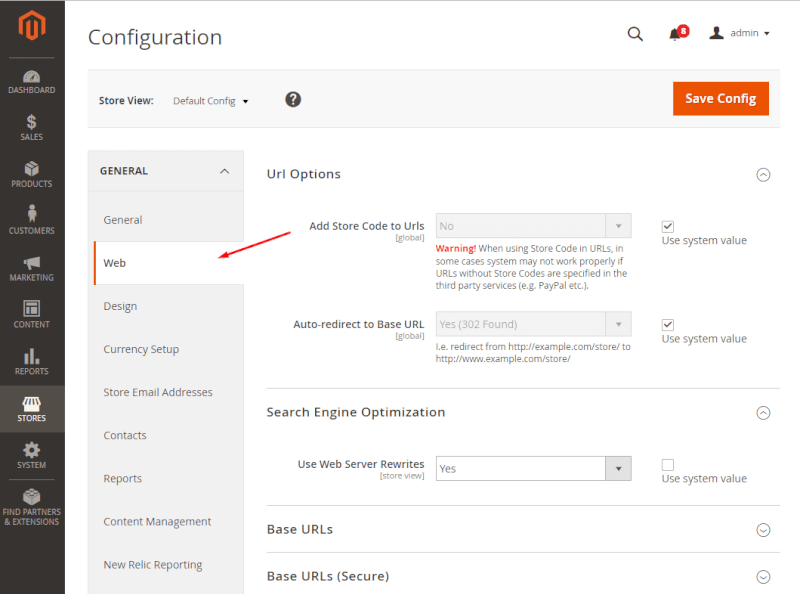
Creating SEO‑friendly URLs in Magento 2 requires both proper configuration and manual optimization for products, categories, and CMS pages. Here’s a detailed step-by-step guide:
Step 1: Configure Core URL Settings in Magento 2 Admin
Magento 2 has settings that control the fundamental behavior of URLs. Correctly configuring these is essential before creating custom URL keys.
1. Enable Web Server Rewrites
- Navigate to Stores > Configuration > General > Web > Search Engine Optimization.
- Set Use Web Server Rewrites to Yes.
2. Decide on Category Path Usage for Product URLs
- Go to the same SEO configuration page.
- Locate Use Categories Path for Product URLs: choose Yes to include the category in product URLs (/mens-jackets/blue-jacket) or No for flat URLs (/blue-jacket).
Tip: Flat URLs are usually preferred for shorter, keyword-rich links.
3. Set Unique URL Keys for CMS Pages
-
- Navigate to Content > Pages > [Page Name] > Search Engine Optimization.
- Ensure each CMS page has a unique URL key to prevent conflicts and duplicate content.
- Navigate to Content > Pages > [Page Name] > Search Engine Optimization.
Step 2: Create SEO-Friendly Product URLs
Magento allows you to define URL keys individually for each product. Follow these steps:
- Navigate to Catalog > Products.
- Select the product you want to optimize.
- Scroll down to the Search Engine Optimization section.
- Edit the URL Key field.
- Save the product. Magento will automatically generate the URL rewrite using your URL key.
Best Practices for Product URL Keys:
- Use primary keywords: Include the main product keyword naturally.
- Keep it short and descriptive: Avoid unnecessary words like the, and, or.
- Use hyphens instead of underscores or spaces: blue-denim-jacket is better than blue_denim_jacket.
- Use lowercase letters only.
Example:
- Product Name: Blue Denim Jacket
- Default URL Key: catalog/product/view/id/1234
- Optimized URL Key: blue-denim-jacket
Step 3: Optimize Category URLs
Categories help define your store hierarchy, and optimized category URLs improve SEO and usability.
- Navigate to Catalog > Categories.
- Select the category you want to edit.
- In the Search Engine Optimization section, edit the URL Key.
- Save the category. Magento will generate URL rewrites for products under that category if you have category paths enabled.
Category URL Best Practices:
- Keep it concise and descriptive: mens-jackets instead of category123.
- Avoid using stop words and special characters.
- Match URL key with search intent: Think about what users would type in Google.
Example:
- Category Name: Men’s Jackets
- Default URL Key: category/view/id/7
- Optimized URL Key: mens-jackets
Step 4: Handle CMS Pages and Custom URLs
CMS pages like About Us or Shipping Policy should also be SEO-optimized.
- Navigate to Content > Pages.
- Click the page you want to edit.
- Scroll to the Search Engine Optimization section.
- Set the URL Key to a descriptive phrase.
Tips:
- Avoid overly long URLs; make them readable and meaningful.
- If you change an existing URL, create a 301 redirect to avoid 404 errors.
Step 5: Implement 301 Redirects for Changed URLs
When URLs change, 301 redirects preserve SEO value and prevent broken links.
- Navigate to Marketing > URL Rewrites.
- Click Add URL Rewrite.
- Choose the Rewrite Type: Product, Category, or Custom.
- Enter the Request Path (old URL) and Target Path (new URL).
- Set the Redirect Type to Permanent (301).
- Save the rewrite.
Example:
- Old URL: /catalog/product/view/id/1234
- New URL: /blue-denim-jacket
- Redirect Type: 301 Permanent
Pro Tip: Always test redirects after implementation to ensure no broken links exist. For a deeper dive into managing redirects in Magento, see our guide on Magento redirect.
Advanced Techniques for SEO‑Friendly URLs in Magento 2
Removing Unnecessary URL Parameters
While Magento handles basic friendly URL generation, query parameters (e.g., filters like ?color=49&size=56) can produce long, messy URLs that confuse search crawlers and dilute relevance.
Using extensions or server rewrites, you can transform these into static, readable paths — for example:
/shirts/blue/size‑m.
Minimizing parameters helps prevent duplicate content issues and makes analytics cleaner.
Using Canonical URLs to Avoid Duplication
Duplicate content can occur when the same page is accessible via multiple URLs. Canonical tags tell search engines which version is the master page.
Magento supports canonical URLs — enabling them ensures you don’t inadvertently compete with your own content in search rankings.
Canonical links function like placing a signpost: “This is the version we want indexed and prioritized.”
Integrating Keywords Strategically in URLs
Search engines use URL keywords to add context to ranking signals. While not the top-ranking factor, keyword presence supports the overall SEO strategy.
Keep URLs:
- Relevant to page content.
- Free of unnecessary filler words.
- Simple enough to be memorable and shareable.
URLs can be as powerful as the meta title in communicating topical relevance to bots.
Common Magento 2 SEO‑Friendly URL Mistakes & How to Avoid Them
Here are the most frequent pitfalls store owners face, with solutions:
| Mistake | Impact | Solution |
| Long, non‑descriptive URLs | Poor rankings | Rewrite with keywords |
| Duplicate URLs | Content cannibalization | Use canonical tags & redirects |
| Special characters | Crawl issues | Clean URLs in URL Keys |
| Ignoring redirects | Lost SEO value | 301 redirects for all changes |
URLs form the backbone of your site architecture. Think of them as breadcrumb trails that guide both search engines and users — clarity is key.
Recommended Extensions & Tools to Enhance Magento 2 URL SEO
Magento’s core capabilities are strong, but extensions help scale and automate SEO URL optimizations:
| Tool | Purpose | Benefit |
| SEO‑Friendly URL extensions | Cleaner URLs for layered navigation filters | Better indexing & UX |
| URL Rewrite Regenerator | Regenerate SEO URLs in bulk | Saves time on migrations |
| Canonical tag modules | Enhanced duplicate control | Stronger SEO clarity |
Many extensions allow admins to control which filters appear in URLs, how they are indexed, and how redirects are managed — improving SEO at scale.
FAQs About Magento 2 SEO‑Friendly URLs
Q1: Can I change URLs without losing rankings?
Yes — by applying 301 redirects from old to new URLs, you preserve most of the SEO value.
Q2: Should product URLs include categories?
It depends on the strategy. Including a category can help hierarchy signals, but shorter product URLs are often cleaner and more keyword-focused.
Q3: Are URLs a major ranking factor?
While not as influential as content quality or backlinks, URLs reinforce relevance and help bots interpret page content.
Q4: How often should I check URLs?
Audit URLs quarterly or before major catalog changes to ensure SEO health.
Conclusion
SEO‑friendly URLs are far more than cosmetic improvements — they represent a clear communication channel between your store and search engines. In Magento 2, mastering this channel means configuring settings correctly, writing meaningful URL keys, handling redirects strategically, and continuously optimizing as your store evolves.
Implement the strategies in this guide to enhance your store’s search visibility, user experience, and long‑term organic performance.