Product pages sit at the core of every Magento store’s organic growth strategy. They are the final destination where search intent, product discovery, and purchase decisions converge. In 2025, Google’s expectations for product pages continue to evolve, favoring sites that deliver clear relevance, strong technical foundations, and frictionless shopping experiences.
This guide outlines actionable Magento SEO best practices for product pages, focusing on what directly improves discoverability, rankings, and conversions. Each section is designed to help merchants understand not only what to optimize, but also how to implement it effectively within Magento’s ecosystem.
Nội dung bài viết
- 1 Understand what Google expects from Magento product pages
- 2 Strengthen on-page product content for higher relevance
- 2.1 Crafting SEO-friendly product titles
- 2.2 Writing compelling meta descriptions tailored to buyer intent
- 2.3 Setting SEO-friendly product URLs in Magento
- 2.4 Writing unique and keyword-optimized product descriptions
- 2.5 Using product attributes effectively for SEO
- 2.6 Structuring product content for readability and conversions
- 3 Implement technical SEO best practices for product pages
- 4 Improve product page discoverability through internal linking
- 5 Enhance product pages with trust and engagement signals
- 6 Measure and maintain product page SEO performance
- 7 Summary
Understand what Google expects from Magento product pages
Google evaluates product pages based on three core signal groups that reflect relevance, user experience, and technical clarity. Below is a concise, high-level overview that does not overlap with later sections:
- Content relevance signals: Google needs to clearly understand what the product is, who it is for, and which queries it satisfies. Elements such as product titles, descriptions, attributes, and structured data strengthen semantic accuracy. In Magento, the product attribute system and catalog structure play a major role in giving Google the correct context for each product page.
- User experience quality signals: Google prioritizes product pages that support a smooth, trustworthy buying experience. Page load speed, content layout, image quality, and readability directly influence engagement metrics. On Magento, multiple images, dynamic content blocks, and heavy extensions can impact Core Web Vitals and overall performance.
- Technical signals that support accurate crawling and indexing: Google requires clean, well-structured product pages that avoid duplication and ensure proper indexing. Canonical tags, URL structure, sitemaps, and schema markup help Google interpret product data correctly. Magento’s layered navigation, URL rewrites, and attribute-driven variations can generate multiple URL versions—making technical control especially important.
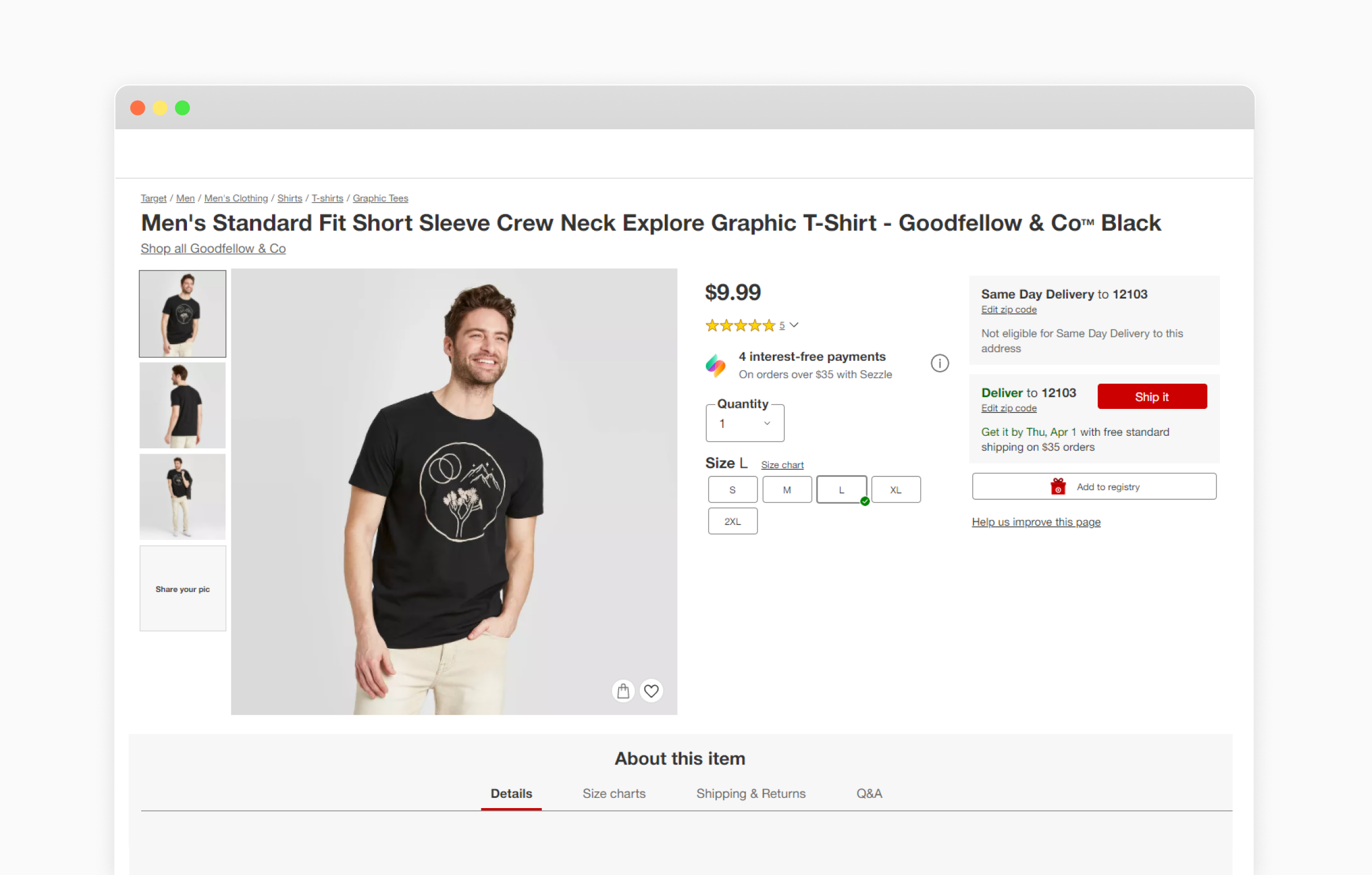
Strengthen on-page product content for higher relevance
Optimizing on-page content is one of the most direct ways to make each Magento product page more relevant to both users and search engines. The goal is to deliver clear information, match shopper intent, and give Google enough semantic signals to understand the product. Below are the essential best practices merchants should follow.
Crafting SEO-friendly product titles
A well-crafted product title helps search engines interpret what the item is and which queries it should rank for. Clear, keyword-aligned titles also make product listings more appealing in search results, improving CTR and overall visibility.
How to do it
- Place the primary keyword naturally at the beginning of the title to emphasize relevance.
- Include essential attributes in a consistent order (e.g., brand → model → key spec → size or color).
- Keep the title concise, ideally within 50–60 characters, so it displays fully in search results.
- Use human-readable wording instead of keyword stuffing or unnecessary modifiers.
- Configure Magento’s Product Name field properly, ensuring it matches the naming format used across the store for consistency.
Writing compelling meta descriptions tailored to buyer intent
Meta descriptions influence how users perceive your product in the SERP. When written with buyer intent in mind, they encourage clicks by highlighting value, benefits, and differentiation.
How to do it
- Focus on what matters most to the shopper—key features, benefits, or a unique selling point.
- Use a secondary keyword naturally to reinforce relevance without sounding forced.
- Write in a clear, action-oriented tone to motivate users to click.
- Keep it within 140–160 characters to avoid truncation.
- Avoid duplication by writing unique descriptions for each product rather than repeating templates across similar SKUs.
Note: While Google no longer uses meta keywords as a ranking factor, Magento still provides the meta keywords field as part of its product metadata. This field can be used to support internal search logic, legacy search engines, or third-party integrations. Meta keywords should be treated as a supplementary signal and must never replace well-optimized titles, descriptions, and on-page content.
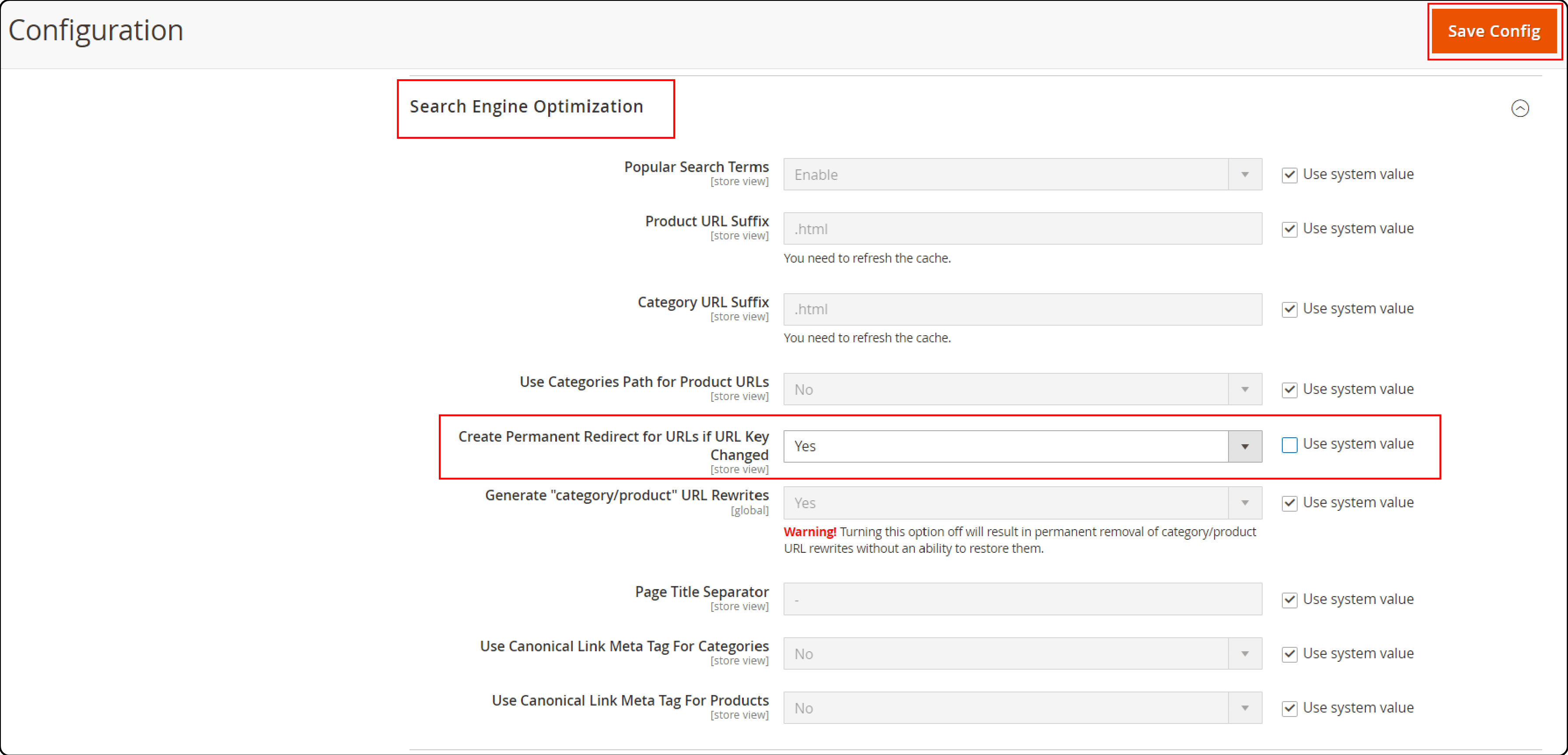
Setting SEO-friendly product URLs in Magento
Clean URLs help search engines crawl product pages more efficiently and signal what the page is about. They also improve user confidence, especially when URLs clearly reflect the product’s identity.
How to do it
- Enable Search Engine Friendly URLs in Magento to automatically remove unnecessary characters.
- Use lowercase letters and hyphens, avoiding parameters, IDs, or special characters.
- Keep URLs short and descriptive, ideally containing only the product name or a simplified version of it.
- Ensure “Use Categories Path for Product URLs” aligns with your URL strategy—disable it if you want cleaner, category-independent URLs.
- Maintain URL consistency across the catalog and avoid frequent URL changes to prevent indexing issues.
Writing unique and keyword-optimized product descriptions
Unique descriptions prevent duplicate-content issues that commonly arise on large Magento catalogs. They also give Google richer context, improving semantic relevance and ranking potential.
How to do it
- Begin with a short introductory paragraph summarizing the product’s core purpose.
- Break down details into structured sections such as features, benefits, and specifications.
- Use keyword research to identify primary and secondary keywords, integrating them naturally into the copy.
- Highlight differentiators instead of repeating the manufacturer’s default description.
- Maintain consistent tone and terminology across similar product lines to support both SEO and brand clarity.
Using product attributes effectively for SEO
Product attributes enhance relevance by supplying Google with structured, meaningful data. They also support layered navigation, filtering, and rich result eligibility, making the product easier to understand and discover.
How to do it
- Optimize high-value attributes such as brand, material, size, color, and model, ensuring they use clear and standardized naming.
- Review attribute labels to ensure they are descriptive, meaningful, and easy for both users and search engines to interpret.
- Assign attributes to the correct attribute sets so similar products share the same structured fields.
- Enable appropriate attributes for “Use in Layered Navigation” or “Use for Sorting” based on user browsing needs.
- Populate all relevant attributes consistently to avoid incomplete or ambiguous product data.
Structuring product content for readability and conversions
Readable content improves user comprehension and supports better engagement metrics, which indirectly impact SEO. Well-structured content also helps shoppers make faster, more confident purchase decisions.
How to do it
- Use short paragraphs and break the text into sections with clear subheadings for easy scanning.
- Apply bullet points to highlight features, technical specs, and key benefits.
- Maintain a logical progression from overview → details → supporting information.
- Ensure spacing, typography, and formatting remain consistent across product pages for a smoother reading experience.
- Align content placement with Magento’s default layout so important information appears above the fold and supports faster decision-making.
Implement technical SEO best practices for product pages
Technical SEO ensures that Google can crawl, interpret, and index Magento product pages accurately. When implemented correctly, these optimizations support stronger visibility, reduce ranking loss from duplicated content, and create a more stable foundation for long-term SEO growth. The following best practices focus on the specific technical elements that directly affect product-page performance.
Canonical tags help search engines understand which version of a product page should be treated as the primary source. Magento stores often generate duplicates through category paths, product variations, and filtered URLs, which can dilute ranking signals. A well-implemented canonical setup ensures Google consolidates authority into the correct URL and avoids content cannibalization across similar pages.
How to do it
- Enable “Use Canonical Link Meta Tag for Products” in Magento to automatically point duplicate versions back to the main product URL.
- Set a single preferred URL structure and avoid mixing category-based and non-category-based product URLs.
- Apply canonicals to product variations, such as size or color, when the content is largely identical and does not warrant separate indexation.
- Review filtered or parameterized URLs created by layered navigation to ensure they do not compete with the primary product page.
- Audit canonical tags regularly to confirm they remain consistent during catalog changes, URL rewrites, or product migrations.
Adding product schema markup for richer search results
Product schema helps Google understand detailed attributes such as price, availability, reviews, and brand. When implemented correctly, this structured data enables Magento product pages to qualify for rich snippets in search results, such as star ratings, price ranges, and stock status—improving visibility and click-through rates.
How to do it
- Verify that Magento’s built-in schema is enabled and correctly outputting essential fields, including name, image, description, SKU, offers, and availability.
- Add missing recommended fields, such as brand, review, aggregateRating, if your theme or setup does not include them by default.
- Ensure all structured data matches the visible content on the page to comply with Google’s guidelines.
- Use a testing tool such as Rich Results Test to confirm the markup is valid and fully recognized by Google.
- Implement schema enhancements through a custom theme or extension if your store requires advanced fields beyond Magento’s default output.

Optimizing product images (alt text, compression, naming)
Product images significantly affect load times, accessibility, and image search ranking potential. Optimized images improve user experience and support stronger performance metrics, which indirectly influence SEO results. Magento stores, especially those with multiple images per product, must manage image assets carefully to avoid slow-loading product pages.
How to do it
- Write descriptive and keyword-appropriate alt text for each product image to help search engines interpret visual content.
- Compress images using modern formats such as WebP or optimized JPEGs to reduce file size without sacrificing clarity.
- Rename image files with clear and relevant wording (e.g., brand-model-color.jpg), avoiding generic names like image123.jpg.
- Use consistent image dimensions across the catalog to prevent layout shifts and improve page stability.
- Leverage Magento’s built-in caching and consider integrating a CDN to speed up image delivery globally.
Improving product page speed for Core Web Vitals
Google’s 2025 ranking standards heavily emphasize Core Web Vitals, especially for ecommerce pages where performance directly affects conversions. Product pages often carry heavy media, scripts, and dynamic elements, making speed optimization essential for maintaining both SEO performance and user satisfaction.
How to do it
- Improve Largest Contentful Paint (LCP) by optimizing hero images, reducing server response time, and preloading above-the-fold assets.
- Reduce Cumulative Layout Shift (CLS) by setting explicit width and height for images and ensuring all dynamic blocks reserve space before loading.
- Enhance Interaction to Next Paint (INP) by minimizing JavaScript execution, removing unused scripts, and deferring non-essential code.
- Implement full-page caching in Magento and verify that product pages are consistently served from cache when appropriate.
- Audit third-party extensions to identify scripts that slow down rendering and remove or replace those that negatively impact performance.
Magento’s default SEO settings come with several limitations, especially the lack of bulk actions and advanced configuration options. If you want a more scalable and efficient workflow, the Magento SEO Extension by BSS Commerce helps automate metadata, schema, canonical tags, and other essential SEO elements, letting you optimize product pages faster and with far greater accuracy.
Improve product page discoverability through internal linking
Internal linking plays a crucial role in helping both users and search engines discover more of your catalog. A strong linking structure ensures that important product pages receive enough authority, are easier to crawl, and remain contextually connected within Magento’s catalog hierarchy.
Cross-linking related items improves the discoverability of deeper catalog pages by connecting products that share similar attributes, use cases, or buyer intent. This semantic reinforcement helps search engines recognize product relationships, which can enhance relevance signals for long-tail queries. It also guides shoppers toward complementary or alternative options, increasing the chances of additional conversions.
How to do it
- Use Magento’s built-in related product types: Configure Related Products, Up-Sells, and Cross-Sells to create logical connections between items based on product attributes, price tiers, or buying behavior.
- Apply rules to automate suggestions at scale: Use Magento’s Automatic Related Products rules (Commerce Edition) or equivalent configurations to dynamically link products without manually editing each SKU.
- Ensure relevance when linking manually: When setting related products manually, prioritize items with shared features, compatible usage, or similar buyer intent rather than random catalog connections.
Enhancing category-to-product linking structure
A clean category-to-product hierarchy helps search engines understand the structure of your Magento catalog. When categories are well organized, crawlers can navigate large catalogs more efficiently and allocate crawl budget appropriately. Shoppers also benefit from clearer pathways, reducing friction and helping them reach product pages within fewer clicks.
How to do it
- Create a logical, hierarchical category tree: Organize categories from broad to specific and ensure each product fits naturally within its assigned category level.
- Assign products to the most relevant categories: Avoid placing products in unrelated categories, as this causes confusion for both users and search engines and dilutes topical relevance.
- Use consistent naming conventions: Maintain clear, keyword-aligned naming for categories to reinforce topic clusters and help search engines map category intent.
- Ensure all categories are crawlable: Enable category pages in the XML sitemap and verify that pagination, filters, and sorting options do not block important products from being discovered.
- Check for orphan product pages: Regularly audit your catalog to ensure every product is accessible through at least one category path.
Breadcrumbs provide additional internal links that reinforce the relationship between products and their parent categories. They offer clear contextual cues for search engines by validating the product’s position within the catalog structure. For users, breadcrumbs make navigation easier, reduce pogo-sticking, and improve overall browsing comfort.
How to do it
- Enable Magento’s built-in breadcrumb functionality: Activate breadcrumbs in Stores → Configuration → Catalog → Catalog → Breadcrumbs to ensure product pages display accurate navigation paths.
- Ensure breadcrumb paths reflect the actual category hierarchy: The breadcrumb trail should follow the most relevant category path assigned to the product. Avoid ambiguous or overly deep breadcrumb structures.
- Maintain consistent formatting: Keep breadcrumb labels short, descriptive, and aligned with your category naming conventions to avoid confusion.
- Verify structured data output: Magento typically generates breadcrumb schema automatically, but ensure it is valid through testing tools to support enhanced SERP understanding.
Enhance product pages with trust and engagement signals
Trust signals and engagement elements help shoppers feel more confident in their purchase decisions, while also sending positive behavioral indicators to search engines. When implemented strategically, these elements strengthen your product page authority and encourage deeper interaction, leading to better SEO and higher conversion potential.
Optimizing product reviews for SEO value
Product reviews introduce user-generated content (UGC) that continuously refreshes the page with natural language, additional keywords, and real customer insights. This helps search engines better understand product relevance while increasing dwell time as users read through feedback. Reviews also contribute to eligibility for rich results when paired with valid structured data, which can boost visibility and click-through rates.
How to do it
- Enable and configure Magento’s native review system: Ensure product reviews are active, appropriately moderated, and displayed prominently near the product details.
- Encourage authentic and descriptive submissions: Request reviews via post-purchase emails and guide customers to include context such as usage scenarios, product features, or benefits.
- Organize reviews for readability: Use sorting options, rating summaries, and filters so shoppers can quickly evaluate positive, negative, or most helpful feedback.
- Avoid thin or duplicate review patterns: Ensure reviews remain genuine and diverse, avoiding copy-paste comments that could reduce perceived trust or trigger low-quality signals.
Adding FAQ sections that support structured data
FAQs help address common objections and provide additional context that shoppers often search for before purchasing. This extra clarity reduces friction, improves user confidence, and contributes to lower abandonment rates.
How to do it
- Create an FAQ block focused on buyer questions: Add concise, helpful answers to questions about compatibility, sizing, materials, shipping, or warranty details.
- Use clear formatting for readability: Present questions and answers using structured headings or accordions to keep the content scannable.
- Implement FAQ schema markup: Add the corresponding structured data fields so search engines can interpret and potentially display the FAQ in SERPs.
- Update FAQs based on customer feedback: Monitor support tickets and on-site search terms to identify new questions that should be added over time.
- Ensure uniqueness across products: Avoid duplicating generic FAQs across the entire catalog; tailor content to each product or product type for maximum value.
Improving UX elements that influence engagement metrics
Strong user experience reduces bounce rates and keeps visitors interacting longer with your product page. These positive engagement behaviors support ranking potential and increase the likelihood of conversions. A clear structure, visually supportive layout, and mobile-friendly presentation help shoppers evaluate products with confidence.
How to do it
- Use a clean, visually balanced layout: Ensure product images, descriptions, pricing, and CTAs appear in predictable positions to reduce cognitive load.
- Optimize CTAs for clarity and visibility: Make “Add to Cart,” “Choose Options,” or “Check Availability” buttons prominent and easy to interact with on both desktop and mobile.
- Improve mobile usability: Ensure touch targets, image zoom, and collapsible sections function smoothly on small screens.
- Provide supporting elements that aid decision-making: Add size guides, comparison charts, material specifications, or compatibility notes where applicable.
- Reduce friction in product evaluation: Limit unnecessary pop-ups, streamline selection options, and ensure variations (size, color, configuration) load instantly without layout shifts.
Measure and maintain product page SEO performance
Consistent monitoring helps ensure your product pages continue performing as expected and remain aligned with search demand. By focusing on the right metrics and auditing regularly, merchants can detect early issues and maintain stable organic growth.
Tracking organic performance and rankings
Monitoring organic performance confirms whether your product pages are gaining visibility and attracting qualified traffic. It also helps identify underperforming pages that may require additional optimization.
How to do it
- Track impressions, clicks, and CTR in Google Search Console: Use the Performance report to evaluate how frequently product pages appear for relevant queries and how often users engage with them.
- Monitor ranking trends for priority product keywords: Follow keyword movements over time to identify growth opportunities or sudden declines that require investigation.
- Segment performance by product categories or page groups: Compare how different product types perform to uncover patterns where certain groups consistently perform better, or worse, than others.
- Evaluate landing page engagement metrics: Review session duration and exit rates to assess how well each product page holds user attention.
Monitoring product-page-specific Core Web Vitals
Product pages often rely on multiple images and interactive components, which can cause performance metrics to degrade over time. Monitoring Core Web Vitals helps ensure that product pages continue to meet Google’s performance standards.
How to do it
- Review product-page URLs in the Core Web Vitals report: Identify which specific product URLs fall into “Needs improvement” or “Poor” groups so you can target fixes effectively.
- Use PageSpeed Insights for URL-level diagnostics: Assess individual slow product pages to determine which elements are affecting their metrics.
- Check performance variations by device type: Compare desktop and mobile results to spot device-specific issues that may impact rankings differently.
- Monitor media-heavy products separately: Products with many images or interactive features often perform differently and should be tracked as their own segment.
Conducting ongoing SEO audits for product pages
Product catalogs change frequently, and small issues can accumulate over time. Regular audits ensure your product pages remain indexable, accurate, and aligned with best practices as your store evolves.
How to do it
- Check metadata for completeness and uniqueness: Ensure titles and descriptions remain aligned with the product and have not become duplicated across variants or related items.
- Validate structured data output: Confirm that required fields remain intact after catalog updates or theme changes to avoid losing eligibility for rich results.
- Review internal access paths: Make sure all product pages remain reachable from categories, search filters, and navigation—especially after catalog reorganizations.
- Test for broken links and missing media: Identify 404 pages or missing images that can hurt user trust and crawl efficiency.
- Reassess indexation and canonical rules periodically: Verify that product-level indexation still reflects your intended rules, especially when adding variants or discontinuing products.
Summary
Strong Magento product page SEO requires balancing relevance, technical performance, and user experience. By strengthening on-page content, optimizing critical technical elements, improving discoverability through internal linking, and enhancing trust signals, merchants can build product pages that align closely with Google’s ranking priorities.
Consistent monitoring and ongoing audits ensure that improvements hold up over time, even as catalogs expand and search behavior shifts. When executed together, these practices create product pages that rank better, engage users more effectively, and support long-term, scalable organic growth for Magento stores.