Magento schema markup is a powerful SEO asset that helps search engines interpret your store’s content with greater accuracy. By adding structured data to your Magento pages, you can unlock rich snippets, highlight key product details, and improve your store’s visibility across search results. This guide explains how to implement, customize, and optimize Magento schema markup for stronger organic performance.
Nội dung bài viết
- 1 What is Schema Markup and Why It Matters for Magento Stores?
- 2 Essential Types of Schema Markup for Magento 2 E-Commerce Sites
- 3 Step-by-Step Guide: Manual Implementation of Schema Markup in Magento 2
- 3.1 Step 1: Choose Your Schema Type and Generate JSON-LD Code
- 3.2 Step 2: Create Custom PHTML Templates for Dynamic Data
- 3.3 Step 3: Inject Schema via Layout XML Updates
- 3.4 Step 4: Handle Dynamic Content: Mapping Magento Attributes to Schema Properties
- 3.5 Step 5: Multi-Language and Multi-Store Considerations for Global Sites
- 3.6 Step 6: Testing Implementation with Real-Time Validation
- 4 Code-Free Methods: Using Modules for Magento Schema Markup
- 5 Frequently Asked Questions About Magento Schema Markup
- 6 Conclusion
What is Schema Markup and Why It Matters for Magento Stores?
Schema markup is structured data vocabulary added to the HTML of a webpage that helps search engines better understand the information on that page and provide richer results (rich snippets) in search listings. For Magento stores, schema markup is particularly important because it can highlight specific product information like price, availability, reviews, and ratings directly in search results, making listings more appealing and informative to potential customers.
Key Benefits of Schema Markup for Magento Stores
- Enhanced Visibility (Rich Snippets): Schema enables your product listings to appear with extra details like star ratings, price, and stock status. This makes your store’s search results stand out from competitors who do not use schema, significantly improving click-through rates (CTR).
- Improved Search Engine Understanding: By explicitly labeling elements like product names, images, and offers using the schema.org vocabulary, you remove ambiguity for search engine crawlers, allowing them to index your products more effectively and accurately.
- Voice Search Optimization: As more consumers use voice assistants for shopping, having structured data makes it easier for these assistants to find and read out specific product information in response to user queries [3, 4].
- Better Local SEO: Schema can be used to mark up business details (address, hours, phone number), which is crucial for local customers searching for physical store locations or same-day pickup options.
- Increased Conversions: Rich snippets offer customers key information upfront, helping them make faster, more informed purchasing decisions and leading to higher conversion rates once they reach your site.
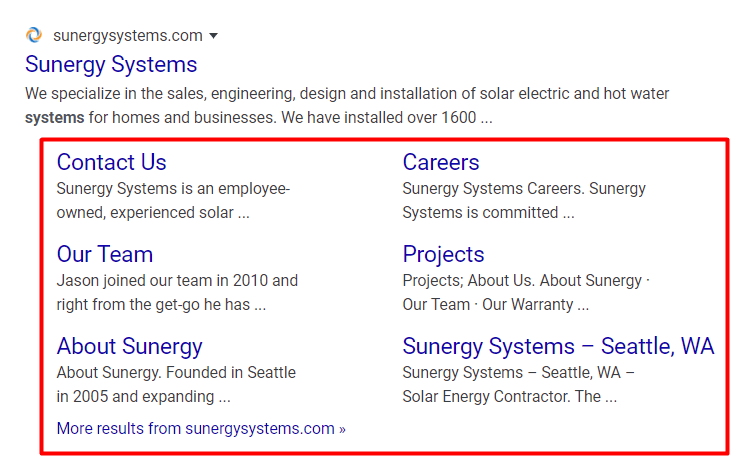
By implementing schema markup, Magento stores can effectively communicate critical product data to search engines, leading to a competitive advantage in organic search results and driving more qualified traffic to their online store.
To fully capitalize on these benefits, schema markup should be implemented alongside broader Magento SEO best practices for product pages, including content optimization, metadata control, internal linking, and technical performance improvements.
Essential Types of Schema Markup for Magento 2 E-Commerce Sites
For a Magento 2 e-commerce site, focusing on a specific set of schema types is essential for maximizing visibility, click-through rates, and conversions. The most crucial schema markups are those related to products, pricing, reviews, and overall site structure.
Here are the essential types of schema markup for your Magento store:
Product Schema (Product)
This is the most critical schema for an e-commerce site, as it provides detailed information about the items you are selling. It tells search engines that the page content describes a specific product.
- Key properties: name, description, image, sku, brand, and unique identifiers like GTIN/MPN.
- Benefit: Enables rich snippets in search results that showcase your product details, making listings more informative and appealing.

Offer/Pricing Schema (Offer, AggregateOffer)
Often nested within the Product schema, the Offer schema allows you to display critical purchasing information directly in the SERPs, which significantly impacts customer decision-making.
- Key properties: price, priceCurrency, itemCondition, availability (e.g., InStock, OutOfStock, PreOrder), and shippingDetails.
- Benefit: Provides transparency about price and stock status upfront, preventing users from clicking on a product that’s unavailable or outside their budget.
Reviews and Rating Schema (Review, AggregateRating)
Customer reviews and ratings build trust and act as powerful social proof. Displaying these directly in search results helps users compare products and increases confidence in your store.
- Key properties: ratingValue (average rating), reviewCount, and individual Review snippets including author, datePublished, and review body.
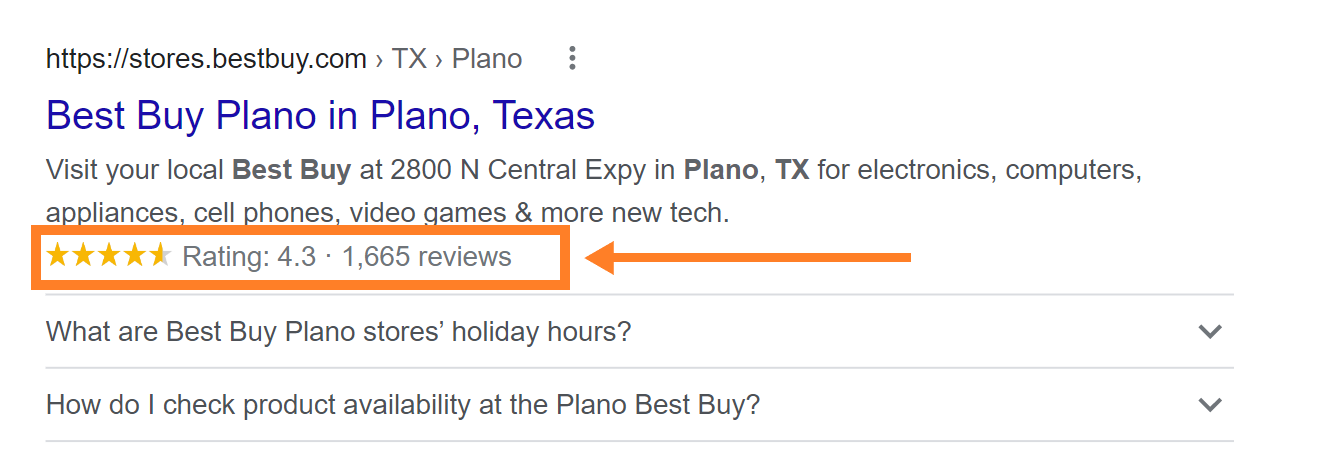
- Benefit: The eye-catching yellow stars in search results can dramatically increase your organic click-through rate.
Organization Schema (Organization)
This schema helps search engines understand your business identity as a whole, which contributes to building your brand’s authority and potentially appearing in the Google Knowledge Panel.
- Key properties: name, logo, url, sameAs (links to social profiles), address, and contactPoint.
- Benefit: Enhances your overall brand presence and local visibility across Google Search results.
Breadcrumb List Schema (BreadcrumbList)
This schema defines the hierarchical position of the current page within your website’s structure.
“With this Magento Rich Snippets Breadcrumbs schema, Google will display a readable category path (category names) instead of a direct URL to the product.”
- Key properties: itemListElement (a list of ListItem with name, position, and item URL for each step in the trail).
- Benefit: Improves site navigation for both users and search engines, and makes your search results cleaner and easier to understand.
Note: To maintain consistency across site structure and category signaling, Magento stores should also review how supporting metadata—such as Magento meta keywords—is applied at the category and product level.
Website Schema (Website and SearchAction)
Implementing this schema on your homepage allows you to enable Google’s sitelinks search box feature, giving users a way to search your internal site directly from the Google search results page.
FAQ Page Schema (FAQPage)
If your product or category pages include a list of frequently asked questions, this schema can present those Q&A pairs directly as a rich snippet in the SERP, engaging potential customers before they even visit your page.
- Key properties: A list of mainEntity items, each containing a question and an answer.
- Benefit: Takes up more search result real estate and provides instant answers, which can reduce bounce rates.
We can audit your current Magento site’s schema implementation using Google’s Rich Results Test tool to see which of these are missing.
Step-by-Step Guide: Manual Implementation of Schema Markup in Magento 2
Implementing schema markup manually in Magento 2 involves directly editing code files. This step-by-step guide outlines the general process for adding JSON-LD structured data to your Magento 2 store.
Step 1: Choose Your Schema Type and Generate JSON-LD Code
Begin by identifying the relevant schema types for your content, such as Product, Offer, or BreadcrumbList. Refer to the official Schema.org documentation for specific templates and requirements. You will need to create a base template of the JSON-LD script, using placeholders for dynamic data that Magento will fill in later.
Step 2: Create Custom PHTML Templates for Dynamic Data
Create dedicated .phtml template files within your custom theme directory. These files will contain the logic to fetch specific product, category, or CMS block data from the Magento environment and embed it into your JSON-LD structure.
- For product pages, you might use a file like vendor/theme/Magento_Catalog/templates/product/schema.phtml.
- For category pages, a file might be located at vendor/theme/Magento_Catalog/templates/category/schema.phtml.
Step 3: Inject Schema via Layout XML Updates
Modify your theme’s layout XML files to inject these new PHTML templates into the appropriate section of the HTML document. For optimal crawling, schema markup is often placed within the <head> or just before the closing </body> tag.
- For product pages, you would modify catalog_product_view.xml.
- For all pages, you can modify default.xml.
Example XML snippet:
<page xmlns:xsi=”www.w3.org” layout=”1column” xsi:noNamespaceSchemaLocation=”urn:magento:framework:View/Layout/etc/page_configuration.xsd”>
<body>
<referenceBlock name=”before.body.end”>
<block class=”Magento\Framework\View\Element\Template” name=”product_schema” template=”Magento_Catalog::product/schema.phtml” />
</referenceBlock>
</body>
</page>
Step 4: Handle Dynamic Content: Mapping Magento Attributes to Schema Properties
In your .phtml templates, use Magento’s built-in methods to dynamically retrieve product attributes such as price, availability status, SKU, and description. Map these attributes to the corresponding Schema.org properties (e.g., offers.price, itemCondition, sku).
Example PHTML snippet:
<?php
$product = $block->getProduct();
if ($product) {
$price = number_format($product->getFinalPrice(), 2, ‘.’, ”);
$sku = $product->getSku();
// … generate the JSON-LD script using these variables …
}
?>
Step 5: Multi-Language and Multi-Store Considerations for Global Sites
For global sites, ensure your implementation correctly handles different currencies, languages, and store views]. You may need to incorporate store-specific logic within your PHTML files to display the correct price format, currency code, or localized descriptions based on the active store view.
Step 6: Testing Implementation with Real-Time Validation
After implementation, it is crucial to test your pages to ensure the schema is correctly interpreted by search engines.
- Use the Google Rich Results Test tool to check specific URLs for errors and confirm eligibility for rich snippets.
- Monitor the “Enhancements” section within Google Search Console to debug errors across your entire site.
Code-Free Methods: Using Modules for Magento Schema Markup
Instead of manual implementation, you can install a third-party Magento 2 SEO extension designed specifically for adding structured data to your store. This extension automates the process of generating accurate JSON-LD across all page types.
Identify and Select a Reputable Module
Search the official Magento Marketplace for extensions that provide “Schema Markup,” “Structured Data,” or “Rich Snippets” functionality. Look for modules that offer:
- Support for key schema types: Product, Offer, Breadcrumbs, Organization, and Website SearchAction.
- Automatic attribute mapping from your existing Magento catalog.
- Compatibility with your specific Magento version (Open Source or Commerce).
- Positive reviews and reliable developer support.
Popular extension providers often include features for managing complex product data, such as variable products and multi-offer scenarios.
The Magento 2 SEO extension by BSS Commerce is one of the solutions that fully supports these structured data requirements. It provides built-in schema markup for essential types such as Product, Offer, Breadcrumbs, Organization, and Website SearchAction, along with automatic attribute mapping to your existing catalog. The module is regularly updated for both Magento Open Source and Adobe Commerce, ensuring stable compatibility, and is developed by a reputable provider known for reliable support and advanced SEO features.
Installation via Composer or Magento Marketplace
Extensions are typically installed using Composer via your server’s command line or directly through the Magento Marketplace interface. Follow the specific installation instructions provided by the extension developer. This usually involves running a few command-line interface (CLI) commands to enable the module and update the database schema.
Configure the Module via the Admin Panel
Once installed, navigate to the extension’s configuration section within your Magento Admin Panel (usually under Stores > Configuration > [Extension Name] or Catalog).
These modules replace manual coding with simple configuration options:
- Enable/Disable Schema: Turn structured data on or off globally.
- Attribute Mapping: Use dropdown menus to select which Magento attributes correspond to Schema.org properties (e.g., select your ‘Special Price’ attribute for the price field).
- Default Values: Set organizational details like your business name, logo URL, and contact information, which apply site-wide.
Automated Implementation Across Page Types
The primary advantage of using an extension is that, once configured, the module automatically injects the correct JSON-LD markup on the relevant page types (product pages, category listings, CMS pages, etc.) without requiring any PHTML or XML modifications. The module handles all dynamic data retrieval behind the scenes.
Validate and Monitor the Results
After installation and configuration, always verify the output.
- Use the Google Rich Results Test to spot-check your main product pages and category pages.
- Monitor your site’s performance and error reporting within Google Search Console to ensure the implementation is stable and error-free over time.
Frequently Asked Questions About Magento Schema Markup
What is Magento 2 Product Schema and How Does It Work?
Magento 2 product schema is a type of structured data, typically implemented using JSON-LD, which provides search engines with explicit details about the products on your site. It works by embedding a block of code containing attributes like price, availability, SKU, reviews, and image URLs directly into the HTML of your product pages. Search engines interpret this data to display visually enhanced results (rich snippets) in search results, such as star ratings and price ranges.
How Do I Add Rich Snippets in Magento 2 Without Coding?
The simplest, code-free way to add rich snippets is by using a dedicated third-party schema markup extension available on the Magento Marketplace. These modules are installed via Composer and configured through the Magento Admin Panel, allowing you to map product attributes using simple dropdown menus, automating the injection of structured data across your store.
Can Schema Markup Hurt My Magento Site’s SEO If Done Wrong?
Yes, incorrect schema implementation can potentially harm your SEO. Common mistakes include providing inconsistent data (e.g., displaying one price on the page but a different price in the schema), hiding schema markup elements, or using outdated property definitions. Google’s structured data guidelines explicitly prohibit deceptive practices. Errors typically lead to manual penalties or, more commonly, simply cause Google to ignore your markup entirely. You should always validate implementations using the Google Rich Results Test tool.
What’s the Difference Between JSON-LD and Microdata for Magento?
JSON-LD (JavaScript Object Notation for Linked Data) is the recommended format by Google. It is implemented as a single script block typically placed in the <head> or <body> of the HTML document, separate from the visible HTML content. It is generally easier to manage and less invasive to the existing theme code in Magento 2.
Microdata involves adding specific itemscope, itemtype, and itemprop attributes directly into the existing HTML tags of your page content. This approach is more tightly integrated with the visual layout but can be complex to manage within Magento’s PHTML templates and layout structure.
Conclusion
Implementing Magento schema markup is essential for improving search visibility, enabling rich snippets, and enhancing user engagement. With the right setup, your Magento store gains stronger SEO performance and a clear competitive edge.