Managing a Magento multi-store website is powerful—but from an SEO perspective, it can feel like walking a tightrope. One wrong configuration can lead to duplicated pages, diluted authority, or regional search visibility issues.
Magento 2’s multi-store architecture allows you to run multiple storefronts from a single backend. However, search engines don’t understand “store views” the way Magento does. To Google, Bing, or other search engines, each storefront is a collection of URLs that must clearly signal purpose, geography, language, and uniqueness.
This guide breaks down Magento multi store SEO best practices in a practical, configuration-focused way—so you can scale globally without sacrificing organic performance.
Nội dung bài viết
Understanding SEO challenges for multi-store Magento 2 websites
Magento multi-store setups typically include multiple websites, stores, and store views sharing the same codebase and database. While this architecture simplifies management, it introduces SEO complexities that single-store setups rarely face.
Common SEO challenges in Magento multi-store architecture:
- Duplicate content across store views: Same product or category content reused for different regions or languages.
- Conflicting URLs and parameters: Filtered navigation, store codes, and session IDs can generate thousands of crawlable URLs.
- Incorrect international targeting: Missing or misconfigured hreflang signals confuse search engines about regional relevance.
- Shared metadata across stores: Meta titles and descriptions copied across store views reduce click-through rates and ranking potential.
- Crawl budget waste: Search engines spend time crawling low-value or duplicate URLs instead of priority pages.
Note: Many of these issues are well-documented international SEO mistakes in Magento, especially for multi-store and multi-region setups.
Think of a Magento multi-store website like a shopping mall with multiple entrances. If all entrances look the same and lead to identical stores, search engines won’t know which one to prioritize—or whether they should rank any of them at all.

Best practices to optimize Magento multi-store website for SEO
Setting up SEO-friendly URLs for each store
Why it matters
URLs are one of the strongest signals search engines use to understand page hierarchy, relevance, and uniqueness. In multi-store Magento setups, poorly structured URLs can cause:
- Duplicate pages across store views
- Indexing of non-canonical URLs
- Confusion between regional or language-based stores
According to Google Search Central, clean and descriptive URLs improve both crawling efficiency and user trust
Example structure:
- example.com/en/ → English (Global)
- example.com/uk/ → English (UK)
- example.com/vi/ → Vietnamese (Vietnam)
How to do it in Magento 2
- Enable web server rewrites
- Go to Stores → Configuration → General → Web
- Set Use Web Server Rewrites = Yes
- Remove store codes from URLs (when appropriate)
- Same path: Add Store Code to URLs = No
- Only keep store codes if you cannot use separate domains or subdirectories.
- Standardize URL suffixes
- Set product and category URL suffixes consistently (e.g., .html) or remove them entirely.
- Avoid auto-generated parameters
- Disable unnecessary URL parameters such as session IDs.
Best practice:
Use separate domains or subdirectories (example.com/us/, example.com/uk/) for each store whenever possible. Google confirms subdirectories are fully supported for international SEO
Why it matters
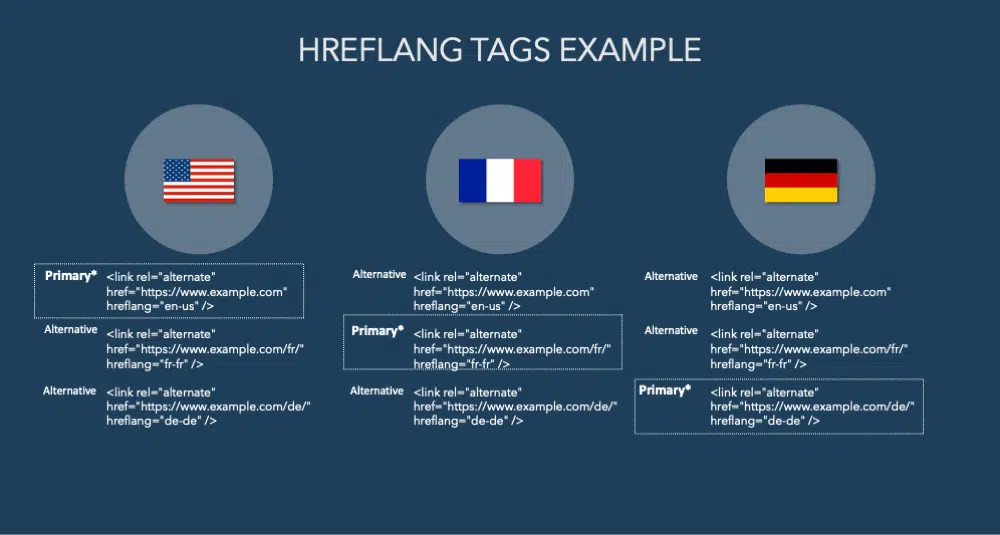
For Magento multi-store websites targeting multiple countries or languages, hreflang tags are critical signals that tell search engines which version of a page should be shown to which audience.
Without hreflang, Google may:
- Show the wrong language version in search results
- Treat localized store views as duplicate content
- Rank only one store view while ignoring others
Google explicitly recommends using hreflang for international and multilingual websites to avoid incorrect targeting
Think of hreflang as a routing system at an international airport. Without clear signs, passengers (search engines) may land in the wrong country—even if the destination exists.
How to do it in Magento 2
First, it is important to clarify a common misconception: Magento 2 does not provide a default configuration for hreflang tags.
Even if your store uses multiple websites or store views with different languages or regions, Magento will not automatically generate hreflang annotations.
To implement hreflang correctly, it must be added manually or handled via a dedicated module.
Option 1: Add hreflang manually (directional approach)
For teams with development resources, hreflang can be implemented at the theme or custom module level.
General direction:
- Output hreflang tags in the <head> section of product, category, and CMS pages
- Each store view must reference:
- Its own URL (self-referencing hreflang)
- All alternate language or regional versions
- Use correct ISO language–region codes (e.g. en-gb, vi-vn)
- Keep hreflang logic consistent with canonical URLs
This approach offers maximum control but requires ongoing maintenance, especially when adding new store views or pages.
Option 2: Implement hreflang via module (recommended for scalability)
For most Magento multi-store websites, using a dedicated hreflang module is the more scalable and less error-prone solution.
A specialized solution like BSS Commerce Magento 2 SEO extension, helps automate hreflang implementation across store views without custom development.
Key benefits of using a module:
- Automatically generate hreflang tags per store view
- Support for products, categories, and CMS pages
- Ensure correct reciprocal hreflang relationships
- Reduce risk of conflicts with canonical URLs
- Easier management when expanding to new markets
Why it matters
Duplicate content is one of the biggest SEO risks in Magento multi-store setups. Similar product pages across store views can dilute ranking signals and confuse crawlers.
Canonical tags tell search engines which URL is the authoritative version of a page.
How to do it in Magento 2
- Enable canonical tags
- Go to Stores → Configuration → Catalog → Catalog → Search Engine Optimization
- Enable:
- Use Canonical Link Meta Tag For Products
- Use Canonical Link Meta Tag For Categories
- Review cross-store canonical behavior
- Each store view should canonicalize to itself, not another region.
- Avoid canonical conflicts with hreflang
- Canonical and hreflang must reference the same logical page set.
- Check layered navigation canonicals
- Filtered URLs should canonicalize back to the main category page.
Optimize content for specific store localization
Why it matters
In a Magento multi-store environment, localization is often misunderstood as simple translation. In reality, search engines evaluate localized stores as separate entities, each competing in its own market with distinct search intent, terminology, and user expectations – key foundation points of Magento local SEO.
When localized stores reuse the same content structure with minimal changes, several SEO issues arise
- Search engines struggle to determine which store best matches local intent
- Local store views fail to rank for region-specific keywords
- Users see content that feels generic or culturally misaligned, reducing engagement
Google emphasizes that localized content should be designed for users in a specific region, not just linguistically translated
How to do it in Magento 2
- Display products and categories based on each local demand
Not every product or category is suitable for every market. Differences in climate, regulations, logistics, and customer preferences mean that each region may require a tailored catalog structure. From an SEO standpoint, exposing only relevant products and categories helps search engines better understand the topical focus of each store view and improves the overall quality of indexed pages.
By aligning product and category visibility with local demand, each store view sends clearer relevance signals, avoids unnecessary crawl waste, and provides a more accurate user experience. This approach also reduces the risk of users landing on pages for products that are unavailable or unsuitable in their region.
How to configure:
Customize product visibility per store view
- Go to Catalog → Products
- Open the product you want to localize
- Use the scope switcher to select the target Store View
- Adjust:
- Status → set to Disabled if the product should not appear in that region
- Visibility → update if the product should be hidden from catalthe og or search
- Save
Control category visibility per store view
- Go to Catalog → Categories
- Select the category
- Switch the scope to the relevant Store View
- Set Is Active → No if the category is not relevant for that market
- Save
- Adjust localized content across CMS blocks, products, and categories
Content localization requires more than language translation. Each market has its own terminology, measurement systems, cultural expectations, and purchasing triggers. Magento allows content to be customized at the store view level, making it possible to adapt messaging so it feels natural and relevant to local users.
When CMS blocks, product descriptions, and category content are aligned with regional context, search engines are more likely to associate the store view with local relevance. At the same time, users are more likely to trust the storefront and engage with content that reflects familiar language and conventions.
Best practices for localized content
CMS blocks: CMS blocks often carry high-visibility messages such as promotions, shipping information, and trust signals. These elements should reflect regional realities and customer concerns.
- Tailor promotional messages to local holidays, seasons, or sales periods
- Adapt trust badges and compliance statements to regional regulations or standards
- Localize delivery messages based on actual shipping times and methods
- Avoid reusing identical promotional copy across store views if offers differ
Product content: Product pages are among the most critical SEO and conversion assets in each store view. Localization here directly affects both rankings and user confidence.
- Adjust measurements to match local standards (e.g. imperial vs metric)
- Use region-specific terminology instead of direct translations
- Reference pricing, taxes, or warranties in a way that matches local expectations
- Rewrite descriptions to emphasize benefits that matter most in that market
Category content: Category pages often target high-volume keywords and serve as entry points from search engines. Their content should align with how users in each region explore and compare products.
- Optimize category descriptions for local keyword variants
- Adapt tone and messaging to match regional shopping behavior
- Highlight product ranges or use cases that are more popular in the local market
- Avoid generic category descriptions duplicated across store views
Generating XML sitemaps for each store view
Why it matters
In a Magento multi-store setup, each store view represents a distinct set of URLs. Search engines rely on XML sitemaps to discover, crawl, and prioritize those URLs.
If all store views share one sitemap or if the sitemap is generated under the wrong scope:
- Search engines may crawl the wrong store view
- Localized pages may be discovered late or not at all
- Indexing signals between store views can become mixed
How to do it in Magento 2
- Create sitemap per store
- Go to Marketing → SEO & Search → Site Map
- Switch store view and generate sitemap.
- Exclude low-value URLs
- Filter out:
- Filtered pages
- Duplicate CMS pages
- Filter out:
- Submit to Google Search Console
- Add each sitemap under the corresponding property.
- Automate regeneration
- Schedule sitemap updates daily or weekly.
Conclusion
Magento multi-store SEO is not about applying more tactics—it’s about applying the right configurations consistently across stores.
When done correctly, a multi-store Magento website becomes a scalable SEO asset rather than a technical liability. By structuring URLs properly, implementing hreflang, controlling duplication, localizing content, and managing crawl efficiency, you give search engines exactly what they need: clarity.
Think of SEO in Magento multi-store as orchestration. Every store plays its own instrument—but together, they must follow the same rhythm.