Expanding a Magento store to multiple languages opens up new markets, but without proper SEO, international visitors may never find your content. Magento multi language SEO ensures that each language version is correctly indexed, ranked, and visible to the right audience. This guide provides a step-by-step approach to configuring store views, URLs, metadata, hreflang tags, and content localization, giving Magento merchants a clear roadmap to optimize their store for global search performance.
Nội dung bài viết
- 1 How Magento Handles Multilingual Architecture
- 2 How to set up a multi-language structure in Magento
- 3 Best practices for optimizing a Magento multilingual store for SEO
- 3.1 Choosing the right URL structure for each language
- 3.2 Content Localization for Global Ranking
- 3.3 Implementing Hreflang Correctly in Magento
- 3.4 Preventing duplicate content with canonical tags
- 3.5 Setting localized meta titles and descriptions
- 3.6 Generating language-specific XML sitemaps
- 3.7 Handling structured data for multiple languages
- 4 Conclusion
How Magento Handles Multilingual Architecture
Magento uses a three-level architecture—Website, Store, and Store View—that allows merchants to manage multiple languages in a structured and scalable way.
- The Website level controls global settings such as customer accounts and base currency, while the Store level manages the shared product catalog and category structure.
- The Store View level is where multilingual capability truly happens, because each store view can have its own language, localized product content, translated CMS pages, interface text, and independent SEO metadata.
This layered system ensures merchants can deliver a fully translated shopping experience without duplicating the entire store.
This architecture also supports strong multilingual SEO because each store view can generate its own language-specific URLs, metadata, and indexing rules – key principles in Magento multi-store SEO. Magento’s separation of scopes makes it easier to avoid duplicate content, apply region-specific configurations, and manage hreflang tagging with predictable one-to-one mapping between language versions. As a result, Magento provides a flexible foundation for building multilingual storefronts that remain organized, scalable, and search engine-friendly.
How to set up a multi-language structure in Magento
Setting up a multilingual structure in Magento allows each language version of your store to operate with its own content, URLs, and SEO settings. By configuring store views and localization options properly, you create a solid foundation for accurate indexing and a smooth user experience across regions.
Creating store views for each language
Each language needs its own store view so Magento can generate separate URLs, metadata, and page content. This separation ensures search engines can correctly identify, crawl, and index the right language version.
How to do it:
- Go to Stores > Settings > All Stores and click Create Store View.
- Select the correct store to attach the new store view to.
- Enter a clear Name (e.g., “French”), set a Code (e.g., “fr”), and change Status to Enabled.
- Save the new store view, then flush your cache.
- Switch to the new store view in the admin top-left selector to begin adding localized content.
Configuring locale, currency, and regional settings
Each market has different formats for dates, numbers, and currency. Setting these correctly improves user trust and helps search engines understand which audience the store view is intended for.
How to do it:
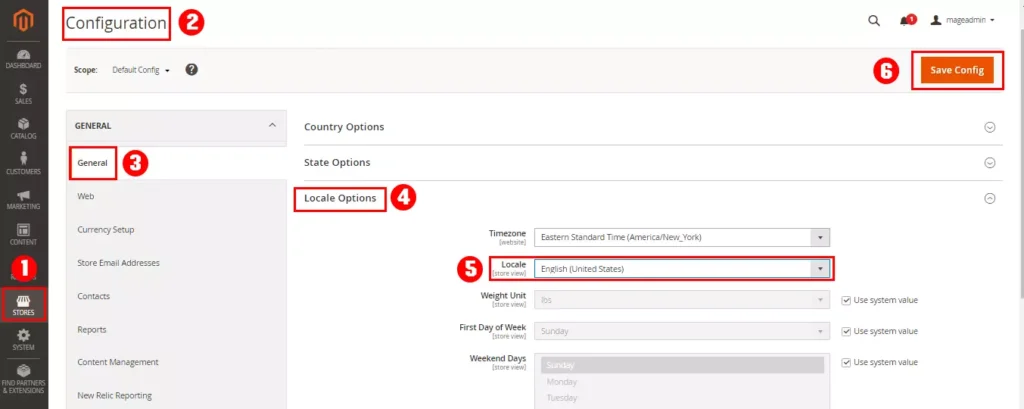
- Navigate to Stores > Configuration > General > Locale Options.
- Switch the Scope to the relevant store view.
- Set the correct Locale (language), Timezone, and First Day of Week.
- Go to Currency Setup under General and configure the appropriate default and allowed currencies.
- Save the configuration and refresh the cache.
Setting language-specific product and category attributes
Localized product and category content improves relevance for local search queries and ensures search engines index the right information for each language.
How to do it:
- Switch to the target store view using the admin language selector.
- Open a product and change the Store View scope at the top-left.
- Click “Use Default Value” to unlock each field you want to translate.
- Enter localized versions of product names, descriptions, short descriptions, and any other relevant attributes.
- Repeat the same process for categories by navigating to Catalog > Categories.
Managing translations for CMS pages and static blocks
Static content makes up key parts of the user journey—homepages, landing pages, menus, and footers. Translating these elements ensures consistency across languages and reinforces relevance for search engines.
How to do it:
- Go to Content > Pages or Content > Blocks.
- Duplicate the original CMS page or block, then assign the copy to the correct store view
- Translate all text elements, headings, and Call-To-Action labels.
- Replace or localize banners, images, and URLs where needed.
- Save and preview the page in the corresponding store view to ensure it displays correctly.
Best practices for optimizing a Magento multilingual store for SEO
Choosing the right URL structure for each language
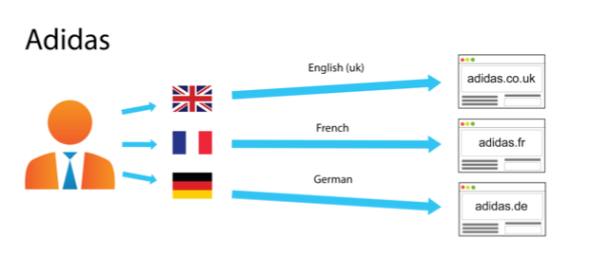
Your URL structure directly influences how search engines detect language variations and how easily they crawl your site. Clear and consistent structures—such as language-based subdirectories—help search engines categorize content and assign the right version to the right audience.
How to do it:
- Decide on a subdirectory format such as /fr/, /de/, or /es/ for each language store view.
- Go to Stores > Settings > Configuration > Web and switch the Scope to the correct store view.
- Under URL Options, configure the Store Code so that each store view produces its own language-specific URL path.
- Disable auto-redirects that might override language URLs and cause indexing issues.
- Clear the cache and test the generated URLs to ensure the structure reflects the intended language code.
Content Localization for Global Ranking
Simply translating your Magento store content is not enough to achieve strong SEO performance in multiple markets—a common issue highlighted in many international SEO mistakes in Magento.
- Direct translations often fail to match local search intent, resulting in low visibility in search engines.
- Cultural differences, idiomatic expressions, and local preferences can make literal translations less engaging or unclear to users.
- Keywords that perform well in one language may not have the same volume or relevance in another, affecting your rankings.
- Search engines may perceive identical structure or phrasing across languages as duplicate content if not properly localized.
Local keyword research and search intent differences by language
Each market uses different search terms, phrasing, and query formats. Optimizing for local keywords ensures that your content aligns with user intent and improves visibility in regional search results.
How to do it:
- Use language-specific SEO tools or Google Keyword Planner to research target keywords in each market.
- Identify high-volume and relevant keywords for products, categories, and CMS pages in each language.
- Map these keywords to corresponding store views, ensuring product titles, descriptions, meta tags, and headings incorporate the localized terms naturally.
- Analyze competitors in the local market to understand search trends and content gaps.
- Regularly update keyword targeting as search behavior evolves in different regions.
Best practices for content quality across all languages
- Ensure each language version is written or reviewed by native speakers to maintain clarity and tone.
- Adapt product descriptions, CTAs, and marketing copy to fit the cultural context rather than literal translation.
- Maintain consistent formatting, style, and branding across all store views.
- Review content for duplicate content issues, ensuring unique phrasing for each language.
- Include local examples, references, and measurements to improve relevance and user trust.
Implementing Hreflang Correctly in Magento
Proper implementation of Hreflang Tags in SEO is essential for multilingual Magento stores because these tags tell search engines which language or regional version of a page should be shown to users. Without correctly configured hreflang tags, search engines may display the wrong language, split link equity between versions, or treat content as duplicate.
Different implementations affect accuracy, scalability, and maintenance effort. Choosing the right approach ensures that hreflang tags are applied consistently, updated automatically when content changes, and are manageable as your store grows.
- Built-in Tools / Magento Core Features: Magento does not provide full native hreflang automation, but you can partially manage language URLs and canonical relationships to support hreflang via store view configurations.
- Extensions / Modules
- Use dedicated Magento extensions like Magento SEO extension by BSS Commerce to automate hreflang generation.
- Ensure the extension supports dynamic hreflang updates for products, categories, and CMS pages.
- Validate that it allows mapping multiple languages and regions without conflicts.
- Theme Customization
- Add hreflang tags directly in your theme’s head section using layout XML or template files.
- Suitable for small stores with limited languages, but requires developer knowledge and manual updates.
How to do it:
- Understand that each store view should have a unique hreflang tag corresponding to its language and region (e.g., fr-FR for French in France).
- Include hreflang for all pages with multiple language variants, such as product pages, category pages, and CMS pages.
- Verify that hreflang tags reference only valid URLs that are accessible and indexable by search engines.
Tips for maintaining hreflang consistency across store views
- Always ensure every language version of a page references all other variants, including itself.
- Use the correct ISO language and country codes (e.g., en-US, fr-FR).
- Keep URLs in hreflang tags consistent with the store view URLs.
- Regularly test hreflang implementation using Google Search Console or third-party validators.
- Automate updates for new pages and content changes whenever possible.
- Avoid linking to non-indexable or redirected URLs in hreflang.
- Monitor for hreflang errors in the search console and fix inconsistencies promptly.
Multilingual stores often share similar product structures across languages, which can create unintended duplication. Canonical tags help search engines understand which URL should be treated as the primary version and prevent cross-language content conflicts.
How to do it:
- Go to Stores > Configuration > Catalog > Catalog and open the Search Engine Optimization section.
- Enable Use Canonical Link Meta Tag for Products and Use Canonical Link Meta Tag for Categories.
- For CMS pages, add canonical tags manually in the Page Builder head section or through the HTML Head field.
- Ensure each language version of a page has a canonical pointing to its own version, not another language’s URL.
- Reindex and refresh the cache to apply changes across all store views.
Setting localized meta titles and descriptions
Meta titles and descriptions are key on-page SEO elements that communicate relevance to search engines and users. Localized metadata ensures that each language version of a page targets the right keywords and aligns with user search intent in that region.
How to do it:
- Switch to the store view you want to configure in the Magento admin top-left selector.
- Navigate to Catalog > Products or Content > Pages, depending on whether you are editing product pages, categories, or CMS pages.
- For each page, locate the Meta Title and Meta Description fields.
- Disable “Use Default Value” to allow custom text for the selected store view.
- Enter the translated title and description, incorporating relevant local keywords while keeping them natural and user-friendly.
- Save changes and repeat for each page and store view.
Generating language-specific XML sitemaps
Sitemaps help search engines efficiently discover all pages on your site, including language-specific versions. Separate sitemaps per store view to reduce indexing errors and improve crawl efficiency for multilingual stores.
How to do it:
- Go to Marketing > SEO & Search > Sitemap in the Magento admin panel.
- Click Add Sitemap and select the store view for which the sitemap will be generated.
- Name the sitemap file and specify its location within the pub/ folder.
- Include the relevant page types (products, categories, CMS pages) for that store view.
- Generate the sitemap and verify that the URLs correspond to the selected language.
- Repeat the process for each additional store view.
- Submitting international sitemaps to search console
- Optionally, use the International Targeting tool in Search Console to verify hreflang and regional settings for each store view.
Handling structured data for multiple languages
Structured data helps search engines understand your content and enhances listings with rich results. For multilingual stores, structured data must reflect the correct language and context to maintain SEO relevance across regions.
How to do it:
- Apply schema.org markup to products, categories, and CMS pages, ensuring all required fields are included.
- Localize structured data fields such as product names, descriptions, availability, and currency per store view.
- Include language and region information in the markup to signal the correct audience to search engines.
- Test structured data using Google’s Rich Results Test or Schema Validator to ensure accuracy for each language version.
- Automate schema generation via Magento extensions or custom templates where possible, to maintain consistency across store views.
Conclusion
Implementing effective multilingual SEO in Magento requires a combination of strategic planning, technical configuration, and content localization. From setting up proper store views and configuring locale-specific settings to optimizing URLs, metadata, sitemaps, and hreflang tags, every step contributes to better search visibility for each target language. Additionally, technical SEO enhancements such as crawl budget optimization, page speed improvements, and structured data localization ensure your store performs well for both users and search engines across regions.
By following this comprehensive guide, Magento merchants can create a scalable, search-engine-friendly multilingual store that not only ranks well internationally but also delivers a seamless experience for customers in every market. Consistent monitoring, testing, and content updates will maintain these benefits and support long-term global growth.