In a Magento 2 store, navigation quality has a direct impact on user experience, engagement, and conversion rates. One of the most effective yet often underestimated navigation elements is breadcrumbs. Magento breadcrumbs provide users with a clear visual trail that shows where they are within the website structure and how they can quickly return to previous pages.
For stores with complex catalogs, multiple CMS pages, and layered navigation, properly configured breadcrumbs are not optional—they are essential. This guide explains how to enable, manage, and optimize Magento 2 breadcrumbs for CMS pages, while following best practices that ensure both usability and SEO benefits.
Nội dung bài viết
Benefits of Breadcrumbs in Magento 2
Breadcrumbs deliver value for both shoppers and store owners.
Enhance User Experience
Breadcrumbs give users instant context about their current location within the site. This is especially important for large stores with deep category trees or content-rich CMS sections.
Reduce Bounce Rates
By offering a clear path back to higher-level pages, breadcrumbs encourage users to continue browsing instead of leaving after viewing a single page.
Improve SEO Performance
Breadcrumbs help search engines understand site hierarchy and page relationships. When implemented correctly, they strengthen internal linking and can enhance how pages appear in search results.
Beyond improving site structure and internal linking, breadcrumbs also influence how category pages appear in search results. However, breadcrumb visibility alone is not enough to maximize click-through rates. Well-written category meta descriptions play a crucial role in reinforcing relevance and attracting qualified traffic. To further improve category-level SEO performance, see our guide on best optimization practices for Magento category meta descriptions for SEO.

Types of Breadcrumbs
Magento 2 commonly uses the following breadcrumb models.
Hierarchy-Based Breadcrumbs
These breadcrumbs reflect the structural path of the site, for example:
Home → Category → Subcategory → Product
They are the most widely used type and are ideal for category-driven stores.
History-Based Breadcrumbs
History-based breadcrumbs display the actual path a user followed during their browsing session, similar to a browser back button but with preserved navigation context.
Attribute-Based Breadcrumbs
Attribute-based breadcrumbs show selected product attributes or filters, such as color, size, or price range. They are especially useful in layered navigation, allowing users to remove filters easily.
Note: Poorly structured breadcrumb paths can confuse both users and search engines, especially in catalogs with deep or overlapping categories. To ensure your breadcrumb structure reinforces site architecture and internal linking, follow the proven guidelines outlined in Breadcrumb hierarchy best practices in Magento.
Configuration and Customization Details
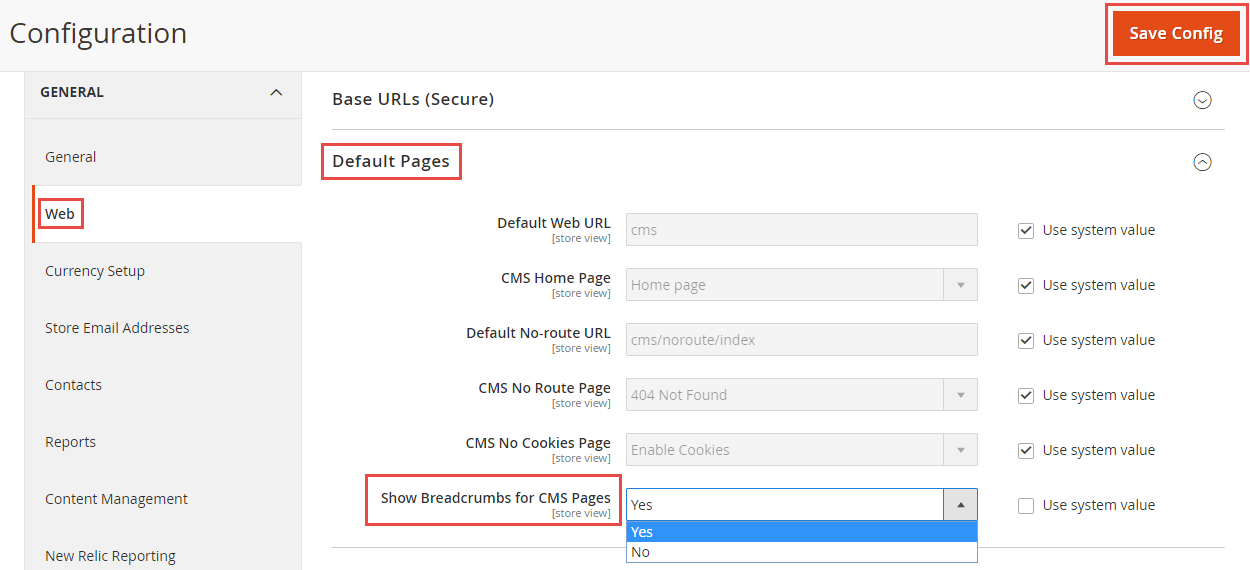
Configuring Breadcrumbs for CMS Pages (Admin Panel)
Breadcrumb visibility for CMS pages can be controlled directly from the Magento Admin panel.
Steps:
- Log in to the Magento Admin panel.
- Navigate to Stores → Configuration.
- Under General, select Web.
- Expand the Default Pages section.
- Set Show Breadcrumbs for CMS Pages to Yes or No.
- Click Save Config.
Configuration path:
Admin Panel → System → Configuration → Web → Default Pages
To remove breadcrumbs from a specific CMS page, go to Content → Pages, edit the page, open the Design tab, and apply a custom layout update that removes the breadcrumbs block.
Implementing and Customizing Breadcrumbs on Product Pages
Breadcrumbs on product pages are enabled by default, but theme support may vary. If breadcrumbs do not appear, add the following to the product page layout XML:
<referenceBlock name=”breadcrumbs” template=”Magento_Theme::html/breadcrumbs.phtml”/>
<block class=”Magento\Catalog\Block\Breadcrumbs”/>
Additional implementation notes:
- Product page breadcrumbs are defined in catalog_product_view.xml.
- The rendering template is breadcrumbs.phtml.
- JavaScript-based rendering relies on:
- vendor/magento/module-catalog/view/frontend/templates/product/breadcrumbs.phtml
- vendor/magento/module-theme/view/frontend/web/templates/breadcrumbs.html
- To override breadcrumb output, place a customized template at
Magento_Theme/web/templates/breadcrumbs.html within your theme.
If custom coding becomes too complex and time-consuming, consider using a third-party extension to optimize your images quickly and efficiently—like the SEO Extension for Magento 2 by BSS Commerce.
Handling Products Assigned to Multiple Categories
When a product belongs to more than one category, breadcrumbs may not reflect the exact navigation path taken by the customer.
Common solutions:
- Configuration Adjustment
Navigate to Store → Configuration → Catalog → Catalog → Search Engine Optimization.
Set Use Categories Path for Product URLs to No at both Website and Store View levels, then reindex and clear cache. - AJAX-Based Breadcrumb Loading
If full-page caching (for example, Varnish) serves the same product page regardless of navigation path, breadcrumbs may appear incorrect. Loading breadcrumbs asynchronously via AJAX allows accurate paths while preserving full-page cache performance.
Advanced Customization and SEO
Magento’s default breadcrumbs are relatively inflexible, but several enhancement strategies are available:
- Visual Customization (CSS)
Modify theme styles to adjust typography, colors, spacing, and separators so breadcrumbs align with your store’s design. - SEO Markup and Rich Snippets
Structured data for breadcrumbs often requires third-party extensions. Rich snippets allow search engines to display breadcrumb paths instead of raw URLs. - Extension-Based Breadcrumb Logic
Some extensions allow selection between different breadcrumb calculation modes, such as:- Shortest Path: Store → Category → Product
- Longest Path: Product → Category → Subcategory → Product
Extensions may also provide Category Priority controls for products assigned to multiple categories.
Remove Breadcrumbs from a Specific CMS Page
For more granular control:
- Navigate to Content → Pages
- Edit the desired CMS page
- Open the Design tab
- Apply a custom layout update that removes the breadcrumbs block
This approach is ideal for landing pages or standalone content where breadcrumbs may not add value.
Configuring Breadcrumbs in Magento 2: Best Practices
To keep breadcrumbs helpful and unobtrusive, follow these guidelines.
Implement Breadcrumbs on Category and Product Pages
Ensure breadcrumbs are enabled on category and product pages so users can easily navigate back through the catalog.
Use Rich Snippets for Breadcrumbs
Adding structured data improves how breadcrumbs appear in search results and can increase click-through rates.
Customize Breadcrumb Type
Choose breadcrumb logic that aligns with your store structure. Some stores benefit from shorter paths, while others need deeper hierarchical trails.
Enable Breadcrumbs for CMS Pages
CMS pages often support navigation and SEO goals. Breadcrumbs help users move back to relevant sections without confusion.
Optimize Breadcrumb Display
Keep breadcrumb trails clean, readable, and free from unnecessary elements. Avoid overloading them with too many levels.
Ensure Mobile-Friendly Design
Breadcrumbs should be responsive and easy to use on touch devices to support mobile shoppers.
Maintain Consistent Styling
Consistent breadcrumb styling across the site helps users immediately recognize navigation patterns.
Place Breadcrumbs Strategically
Position breadcrumbs near the top of the page, typically just below the main navigation bar, where users naturally look for orientation cues.
Action-Oriented FAQ
- When should breadcrumbs be disabled on CMS pages?
Breadcrumbs can be disabled on conversion-focused landing pages where additional navigation might distract users from key actions. - Do breadcrumbs negatively affect page performance?
No. Breadcrumbs are lightweight by default. Performance issues usually come from heavy custom scripts or poorly optimized themes. - Should the current page be clickable in breadcrumbs?
No. The final breadcrumb item should represent the current page and remain unlinked to avoid redundancy. - How do breadcrumbs support internal linking?
They create consistent hierarchical links between parent and child pages, strengthening site architecture for both users and search engines. - Are breadcrumbs a replacement for the main navigation menu?
No. Breadcrumbs complement primary navigation but should never replace menus or category structures.
Conclusion
Breadcrumbs may seem like a small detail, but they play a critical role in Magento 2 store navigation. When properly configured—especially for CMS pages—they improve clarity, reduce friction, and support both user experience and SEO.
By enabling breadcrumbs thoughtfully, following best practices, and placing FAQs strategically within your content, you create a navigation system that scales with your store and supports long-term growth. Regularly review your breadcrumb configuration to ensure it continues to align with your store structure and user behavior.