In the competitive landscape of e-commerce, driving traffic to your Magento store is only half the battle. To rank higher on search engine results pages (SERPs) and provide a seamless shopping experience, you need a robust internal linking strategy. For Magento users, this isn’t just about adding hyperlinks; it’s about architecting a site structure that tells Google exactly which pages are your most important.
Nội dung bài viết
Why Internal Linking Matters For Magento Stores
Internal linking serves as the circulatory system of your Magento website. Without it, search engine crawlers cannot discover your deep-layered product pages, and link equity (ranking power) cannot flow from your high-authority homepage down to your individual listings.
For Magento stores specifically, internal linking provides three critical benefits:
- Enhanced Crawlability: Magento stores can scale to thousands of products. Internal links ensure that Googlebot can find every SKU without getting lost in “crawl traps” or hitting dead ends.
- Boosting Page Authority: By linking from a high-authority page (like your homepage or a viral blog post) to a specific category, you pass “link juice,” helping that target page rank higher.
- Improving User Experience (UX): A logical linking structure helps customers navigate from broad categories to specific products, reducing bounce rates and increasing the average time on site.
Internal Linking Structure Strategy for Magento
Building a strategy requires a blueprint. Magento’s default architecture is powerful, but it needs manual refinement to outperform competitors.
The Golden Rule: The Silo Hierarchy
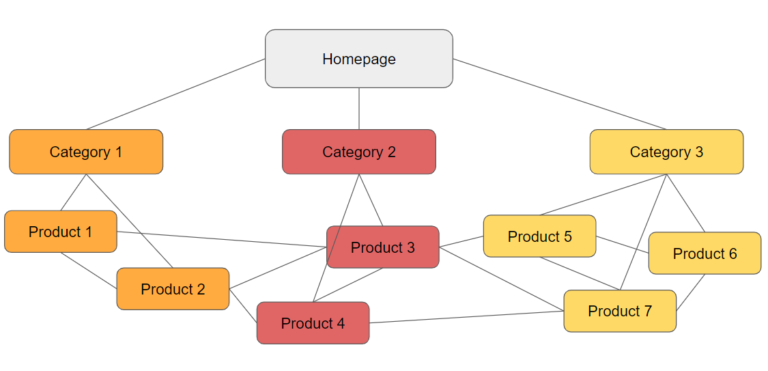
The most effective structure for a Magento store follows a top-down approach. This creates a clear topical relevance that search engines love.
Homepage → Category → Subcategory → Product
By following this flow, you ensure that authority is distributed evenly and that the “intent” of the user is respected as they move from broad interest to a specific purchase.
Strengthen Key SEO Pages
Not all pages are created equal. To maximize your SEO ROI, you should prioritize linking to:
- Category Pages (PLPs): These are usually your highest-value SEO targets for broad keywords.
- Bestselling Products: Ensure your top-performing items have the most internal visibility to maintain their rankings.
- High-Margin Pages: Link to products that offer the best return for your business.
- Seasonal Collections: Use temporary internal links (like homepage banners or footer links) to boost Black Friday or Summer Sale pages.
Cluster Strategy for Magento SEO
A topic cluster consists of a “Pillar Page” (the main hub) and “Cluster Pages” (supporting content). This is highly effective for Magento stores that use a blog or extensive CMS pages.
Example: SEO for “Magento Hosting”
- Pillar Page: A comprehensive “Magento Hosting Guide.”
- Cluster Pages: * Magento Performance Optimization
- Magento Caching Strategies
- Magento Server Setup Requirements
- The Action: All cluster pages must link back to the Pillar Page, and the Pillar Page should link out to each cluster page. This creates a “hub and spoke” model that dominates topical authority.
A Comprehensive Guide to Implementing Internal Links on a Magento Website
Magento offers several built-in areas to implement links. Understanding how to use them is key to a professional SEO setup.
Navigation links are the most powerful because they typically appear on every page of the site (sitewide links).
- Main Menu / Mega Menu: This is your primary tool for defining site hierarchy.
- Direction: Include your top-level categories and most important subcategories.
- Magento Configuration:
- Navigate to Catalog > Categories.
- Select your category from the tree on the left.
- Under General Information, set Include in Menu to “Yes”.
- For Mega Menus, you often need to go to Content > Elements > Blocks to create a custom static block and then link it to the category via the “Display Settings” tab.
- Footer Menu: Used for “Trust” pages and secondary SEO targets.
- Direction: Link to your Terms of Service, Privacy Policy, and “SEO Landing Pages” that might be too specific for the main menu.
- Magento Configuration: 1. Navigate to Content > Elements > Blocks.
2. Search for a block typically named footer_links or footer_content.
3. Edit the HTML to include <a> tags pointing to your desired CMS pages or categories.
- Tag / Filter / Layered Navigation Links:
- Direction: Use Layered Navigation to link to filtered results (e.g., “Red Leather Boots”).
- Magento Configuration:
- Navigate to Stores > Attributes > Product.
- Select an attribute (e.g., Color).
- In the Storefront Properties tab, set Use in Layered Navigation to “Filterable (with results)”.
- Ensure the category is set as an Anchor (Catalog > Categories > Display Settings > Is Anchor = Yes).
Using Breadcrumbs
Magento breadcrumbs provide a clear path back to the homepage and help Google understand the relationship between products and categories.
- Direction: Always enable breadcrumbs for both UX and SEO schema.
- Magento Configuration:
- Go to Stores > Settings > Configuration.
- Navigate to General > Web > Default Pages.
- Set Show Breadcrumbs for CMS Pages to “Yes”.
- For product pages, ensure “Use Categories Path for Product URLs” is enabled under Stores > Configuration > Catalog > Catalog > Search Engine Optimization to ensure the breadcrumb path matches your desired hierarchy.
Standard Magento breadcrumbs have limitations in how they display paths. To gain more control over your site hierarchy and navigation, consider tools like the Magento 2 SEO Suite, which offers advanced breadcrumb settings to ensure Google understands your site structure perfectly.
To ensure your breadcrumb trails reinforce site architecture and topical relevance, follow the proven guidelines outlined in Breadcrumb hierarchy best practices in Magento.
Using Interlink Pages Based on Their Topical Relevance
Direction: The principle for building topical internal links is to map out topic clusters for your Magento site.
- Category ↔ Subcategory pages: Creates a vertical flow.
- Category ↔ Product pages: Simply assign the product to the correct categories.
- Product ↔ Related product suggestions: Encourages horizontal movement across the site.
- Blog/content pages ↔ Product pages they reference: Converts informational intent into transactional intent.
- Blog ↔ Related blog: Connects supporting content.
Note: By default, Magento handles basic hierarchical connections, such as routing subcategories to parents and linking products back to their primary categories through breadcrumbs and the main menu. However, to truly solidify your topical authority, you must manually implement strategic links that go beyond these automated paths.
Detailed Configuration Steps in Magento Store
- Link from Categories to Subcategories
If a customer lands on a parent category, you must guide them deeper into the sub-levels.
- Method 1: Use CMS content on category pages:
- Go to Catalog > Categories and select the parent category.
- Expand the Content section.
- In the Description or CMS Block field, add text like “Explore our sub-collections:” and insert links to subcategory URLs using specific keywords as anchor text.
- In the Display Settings tab, ensure Display Mode is set to “Static block and products”.
- Method 2: Use the layered navigation bar:
- Go to Catalog > Categories and select the parent category.
- In the Display Settings tab, set Is Anchor to “Yes”.
- This will automatically generate a sidebar menu in the storefront that links to all active subcategories.
- Link from Categories to Product Pages
Simply assign the product to the correct categories.
- Go to Catalog > Products.
- Open a product in Edit mode.
- In the Categories dropdown, select the target category.
- To further optimize, use the Visual Merchandiser (Magento Commerce) to drag and drop high-priority products to the top of the category grid, giving them more visibility and potentially more internal “clicks.”
- Link among product pages using Related Products, Up-sells, and Cross-sells
- Navigate to Catalog > Products and edit a product.
- Scroll down to the Related Products, Up-Sells, and Cross-Sells section.
- Related Products: Click “Add Related Products” to link items meant to be purchased with the current item (e.g., batteries for a flashlight).
- Up-sells: Click “Add Up-Sell Products” to link items that are better versions of the current item.
- Cross-sells: Click “Add Cross-Sell Products” to link impulse buys that appear on the Shopping Cart page.
- Link from content pages to product pages using blog articles and CMS pages
- Navigate to Content > Elements > Pages (for CMS pages) or your specific Blog extension menu.
- In the content editor, highlight the keyword you want to link.
- Click the Insert/Edit Link icon.
- Enter the product URL. Pro-tip: Use the “Insert Widget” button to choose a “Catalog Product Link” so the link updates automatically if the product URL changes.
- Link among blog posts following topic cluster
- Open your blog post editor.
- At the end of the post, create a “Recommended Reading” section.
- Manually link to other articles within the same cluster.
- Advanced: If using an extension like Magefan or Amasty Blog, use the “Related Posts” feature to automate these links based on categories or tags.
Technical Best Practices
- Avoid orphan pages: Every page should have at least one incoming link. Use a sitemap crawler to identify pages with zero internal links.
- Deepest page click ≤ 3 clicks: Ensure important products are reachable within three clicks from the homepage. Use sub-category links and featured product blocks to shorten the path.
- Use descriptive anchor text: Avoid “Click here” or “Learn more.” Use keywords like “Organic Cotton T-Shirts” or “Magento SEO Guide.”
- Keep links relevant: Don’t link a “Tires” category to a “Coffee Machine” blog post.
- Limit links per page: Especially in blog posts, too many links can look like spam and dilute link equity. Aim for 3-5 high-value links per 1,000 words of content.
- Regular internal link audit: Use tools like Google Search Console to monitor “Internal Links” report and fix broken 404 links immediately via Marketing > SEO & Search > URL Rewrites.
Conclusion
A well-executed internal linking strategy for Magento is the difference between a site that merely exists and one that dominates the search results. By moving beyond Magento’s default settings and actively managing your topic clusters, category-to-product flows, and descriptive anchor text, you create a powerful SEO engine.
Would you like me to help you create a specific internal linking audit checklist for your Magento store?