In the competitive landscape of modern eCommerce, platform performance is the primary differentiator between market leaders and stagnant storefronts. While Magento 2 offers an unparalleled feature set, its sophisticated modular architecture requires a precise, practitioner-first approach to speed optimization.
A slow-loading site does more than frustrate users; it erodes brand equity, diminishes search visibility, and directly impacts the bottom line.
This guide provides a comprehensive roadmap for direct implementers and store owners to transform Magento’s resource-intensive framework into a high-velocity conversion engine.
Nội dung bài viết
- 1 The Anatomy of a Slow Magento Installation
- 2 The Business Case for Technical Velocity
- 3 Professional Diagnostics: Identifying the Bottlenecks
- 4 The 11-Step Framework for a High-Velocity Store
- 4.1 Step 1: Strict System Requirement Compliance
- 4.2 Step 2: Strategic Version Management
- 4.3 Step 3: Infrastructure and Server Tuning
- 4.4 Step 4: Implementing Varnish for Full-Page Caching
- 4.5 Step 5: Leveraging In-Memory Data Stores (Redis)
- 4.6 Step 6: Content Delivery Network (CDN) Integration
- 4.7 Step 7: Comprehensive Image Optimization
- 4.8 Step 8: Database Log and Bloat Management
- 4.9 Step 9: Deprecating Flat Catalogs
- 4.10 Step 10: Advanced Frontend Optimization
- 4.11 Step 11: The Shift to PWA and Hyva
- 5 Implementation Checklist: The “Production Mode” Protocol
- 6 FAQ: Practitioner Insights for Real-World Scenarios
- 7 Conclusion: Establishing a Maintenance Routine
The Anatomy of a Slow Magento Installation
By its default design, Magento 2 is not inherently slow. However, as business requirements evolve, the accumulation of technical debt and unoptimized configurations often leads to performance degradation. Understanding “Why is Magento slow?” requires a look beneath the surface at several common architectural pitfalls.
Environmental Discrepancies
Many stores fail to meet the strict system requirements established by Adobe. Running Magento on outdated PHP versions or without sufficient RAM (at least 2GB-4GB for basic operations) creates immediate bottlenecks. Furthermore, the use of traditional HDD storage instead of high-speed NVMe SSDs significantly increases the time required for the database to process complex queries.
Extension Bloat and Customization Errors
The flexibility of Magento is a double-edged sword. Poorly coded third-party extensions often introduce “observer” loops or redundant database calls that fire on every page load. Inappropriate customizations—such as executing heavy logic within templates instead of ViewModels or blocks—can stall the rendering process.
Mismanaged Caching and Indexing
Magento relies on several layers of caching to avoid regenerating content for every request. If the Full Page Cache (FPC) is disabled or misconfigured to use file-based storage during high traffic, the server’s CPU usage will spike, leading to catastrophic slowdowns. Similarly, real-time indexing (“Update on Save”) during bulk product updates can lock database tables and prevent the frontend from responding.
The Business Case for Technical Velocity
For the implementer, speed is a technical requirement, but for the business owner, it is a financial one. Investing in Magento SEO plugin integrations is only effective if the underlying site speed supports the traffic these tools generate.
The Conversion-Speed Correlation
The data is unequivocal: faster load times lead to higher sales. Industry benchmarks indicate that every second shaved off the loading time can result in a 2% to 7% increase in conversion rates. When product filters, search results, and checkout transitions happen instantaneously, the “friction of purchase” is eliminated.
Search Engine Dominance
Google’s algorithm now explicitly uses Core Web Vitals as a ranking signal. A store that fails on metrics like First Contentful Paint (FCP) or Cumulative Layout Shift (CLS) will find itself relegated to the second page of search results, regardless of content quality.
Utilizing Magento LCP optimization techniques is essential to ensure that the largest visible elements—like hero banners—render within the 2.5-second “Good” threshold.
User Experience and Brand Loyalty
First impressions in eCommerce are measured in milliseconds. High bounce rates are frequently a symptom of perceived sluggishness.
By reducing CLS issues in Magento themes, you ensure that users don’t accidentally click the wrong button because a layout shifted while loading, a common frustration that leads to permanent site abandonment.
| Metric | Target Value | Tool for Measurement |
| TTFB (Time to First Byte) | < 0.5s | Chrome DevTools / New Relic |
| LCP (Largest Contentful Paint) | < 2.5s | Google PageSpeed Insights |
| CLS (Cumulative Layout Shift) | < 0.1 | Google Lighthouse |
| FID (First Input Delay) | < 100ms | Real User Monitoring (RUM) |
Professional Diagnostics: Identifying the Bottlenecks
Optimization without measurement is guesswork. A practitioner must utilize a suite of diagnostic tools to pinpoint whether issues reside in the backend, the database, or the frontend.
Synthetic Testing
Tools like Google PageSpeed Insights and GTMetrix provide a snapshot of performance. However, these are “lab data” tests. They don’t account for the variability of real-world internet connections or server-side latency under load.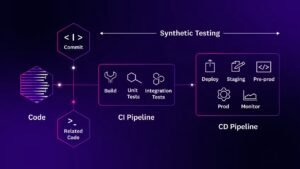
Real User Monitoring (RUM)
New Relic is the gold standard for Magento monitoring. It allows developers to see exactly which SQL queries are taking the longest and which PHP methods are consuming the most memory. Microsoft Clarity can further assist by showing “heatmaps” of where users experience lag, helping to identify frontend elements that require optimization.
The 11-Step Framework for a High-Velocity Store
Step 1: Strict System Requirement Compliance
Before changing a single line of code, ensure your stack is optimized. Magento 2 requires a specific environment:
- PHP: Always use the latest supported version (e.g., 8.2 or 8.3) with a memory limit of at least 2GB.
- Database: MariaDB or MySQL 8.0 is required for optimized query execution.
- Search: Elasticsearch or OpenSearch is mandatory for catalog navigation.
Step 2: Strategic Version Management
New Magento releases are not just about features; they are about efficiency.
- Upgrade Path: Moving to Magento 2.4.7+ introduces optimized Redis integration and improved page rendering logic.
- Patching: Use the magento-composer-installer to apply specific performance patches provided by Adobe.
Step 3: Infrastructure and Server Tuning
The server is the foundation of your speed. Avoid shared hosting at all costs.
- NVMe Storage: Standard SSDs are fast, but NVMe drives offer the throughput required for Magento’s intensive file-reading operations.
- PHP-FPM Optimization: Tune the pm.max_children and pm.start_servers settings based on your available RAM to ensure the server can handle concurrent requests without queueing.
Step 4: Implementing Varnish for Full-Page Caching
Varnish is a reverse proxy that sits in front of your web server. It stores a copy of the rendered HTML in memory and serves it to users without ever touching PHP or the database.
- Configuration: Switch the “Caching Application” in the Magento Admin to Varnish.
- Grace Period: Configure Varnish to serve “stale” content for a few seconds if the backend is busy, ensuring the user never sees a loading spinner.
Step 5: Leveraging In-Memory Data Stores (Redis)
Magento’s default file-based cache is slow because it requires disk I/O. Redis moves this data into RAM.
- Segmentation: Use separate Redis instances for cache, page_cache, and session to prevent one from overwhelming the others.
- Persistence: Configure Redis with AOF (Append Only File) to ensure that your cache survives a server restart.
Step 6: Content Delivery Network (CDN) Integration
A CDN like Cloudflare or Fastly reduces the physical distance between your data and your user.
- Static Assets: Offload all CSS, JS, and product images to the CDN.
- HTTP/3: Ensure your CDN supports the latest protocols to reduce the number of “round trips” required to load a page.
Step 7: Comprehensive Image Optimization
Images typically account for 70% of a page’s total weight.
- Format Migration: Use extensions to automatically convert JPEGs and PNGs into WebP or AVIF formats.
- Adaptive Sizing: Serve smaller images to mobile users and high-resolution images to desktop users via the <picture> tag.
- Lazy Loading: Implement native browser lazy loading (loading=”lazy”) for all images below the fold.
Step 8: Database Log and Bloat Management
Over time, tables like customer_visitor and quote can grow to millions of rows, slowing down every database operation.
- Cleaning: Configure the “MySQL Message Queue Cleanup” in the Magento System settings.
- Truncation: Periodically truncate log tables that do not contain business-critical data.
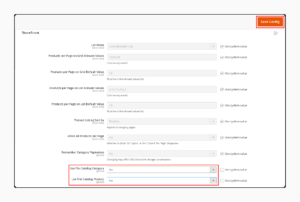
Step 9: Deprecating Flat Catalogs
In early versions of Magento 2, Flat Catalogs were recommended. In version 2.3 and above, the EVI (Entity-Attribute-Value) indexer has been so heavily optimized that Flat Catalogs are now a detriment. Ensure they are disabled in the Catalog Storefront settings to avoid indexing overhead.
Step 10: Advanced Frontend Optimization
The “Luma” theme is notoriously heavy. To fix this:
- Minification: Enable JavaScript and CSS minification in Production Mode.
- Critical CSS: Generate a “Critical CSS” file that contains only the styles needed to render the top of the page.
- JS Bundling: Use a tool like baler or MagePack for advanced JavaScript bundling, which is much more efficient than Magento’s native bundling.
Step 11: The Shift to PWA and Hyva
If the traditional frontend is still too slow, consider a total architectural shift.
- Hyva Themes: A revolutionary theme that replaces Magento’s 2MB of default JavaScript with a tiny Alpine.js footprint.
- PWA Studio: Transforms the store into a “Progressive Web App,” allowing for instant page transitions and offline capabilities.
Implementation Checklist: The “Production Mode” Protocol
Many performance issues arise simply because a store is left in “Developer” or “Default” mode.
- Production Mode: Run bin/magento deploy:mode:set production. This compiles all code and generates static assets, reducing the load on the server during runtime.
- Indexer Mode: Switch all indexers to “Update on Schedule.” This moves indexing tasks to a background cron job, preventing frontend slowdowns during product saves.
- Compression: Enable GZIP or Brotli compression at the NGINX level. This can reduce the size of transmitted text files (HTML, CSS, JS) by up to 80%.
FAQ: Practitioner Insights for Real-World Scenarios
Q: How do I identify which specific extension is slowing down my checkout? A: Use a profiler like Xdebug or the New Relic “Transaction Trace” feature. Look for the “External Services” or “Database” tabs to see which module’s classes are being called most frequently during the checkout process.
Q: Is Varnish better than Redis for Full Page Cache? A: Yes. While Redis is excellent for general cache and sessions, Varnish is significantly faster for serving full HTML pages because it operates at the network level, bypassing the web server entirely for cached hits.
Q: Does Magento image optimization affect SEO? A: Absolutely. Faster images improve LCP scores, and providing “Alt text” through optimization extensions improves image search rankings. Furthermore, smaller images reduce bandwidth costs for your server.
Q: Why should I avoid “Update on Save” for indexers? A: “Update on Save” forces Magento to recalculate prices and categories the moment a change is made. On a busy store with many concurrent updates, this leads to database deadlocks and high CPU usage. “Update on Schedule” is much more efficient for high-volume stores.
Q: Can I implement HTTP/2 without a CDN? A: Yes, provided your web server (NGINX or Apache) and your SSL certificate are configured correctly. HTTP/2 allows for multiplexing, which lets the browser download multiple assets simultaneously over a single connection.
Q: What is the benefit of the Hyva theme over standard Luma? A: Hyva removes the dependency on RequireJS and Knockout.js. This reduces the number of JS requests from over 200 to just 2, drastically improving the “Total Blocking Time” (TBT) and making the site feel much faster to the end-user.
Conclusion: Establishing a Maintenance Routine
Performance optimization is not a one-time project; it is a continuous maintenance routine. A high-performance Magento store requires regular audits of third-party extensions, consistent monitoring of database health, and a commitment to keeping the underlying server stack updated.
By following this 11-step execution framework, practitioners can ensure that their Magento 2 installation remains stable, secure, and—most importantly—lightning-fast. The goal is to move beyond mere “responsiveness” toward a truly reactive eCommerce experience that drives growth and customer satisfaction.