Mastering SEO for a Magento store requires more than just high-quality products; it demands a deep understanding of how Google perceives your site. Google Search Console (GSC) provides the most direct feedback loop between your store and the search engine’s crawlers.
For Magento users, GSC is more than a reporting tool—it is a diagnostic instrument that identifies technical bloat, indexing hurdles, and performance bottlenecks unique to the platform. This guide breaks down the essential GSC insights and provides a tactical roadmap to acting on them specifically for Magento environments.
Nội dung bài viết
- 1 1. Performance Insights: Understand Which Pages Drive Money
- 2 2. Indexing Insights: Making Sure Magento Pages Are Seen
- 3 3. Core Web Vitals Insights: Speed Impacts Rankings
- 4 4. Enhancements: Maximizing Rich Results
- 5 5. Links Report: Strategic Internal Linking
- 6 6. Manual Actions & Security: The Magento Safety Net
- 7 7. Practical Workflow: Your Magento SEO Schedule
- 8 Conclusion
1. Performance Insights: Understand Which Pages Drive Money
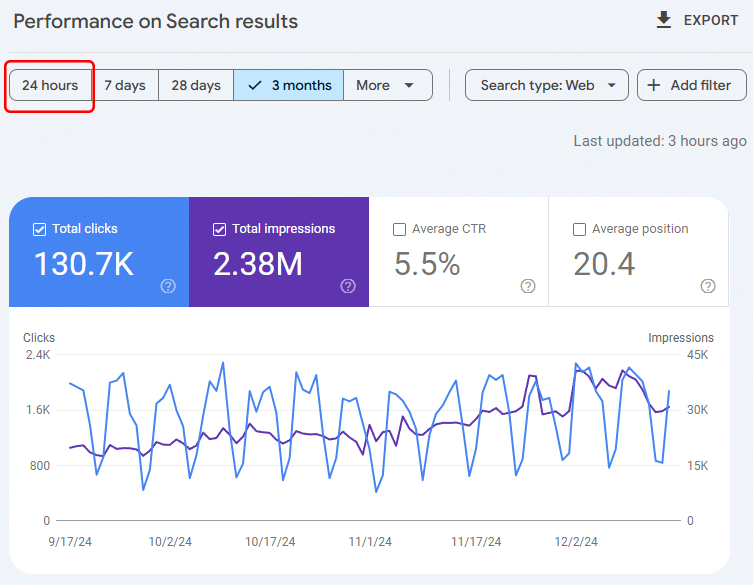
The Search Results report is your primary window into user behavior. In Magento, where catalog structures can be deep and complex, identifying “money pages” is critical for prioritizing your SEO resources.
Key GSC Reports to Monitor
- Queries: Reveals the exact terms users type. Look for “branded vs. non-branded” splits to see if you are attracting new customers or just serving existing ones.
- Pages: Shows which specific URLs (Product vs. Category vs. CMS) are pulling the most weight. In Magento, your Category Pages should ideally have higher impressions than individual products.
- Countries & Devices: Essential for determining if your Magento theme is performing well across different regions and mobile screen sizes. If your “Mobile” CTR is significantly lower than “Desktop,” your Magento mobile template may have UX friction.
What to Look At
- High Impressions + Low CTR: Your page is appearing on Page 1, but no one is clicking. This usually points to weak Title Tags or Meta Descriptions. Magento often defaults to “Product Name – Store Name,” which lacks a “Call to Action.”
- High Clicks + Low Conversions: If Google sends traffic but users don’t buy, it’s a UX or Conversion Rate Optimization (CRO) issue. Common culprits in Magento include slow “Add to Cart” AJAX responses or hidden shipping costs.
- Ranking Drop Trends: Use the “Compare” feature in GSC (last 28 days vs. previous period). If a top-performing category page begins to slide, it may be due to “content decay” or a technical error like a broken canonical tag.
Magento-Specific Actions
✔ Optimize Product Titles for Search Intent Don’t let Magento auto-generate titles based solely on the product name. Use a pattern that matches how people search.
- Bad: “Leather Bag”
- Good: “Women’s Leather Tote Bag | Lightweight & Premium Quality | [Brand Name]”
- Tip: You can use Magento’s “Product Attribute” templates to bulk-update these if you have thousands of SKUs.
✔ Improve Category Pages (The “Money” Pages) In Magento SEO, category pages often rank more easily than individual products because they aggregate authority.
- H1 Tags: Ensure the category name is descriptive (e.g., “Industrial Power Tools” instead of just “Tools”).
- Description Block Content: Magento allows you to add content above or below the product grid. Add 200–300 words of helpful context to help Google understand the page’s relevance.
- Internal Links: Use the “Featured Products” widget to link from your top-tier categories to high-margin products.
✔ Fix Pages with Declining Clicks Common Magento issues that cause traffic drops:
- URL Change: You renamed a category and Magento didn’t automatically create a 301 redirect.
- Out of Stock: The product is out of stock, and your settings are hiding it from the catalog, leading to a 404.
- Layered Navigation: A recent update enabled filters (like ?color=red) to be indexed, cannibalizing the traffic of the main category page.
2. Indexing Insights: Making Sure Magento Pages Are Seen
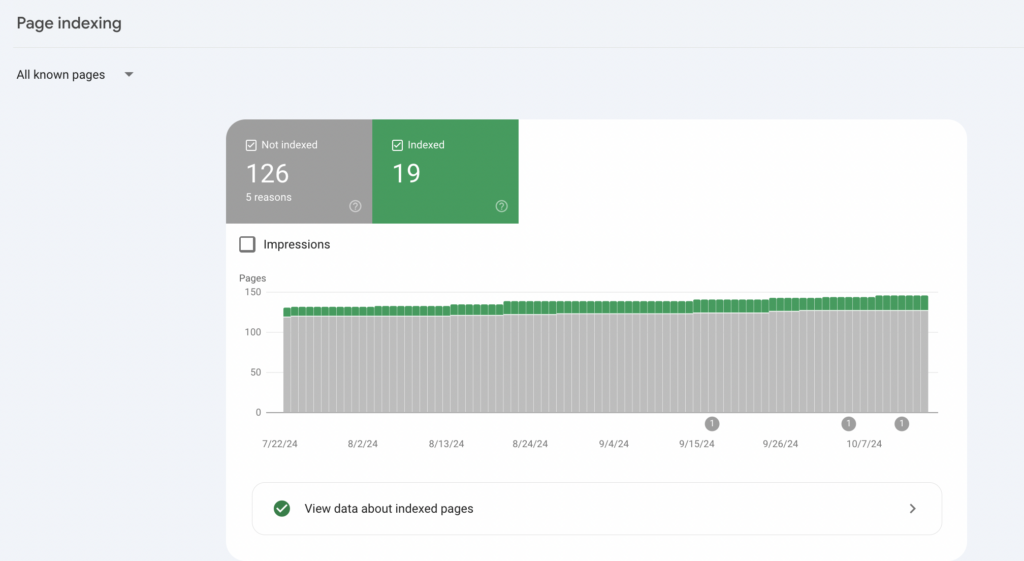
Magento is notorious for creating “index bloat”—where Google indexes thousands of thin or duplicate pages (like filtered results or session IDs) instead of your core products.
Critical Metrics
- Indexed vs. Not Indexed: A large gap here suggests Google is getting “stuck” in your faceted navigation or finding too many low-value URLs.
- Crawl Stats: Located under Settings, this shows if your server is struggling to keep up with Googlebot.
- Sitemap Status: Ensure your /sitemap.xml is successfully processed.
Common Magento SEO Index Problems
- Dynamic URLs: Search engines often accidentally index system URLs like /catalog/product/view/id/… or customer account pages like /wishlist/.
- Duplicate URLs: The same product often exists under multiple paths (e.g., /category1/product vs. /category2/product).
What To Do
- Enable Canonical Tags: This is the #1 fix for Magento duplication. Go to Stores → Configuration → Catalog → Catalog → Search Engine Optimization and set both Use Canonical Link Meta Tag for Products and Categories to Yes.
- Optimize the Sitemap: Ensure your sitemap only includes the “clean” URLs you want indexed. In Magento, you can configure this under Marketing → SEO & Search → Site Map.
3. Core Web Vitals Insights: Speed Impacts Rankings
Magento’s heavy PHP and JavaScript architecture can lead to poor Core Web Vitals (CWV) scores, which Google now uses as a direct ranking signal.
Metrics to Watch in Magento
- LCP (Largest Contentful Paint): Usually the product image or the hero banner. If this takes longer than 2.5 seconds, you may need better hosting or image compression.
- CLS (Cumulative Layout Shift): Often caused by Magento sliders or pop-ups that “push” content down as they load.
- INP (Interaction to Next Paint): High INP is common in JS-heavy Magento checkouts or layered navigation filters.
Fix Priorities
- Image Optimization: Use WebP formats and ensure your theme uses “srcset” to serve the right image size for the right device.
- Enable Varnish Cache: Go to Stores → Configuration → Advanced → System → Full Page Cache. Switching from the built-in cache to Varnish can drastically reduce Time to First Byte (TTFB).
- Use a CDN: Offload your static assets (CSS, JS, Images) to a provider like Cloudflare or Fastly to reduce the load on your Magento server.
Note: In many Magento stores, poor INP and LCP scores are not caused by the core platform itself, but by uncontrolled third-party scripts such as tracking pixels, chat widgets, or marketing tags that block rendering and delay interactions. Learn how third-party scripts hurt Magento SEO and how to audit and control them effectively.
4. Enhancements: Maximizing Rich Results
Rich results (like star ratings and prices appearing in search) significantly boost CTR. GSC’s Enhancements section tells you if your Magento schema is working.
Magento SEO Structured Data Must-Haves
- Product Schema: Automatically passes Price, Availability (In Stock/Out of Stock), and Ratings to Google.
- Breadcrumb Schema: Helps Google understand your site hierarchy and displays a “clean” path in the search results instead of a messy URL.
Check these reports regularly; if you see “Warnings” or “Errors,” it usually means an extension or a custom theme change has broken the JSON-LD code in your template files.
5. Links Report: Strategic Internal Linking
Google uses internal links to understand which of your pages are most important. The Links report in GSC shows your internal link distribution.
What to Look For
- Top Linked Pages: Do your high-margin categories have the most internal links? If your “Privacy Policy” has more links than your “Best Sellers,” your link equity is being wasted.
- Orphan Pages: Important products that have zero internal links are unlikely to rank.
Magento Internal Linking Strategy
- Cross-Link from Blog to Category: If you use a blog extension, link from educational posts directly to the relevant category pages.
- Optimize Footer Links: Use the footer for high-value “SEO Silos”—your top 5–10 collections.
- Avoid Redirect Chains: When updating categories, ensure you aren’t linking to an old URL that then redirects to a new one.
If you want to move beyond simply viewing Google Search Console data and actually turn those insights into measurable SEO performance, the next step is connecting Google Search Console with Magento SEO extensions.
These extensions help you automate keyword and ranking tracking, improve indexing accuracy, enhance structured data for products and categories, and continuously monitor the performance of your most important pages in search. Instead of managing everything manually, you get smarter visibility, faster issue detection, and clearer guidance on what truly drives growth. Connecting GSC with the right Magento SEO tools makes your optimization process more strategic, efficient, and results-driven.
6. Manual Actions & Security: The Magento Safety Net
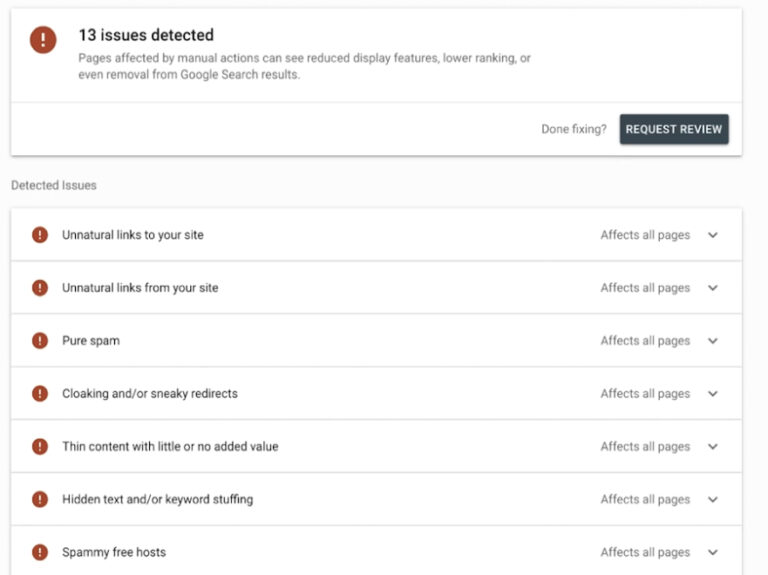
E-commerce sites are frequent targets for SEO spam. The Security & Manual Actions report is where Google alerts you if your store has been hacked or penalized.
Common Risks
- Outdated Magento Versions: Older versions are vulnerable to “Cloaking” hacks, where a hacker hides spammy links on your site that only Googlebot can see.
- Spammy Backlinks: If you or a previous agency used “black-hat” link-building tactics, you might see a Manual Action here.
Action: If an issue is detected, clean the site immediately, use the URL Inspection Tool to see how Google views the affected page, and then click Request Review.
7. Practical Workflow: Your Magento SEO Schedule
Insights are only valuable if they lead to action. Follow this routine to keep your Magento store optimized.
| Frequency | Task | GSC Report to Use |
| Weekly | Identify low CTR queries for top products. | Performance → Queries |
| Weekly | Check for new 404 errors or crawl anomalies. | Indexing → Pages |
| Biweekly | Monitor “Not Indexed” pages for unexpected growth. | Indexing → Pages |
| Monthly | Review Core Web Vitals and Page Experience. | Experience → Core Web Vitals |
| Monthly | Validate Structured Data for products. | Enhancements → Products |
Using Insights to Prioritize
Don’t try to fix everything at once. Focus on Revenue-Focused SEO: identify queries that have high impressions (meaning there is demand) but are sitting on Page 2 (Positions 11–20). A simple H1 update or a few internal links to these pages can often push them to Page 1, resulting in an immediate sales lift.
Conclusion
Mastering Google Search Console for Magento is about transforming complex data into a clear action plan. By consistently monitoring indexing health and performance trends, you can overcome Magento-specific hurdles like index bloat and slow page speeds. Using these insights ensures your SEO strategy is focused on high-revenue pages, allowing you to bridge the gap between technical optimization and actual sales growth.
Ultimately, a well-monitored GSC account serves as the early warning system for your store’s health. By following a structured weekly and monthly workflow, you can proactively resolve technical errors and refine your content to meet user intent. This disciplined approach not only improves your search rankings but also creates a faster, more reliable shopping experience that builds long-term customer trust.