Maintaining a seamless shopping path is critical for digital commerce success, yet many merchants overlook the silent conversion killer: the broken link. Statistics indicate that approximately 73% of shoppers will abandon a site permanently after hitting a dead end.
Addressing the Magento 404 error is not just a technical necessity; it is a vital strategy for protecting your revenue and ensuring that your store remains accessible to both users and search engines.
Nội dung bài viết
Identifying and Auditing “404 Error” Vulnerabilities
- Systemwide Inspections: Leverage the native URL Rewrite management tool within Magento to scan for orphaned paths. This utility identifies broken links and clarifies their origins.
- Mapping Mismatches: Evaluate whether bulk data migrations or category shifts have left products pointing toward non-existent destinations.
- Bulk Correction Protocols: For stores managing extensive catalogs, utilize mass update features or specialized SEO Magento plugin solutions to rectify large batches of URL paths simultaneously.
- Taxonomy Verification: Confirm that all products are assigned to active categories to prevent broken internal links in Magento from surfacing due to organizational changes.
- Automated Monitoring: Deploy marketplace extensions that automate the detection and resolution of broken links before they reach the customer.
- Routine Health Checks: Integrate periodic audits using internal Magento logs or external SEO crawlers to catch errors in their infancy.
| Method | Diagnostic Tool | Actionable Data |
| Bing Webmaster Tools | Index/Crawl Reports | Identifies 404s discovered by search bots beyond Google. |
| Server Logs | Nginx/Apache Access Logs | Detailed list of 404 requests, frequency, and referring sources. |
| Edge/CDN Logs | Cloudflare or Fastly Logs | Errors served at the network edge, including cached failures. |
| Site Crawlers | Screaming Frog or Ahrefs | Maps broken internal/external links and their source pages. |
| Link Checkers | Semrush Backlink Audit | Identifies external and internal 404s and outdated backlinks. |
| CMS Logging | Magento no_route Action Logs | Captures errors within the app when server logs are inaccessible. |
| Centralized Monitoring | Datadog or New Relic | Real-time dashboards visualizing 404 trends and user agents. |
| Campaign Verification | Pre-deployment Scripts | Validates ad and email URLs via curl before they go live. |
5 Categories of Magento 404 Disruption
| Types | Description | Primary Triggers | Resolution Steps |
| Frontend Failures | Errors encountered by shoppers on product, category, or CMS pages. | Deleted products without a Magento 301 redirect; restructuring without mapping. | Establish 301 redirects; flush the cache; reindex all data. |
| Admin Access Issues | Backend pages returning 404s for store administrators. | Software updates; permissions errors; admin URL changes. | Clear sessions via SSH; verify user roles; check for module conflicts. |
| Base URL Conflicts | Site-wide failures where no pages resolve correctly. | Domain migrations; SSL updates; incorrect server environment variables. | Update core_config_data via SQL/CLI; verify SSL certificates and server configs. |
| Extension Interference | 404s caused by third-party tools modifying standard routing. | Uninstalled modules leaving dead links; custom routing conflicts. | Disable suspect modules; regenerate URL rewrites; check routes.xml. |
| Server-Level Blocks | Errors originating from .htaccess or Nginx configurations. | Missing .htaccess file; disabled mod_rewrite; restrictive server rules. | Restore default Magento configuration files; enable Apache mod_rewrite. |
Note on Content Staging (Adobe Commerce): If a scheduled update expires or content is removed while staging records remain, it can cause a 404. Review your staging dashboard to clear orphaned schedules and republish current versions.
7 Primary Drivers of Magento Routing Errors
| Cause | Practical Explanation | Common Context | Corrective Action |
| Flawed URL Rewrites | Magento’s SEO-friendly pathing fails if rewrites are misconfigured. | Name changes for categories or products. | Update rewrites in Marketing > SEO & Search. |
| Compromised .htaccess | The server loses the instructions needed to handle Magento’s URL structure. | Accidental edits or deletion during server maintenance. | Re-upload the standard Magento .htaccess file. |
| Inactive Modules | Essential functionality for URL handling is turned off. | Manual disabling of core components. | Verify module status via CLI and re-enable. |
| Indexing Latency | Stale data causes the site to look for pages that have moved. | Heavy catalog updates without reindexing. | Flush Magento cache and execute a full reindex. |
| Store View Errors | Incorrect base URLs for specific store views or websites. | Setting up multi-site environments. | Correct URLs in Stores > Configuration > Web. |
| Vanished CMS Content | Deleted or renamed informational pages leave dead links in menus. | Manual page removal without updating links. | Restore pages or update all internal navigation. |
| Broken Catalog Links | Changes in category hierarchy break existing product paths. | Moving products between categories. | Regenerate the sitemap and check “Use Categories for Product URLs” settings. |
5 Consequences of Neglecting 404 Errors
- Eroded User Experience (UX): Shoppers facing dead ends lose confidence in your brand. This frustration leads to higher bounce rates and abandoned shopping carts as users migrate to competitors. Beyond immediate abandonment, it creates a “broken window” effect where the entire site feels unmaintained, directly diminishing customer lifetime value.
- Degraded Search Rankings: Search engines interpret frequent 404s as a sign of poor site health. This reduces crawl efficiency—forcing bots to waste their “crawl budget” on dead ends—and can lead to a drop in domain authority as link equity is lost.
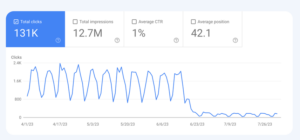
- Loss of Revenue: Every broken link on a product or checkout page is a direct hit to your conversion rate. Internal dead ends stop the customer journey before it can result in a sale, making even the most expensive marketing campaigns ineffective if they lead to non-existent landing pages.
- Strained Server Resources: High volumes of 404 errors force the server to log additional data and waste processing power on empty requests. For high-traffic stores, this can spike server load, potentially slowing down the response times for legitimate shoppers and legitimate transactions.
- Increased Support Burden: Instead of completing self-service purchases, frustrated customers flood support channels with inquiries about missing pages. This increases operational overhead, forces your team into reactive troubleshooting, and slows down resolution for more complex customer issues.
Top 7 Best Practices for Error Prevention
- URL Stability: Avoid changing product slugs once they are indexed. Disable “Use Categories Path for Product URLs” in Magento settings to keep paths simple, permanent, and independent of category restructuring.
- Strategic Redirection: Always implement 301 redirects for permanent moves. This ensures that any “SEO juice” accumulated by the old URL is transferred to the new one. Reserve 302 redirects for strictly temporary changes, such as seasonal landing pages.
- Cache Hygiene: Regularly refresh your cache and indexes after any structural change using bin/magento cache:flush. This ensures the frontend doesn’t continue to serve outdated paths that no longer exist in the database.
- Permission Auditing: Ensure directory permissions are set to 755 and files to 644. This prevents “Permission Denied” errors, which the server often serves as 404s because it cannot access the files necessary to render the page.
- Continuous Monitoring: Use tools like Google Search Console to track crawl errors and address them weekly. Proactive monitoring allows you to fix a single broken link before it is clicked by hundreds of visitors.
- Configuration Accuracy: Double-check that secure and unsecure base URLs are correctly defined for every store view. Errors here can lead to recursive redirection loops or site-wide 404s where no media or scripts load correctly.
- Extension Maintenance: Keep all third-party modules updated to ensure they remain compatible with Magento’s core routing logic. Conflicting modules are a top reason for 404s in the admin panel and specialized checkout flows.
FAQ
What is the most efficient way to resolve a 404 error in Magento?
Begin by clearing the Magento cache and reindexing. If the issue persists, verify your URL Rewrites in the admin panel and ensure the .htaccess file is present and correctly configured.
Can I personalize the 404 “Page Not Found” screen?
Yes. Navigate to Content > Pages in the Magento admin, edit the “404 Not Found” CMS page, and add custom blocks like product grids or search bars to improve retention.
Why did my admin panel return a 404 after a module installation?
This is often caused by a permission mismatch or a failure to update the system schema. Run php bin/magento setup:upgrade followed by php bin/magento setup:static-content:deploy to refresh the backend routing.
Should I delete a URL to fix a recurring 404 error?
No. Deleting the URL does not fix the underlying problem of external or internal links pointing to that path. Instead, use a 301 redirect to point the old URL to the most relevant active page.
How do I regain access if my admin user is locked?
If you are locked out due to security settings or errors, use the CLI command php bin/magento admin:user:unlock <username> to restore access immediately.
Conclusion
Managing 404 errors is a fundamental aspect of Magento store health that directly influences both SEO and customer loyalty. By moving from a reactive “fix it when it breaks” mindset to a proactive strategy of audits, redirects, and optimized error pages, you ensure your store remains a high-converting environment. Implement these technical checks today to secure your sales funnel and provide a frictionless experience for every visitor.