Cumulative Layout Shift (CLS) is a critical User Experience (UX) metric that measures the visual stability of a page. In the context of Magento 2, a platform known for its complexity, heavy JavaScript execution, and extensive DOM structures, CLS issues are remarkably common. Whether you are using the default Luma/Blank architecture or a custom-built theme, Magento theme plays a major role in Core Web Vitals, user experience, and search visibility.
This guide provides a comprehensive, developer-focused approach to identifying and fixing CLS issues specifically within the Magento ecosystem.
Nội dung bài viết
- 1 What Causes CLS in Magento Themes?
- 2 How To Reduce CLS in Magento Themes
- 2.1 Always Reserve Space for Images and Thumbnails
- 2.2 Fix Sliders and Carousels (Owl/Swiper)
- 2.3 Prevent Header and Navigation Shifting
- 2.4 Optimize Web Font Loading
- 2.5 Reserve Space for Dynamic Magento Blocks
- 2.6 Correct Improper Lazy Loading
- 2.7 Audit Third-Party Extensions
- 2.8 Reduce Render-Blocking CSS and JS
- 2.9 Theme-Specific Considerations
- 3 Conclusion
What Causes CLS in Magento Themes?
Understanding the “why” is the first step toward optimization. In Magento, layout shifts typically occur when the browser starts rendering elements before all assets (images, fonts, scripts) are fully loaded or processed.
The most frequent culprits in Magento environments include:
- Unspecified Image Dimensions: Magento’s default templates often omit width and height attributes on product thumbnails and CMS banners.
- Late-Loading Sliders: JavaScript-based carousels (like OwlCarousel or Swiper) often initialize after the page has already started rendering.
- FOIT/FOUT (Flash of Invisible/Unstyled Text): Custom web fonts are swapped in late and change the line height of text blocks.
- Dynamic Content Injection: “Recently Viewed” products or “Related Products” blocks that pop into the layout after an AJAX call.
- Third-Party Widgets: Reviews, cookie banners, and social feeds that push the footer or main content down.
- Incorrect Lazy Loading: Implementing lazy loading without reserving the space for the image.
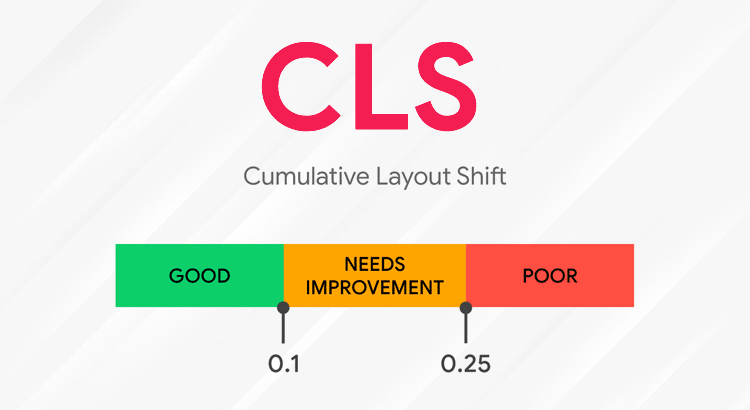
How To Reduce CLS in Magento Themes
Cumulative Layout Shift (CLS) is one of the most frustrating performance issues for Magento stores, causing unexpected content movement, a poor browsing experience, and lower Core Web Vitals scores. In Magento themes—especially those with sliders, dynamic content blocks, and heavy visual elements—CLS often originates from images without predefined sizes, unstable headers, and late-loading scripts. In this section, we’ll walk through practical, Magento-focused techniques to stabilize your layout, prevent visual shifting, and create a smoother browsing experience for users.
Always Reserve Space for Images and Thumbnails
One of the biggest contributors to CLS in Magento 2 is the product grid. When the browser doesn’t know the dimensions of an image, it collapses the container to 0px height. Once the image downloads, the container expands, pushing everything below it downward.
The CSS Fix
In your theme’s _module.less or custom CSS, ensure images have explicit aspect ratios. Modern browsers support the aspect-ratio property, which is a lifesaver for responsive Magento themes.
CSS
/* Ensure images respect their attributes */
img {
aspect-ratio: attr(width) / attr(height);
height: auto;
max-width: 100%;
}
/* Hard-code ratios for product containers if necessary */
.product-image-container {
aspect-ratio: 1 / 1; /* Standard square for Magento product grids */
background: #f5f5f5; /* Optional: placeholder color */
}
Magento Admin Configuration
Navigate to Stores > Configuration > Web > Default Pages. If you are using Magento’s native lazy loading (available in newer versions), ensure that the placeholder sizes match the final image dimensions to prevent “popping.”
Fix Sliders and Carousels (Owl/Swiper)
Sliders are notorious for CLS. In many Magento themes, the hero slider container starts with a height of 0px. Once the owl.carousel.js or swiper.js executes, it calculates the height and expands.
The Solution
Always set a min-height or a fixed aspect-ratio for the slider wrapper. This ensures that even before the JavaScript kicks in, the browser has reserved the necessary vertical space.
CSS
.hero-slider-wrapper {
min-height: 450px; /* Match your desktop banner height */
overflow: hidden;
display: block;
}
@media (max-width: 768px) {
.hero-slider-wrapper {
min-height: 250px; /* Match mobile banner height */
}
}
Magento’s “Sticky Header” functionality is often implemented via JavaScript. If the script waits for the DOMContentLoaded event to apply a fixed position, the rest of the page content may “jump” up to fill the void.
The Fix
- Pre-allocate space: Ensure the parent container of your header has a fixed height equivalent to the header itself.
- Avoid Dynamic Height: Do not use scripts to calculate header height on the fly; use CSS variables or hardcoded values in your LESS/SASS files.
Optimize Web Font Loading
When a Magento store uses Google Fonts or custom self-hosted fonts, the browser often renders a fallback font first. If the custom font has a different X-height or letter spacing, the entire layout—including paragraphs and headings—will shift when the font finishes loading.
The Fix: font-display
Ensure your @font-face declarations include font-display: swap;. This tells the browser to use a fallback font immediately and swap it only when the custom font is ready, minimizing the shift.
CSS
@font-face {
font-family: ‘MyMagentoFont’;
src: url(‘../fonts/myfont.woff2’) format(‘woff2’);
font-display: swap;
}
If you are using Google Fonts, append the parameter to the URL:
<link href=”https://fonts.googleapis.com/css2?family=Roboto&display=swap” rel=”stylesheet”>
Reserve Space for Dynamic Magento Blocks
Magento uses Private Content (via customer-data.js) to load user-specific information like the mini-cart, “Recently Viewed” items, and “Wishlist” counts. These are loaded via AJAX to bypass the Full Page Cache (FPC).
If these blocks are located above or in the middle of the content, they will cause a massive layout shift when they populate.
Best Practices
- Placeholders: Create CSS skeletons or “shimmer” effects that occupy the same space as the eventual content.
- Fixed Height: Assign a min-height to the .block-recently-viewed container.
- Below the Fold: Whenever possible, move dynamic recommendation blocks to the bottom of the page (below the fold) so their late arrival doesn’t affect the user’s initial viewport.
Correct Improper Lazy Loading
Lazy loading is excellent for performance, but if implemented incorrectly, it is a CLS disaster. If an image is lazy-loaded but the <img> tag lacks a height, the page will shift the moment the user scrolls and the image starts loading.
The Rule
Never lazy load images that appear “Above the Fold” (the part of the page visible without scrolling). This includes:
- The Store Logo
- The first Hero Banner
- The first row of Product Images on a mobile device
For images that are lazy-loaded, always use a LQIP (Low-Quality Image Placeholder) or a solid-colored div that matches the aspect ratio.
Audit Third-Party Extensions
Many Magento extensions for “Reviews,” “Trust Seals,” or “Cookie Consent” are injected into the DOM via JavaScript after the page has loaded.
How to fix extension-driven CLS:
- Lighthouse Audit: Use Chrome DevTools (Lighthouse) to identify which specific elements are causing shifts. This report lists the specific elements contributing the most to your CLS score. In Magento, you will often see elements like .yotpo-main-widget, .trustpilot-widget, or cookie consent wrappers here.
- CSS Pre-sizing: If you know a review widget will appear in a specific div, give that div a min-height in your theme’s CSS. Wrap the extension’s call in a container with a defined min-height. This creates a “reserved seat” for the content.
- Deferral: Not every extension needs to load immediately. A “Chat Bubble” or a “Related Products” slider that sits at the bottom of the page should not be allowed to interfere with the rendering of the Hero section.
- Interaction-Based Loading: For “Chat” or “Feedback” widgets, use a script that only initializes the extension after the first user scroll or mouse movement.
- The Intersection Observer Strategy: Only load the extension’s heavy JavaScript when the user scrolls near the container. This is particularly effective for heavy Magento “Recommendation” blocks.
Note: Beyond causing layout shifts, heavy third-party extensions can also delay user interactions. Optimizing or deferring these scripts is critical not only for CLS but also for improving INP in Magento stores.
Reduce Render-Blocking CSS and JS
If Magento takes too long to parse CSS, the browser may attempt to render the HTML “naked” or partially styled, leading to a “Flash of Unstyled Content” (FOUC).
Magento Optimization Steps:
- CSS Critical Path: Identify the CSS required for the initial viewport and inline it in the <head>.
- Merge & Minify: Go to Stores > Configuration > Advanced > Developer and enable CSS and JS minification/merging.
- Move JS to Footer: Ensure that non-critical JavaScript is moved to the bottom of the page or uses the defer attribute so it doesn’t block the initial layout paint.
Theme-Specific Considerations
Luma and Blank Themes
The default Magento 2 Luma theme is notorious for CLS. Specifically, the product gallery (gallery.js) on the Product Detail Page (PDP) often calculates dimensions after initialization.
- Fix: Customize view.xml to set explicit gallery dimensions and use CSS to force the gallery container to a 1:1 ratio before the script runs.
Hyvä Themes
If you are struggling with CLS on Luma, the ultimate “fix” is often migrating to a modern frontend like Hyvä.
- Advantage: Hyvä removes the bloated RequireJS/Knockout.js stack entirely.
- Result: Because Hyvä is built on Tailwind CSS and Alpine.js, the styles are applied almost instantly, and there are far fewer moving parts to cause layout shifts. It is built from the ground up to achieve 100/100 Core Web Vitals.
Conclusion
Reducing CLS in Magento themes is not about a single “magic button” but a combination of disciplined CSS practices and smart asset loading. By reserving space for images, fixing slider containers, and optimizing how fonts and dynamic blocks load, you can create a stable, professional-feeling storefront.
Consistent visual stability not only makes your customers’ shopping experience smoother but also signals to search engines that your site is high-quality and technically sound.