In modern ecommerce, user experience (UX) and search engine optimization (SEO) are no longer distinct disciplines. Google’s algorithms, particularly since the introduction of Core Web Vitals, treat user satisfaction as a primary ranking factor.
When a product page is easy to navigate, fast, and informative, users stay longer and convert more frequently—signals that tell search engines the page is a high-quality destination.
This guide provides a practical, implementation-ready checklist of product page UX elements that boost SEO, moving beyond abstract theory to focus on the specific layout and content decisions that drive organic growth.
Nội dung bài viết
How UX elements influence SEO on product pages
The relationship between UX signals and SEO outcomes is rooted in how search engines interpret human behavior. When a user lands on a product page from a search result, Google monitors “dwell time” and “pogo-sticking.”
If the UX is poor—perhaps the price is hidden or the page shifts unexpectedly—the user returns to the search results immediately. This high bounce rate signals to the search engine that the page did not satisfy the search intent.
Conversely, strong UX facilitates better crawlability and relevance. A logical page structure helps search bots understand the hierarchy of information, while high engagement metrics suggest the content is valuable.
For those working on complex platforms, utilizing a list of SEO modules for Magento 2 can help automate these structural requirements. Unfortunately, product pages are often the weakest SEO asset in ecommerce. Many retailers rely on thin descriptions and cluttered layouts that prioritize flashy design over functional clarity, resulting in pages that neither satisfy users nor rank effectively.
Unfortunately, product pages are often the weakest SEO asset in ecommerce. Many retailers rely on thin, manufacturer-provided descriptions and cluttered layouts that prioritize flashy design over functional clarity, resulting in pages that neither satisfy users nor rank effectively.
Product page UX elements that boost SEO (complete checklist)
Content and information clarity
The foundation of both UX and SEO is the quality and presentation of information. Search engines rely on text to understand what you are selling, while users rely on it to make purchasing decisions.
Clear, descriptive product titles aligned with search intent
The product title should be the H1 of the page. It needs to balance brand voice with search data. Instead of a vague title like “Blue Shirt,” use “Men’s Slim-Fit Organic Cotton Oxford Shirt – Navy Blue.” This meets the user’s need for specific information while capturing long-tail search queries.
Unique, keyword-optimized product descriptions
Duplicate content is an SEO killer. Using manufacturer copy means you are competing with every other retailer selling the same item. Write unique descriptions that highlight benefits and technical specifications. Ensuring correct structured data in Magento or other platforms can then help search engines interpret these unique details as rich results.
Naturally incorporate primary and secondary keywords, but write for the human first.
Scannable content structure
Users rarely read every word on a product page. Use short paragraphs, bulleted lists for features, and clear subheadings (H2s and H3s).
This scannability improves the user’s ability to find information quickly, which reduces bounce rates and helps search engines parse the page content efficiently.
Consistent product information across variants
If a product comes in multiple colors or sizes, ensure the descriptions and specifications remain consistent and clear. Avoid “hidden” text that requires complex Javascript to reveal, as this can sometimes hinder indexing if not implemented correctly.
Page structure and layout
How a page is organized determines how effectively a user can process the offer. A logical hierarchy is essential for “above-the-fold” optimization.
Logical content hierarchy
The layout should follow a predictable flow: Product Title → Price and Availability → Value Proposition → Primary Call to Action (CTA) → Detailed Specifications.
This flow mirrors the user’s decision-making process. Placing the price and “Add to Cart” button prominently ensures that the most critical UX elements are immediately accessible.
Clear visual separation between sections
Use whitespace and subtle borders to separate the product image gallery from the description and the reviews section. Visual clutter leads to cognitive overload, which can cause users to exit the page prematurely.
Above-the-fold optimization for users and crawlers
Both the user and the search engine bot should be able to identify the primary purpose of the page within the top 600 pixels.
Key elements like the H1, price, and a high-quality image must be visible without scrolling. This improves the “Cumulative Layout Shift” (CLS) and provides immediate relevance.
Minimal layout shifts
Layout shifts occur when elements like late-loading ads or images push content down after a user has already started reading.
This is a major UX frustration and a penalized metric in Google’s Core Web Vitals. Assign fixed dimensions to image containers to prevent these shifts.
Image and media UX
Visuals are the most influential part of a product page, but they are also the most common cause of slow load times.
High-quality images with consistent sizing
Use high-resolution images that allow for detail but ensure they are compressed for the web. Consistent aspect ratios across all product images prevent the layout from jumping when a user toggles through a gallery.
SEO-friendly image file names and alt text
Every image should have a descriptive file name like mens-navy-oxford-shirt-front.jpg rather than IMG_5678.jpg.
Furthermore, alt text is a critical UX element for accessibility (screen readers) and a vital SEO element for Google Image Search. Describe the product accurately in the alt text.
Image zoom and gallery support
Provide a seamless gallery experience. Users expect to zoom in on textures and see the product from multiple angles. Ensure these interactive elements are lightweight and do not rely on heavy libraries that bloat the page’s code.
Optimized video usage
Video can significantly boost conversion and time-on-page. However, avoid auto-playing videos with sound.
Host videos on platforms like YouTube or Vimeo and embed them, or use self-hosted compressed MP4s with lazy loading to ensure they don’t delay the initial page render.
Internal links are the “roads” that search engines use to discover your site’s architecture.
Breadcrumb navigation
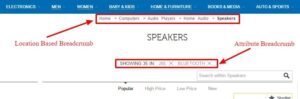
Breadcrumbs (e.g., Home > Men > Shirts > Oxford) provide immediate context for the user and create a clear crawl path for search engines. They also appear in Google’s search snippets, improving the click-through rate (CTR).
Internal links to related products
Strategic internal linking to “related products” or “people also bought” sections helps distribute “link equity” (ranking power) across your site. From a UX perspective, it helps users find alternatives if the current product isn’t exactly what they need.
Variant and attribute selection UX
When a user selects a different color, the URL should ideally update via a parameter or a clean slug without a full page reload (using AJAX). However, ensure that you are not creating thousands of duplicate URLs for every possible size/color combination, which can exhaust your crawl budget.
Avoidance of duplicate URL patterns
Use canonical tags to point multiple variants back to a single primary product page. This prevents “keyword cannibalization” where your own pages compete against each other in search results.
Mobile usability
With the majority of ecommerce traffic now occurring on mobile devices, a mobile-first approach is mandatory.
Mobile-first layout and tap-friendly interactions
Buttons and links must be large enough to be tapped easily without accidental clicks. Ensure that the “Add to Cart” button is easily reachable with a thumb.
Readable typography and spacing
Small screens require larger font sizes (at least 16px for body text) and generous line-heights. If a user has to “pinch to zoom” to read your product description, the UX is failing, and Google will flag the page as not mobile-friendly.
Sticky CTAs
Consider a sticky “Add to Cart” button that remains at the bottom of the screen as the user scrolls through long descriptions. This keeps the primary goal within reach at all times.
Mobile media optimization
Ensure that large images are swapped for smaller, responsive versions on mobile devices. Loading a 2000px desktop image on a 375px phone screen is a waste of bandwidth and slows the page down significantly.
Page speed and performance UX
Speed is a feature. A fast page feels premium and reliable, while a slow one feels broken.
Fast load times for core content
The “Largest Contentful Paint” (LCP) should occur within 2.5 seconds. This usually means the main product image and the title should appear almost instantly.
Lazy loading without hiding SEO-critical elements
Lazy load images and reviews that are below the fold. However, never lazy load the main product description or the H1, as you want search engines to find this content immediately upon crawling.
Reduced script bloat
Ecommerce platforms often accumulate third-party scripts for tracking, heatmaps, and chat bots. Each script adds to the “Total Blocking Time” (TBT). Audit these scripts regularly and remove any that are not providing measurable value.
Stable layout for Core Web Vitals
Ensure that the page doesn’t “jump” as fonts load or third-party widgets initialize. Stability is key to a professional-grade UX.
SEO isn’t just about getting people to the page; it’s about proving to the search engine that the page is a trustworthy resource.
Visible product reviews and ratings
Reviews provide fresh, unique content for search engines to index. They often contain the natural language and long-tail keywords that your formal descriptions might miss.
User-generated content (UGC)
Encourage users to upload photos of the product. This adds immense value to the UX by showing “real-world” versions of the item and provides indexable content that search engines love.
Trust badges and reassurance
Placement of “Secure Checkout,” “Free Returns,” or “Money-Back Guarantee” badges near the CTA reduces user anxiety and improves conversion rates.
While these don’t directly impact SEO rankings, they improve engagement metrics which indirectly influence SEO.
FAQ sections
An FAQ section on a product page addresses common buyer concerns and provides an opportunity to rank for “how-to” or “problem-solution” queries.
Schema and search appearance UX
Technical markup bridges the gap between how a human sees a page and how a machine understands it. Implementing robust Magento schema markup or equivalent JSON-LD ensures that your product attributes are correctly mapped to Google’s requirements.
Product schema for price, availability, and reviews
Using schema markup allows Google to display “Rich Snippets” in search results. These snippets show star ratings, prices, and stock status directly on the search results page. This significantly increases your CTR.
Structured data for FAQs
If you have an FAQ section, use FAQ schema. This can result in your questions appearing directly in the search results, taking up more “real estate” and pushing competitors further down the page.
Common UX mistakes that hurt product page SEO
Even with a checklist, it is easy to fall into common traps that undermine your efforts:
- Thin or duplicated content: Relying on a single sentence or a bulleted list from the manufacturer.
- Overloaded design: Using high-resolution videos or heavy parallax effects that bring page speed to a crawl.
- Hidden content: Using “Read More” buttons or tabs that hide the main description from search bots (though modern bots are better at this, it’s still a risk).
- Poor mobile experience: Designing for desktop first and then simply “shrinking” the page for mobile, leading to tiny text and un-clickable buttons.
How to audit product page UX for SEO (quick checklist)
To ensure your product pages remain optimized, perform a regular audit:
Manual review
- Check the page on a real mobile device.
- Read the alt text of the top 5 images.
- Verify that the breadcrumbs lead to the correct categories.
- Ensure the CTA is visible and functional.
Tool validation
- Use Google PageSpeed Insights to check Core Web Vitals.
- Use the Rich Results Test tool to verify that your schema markup is valid.
- Use Google Search Console to check for mobile usability errors.
Audit frequency Product pages should be audited whenever a new template is deployed, or at least quarterly. High-volume “hero” products should be monitored monthly for engagement and speed performance.
Final checklist summary
To prioritize your fixes, focus on these elements in order:
- Critical: Mobile responsiveness, page speed (LCP), and unique H1 titles.
- High Priority: Schema markup, high-quality images with alt text, and clear pricing/CTAs.
- Optimization: FAQ sections, internal linking to related products, and user-generated content.
- Refinement: Advanced variant UX, sticky CTAs, and video optimization.
Conclusion
Product page UX elements that boost SEO are centered on a single goal: making it as easy as possible for both users and search engines to understand the value of your product. By following this checklist, you ensure that your pages are fast, accessible, and informative.
When you prioritize the user’s journey, search engine rankings naturally follow. Start with the structural basics, optimize your media, and leverage structured data to turn your product pages into high-ranking, high-converting assets.