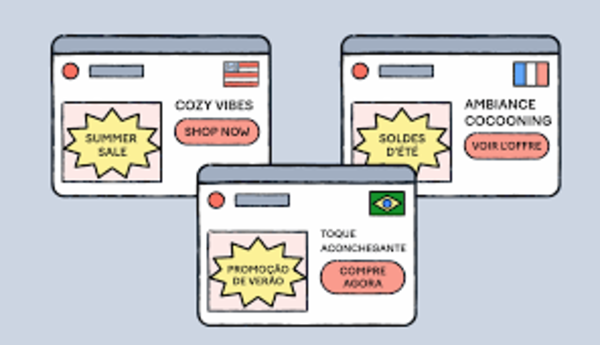
For eCommerce businesses scaling across borders, Magento (Adobe Commerce) is a powerhouse. Its native multi-store architecture allows merchants to manage multiple countries and languages from a single backend. However, this complexity is a double-edged sword. If the technical foundation is misconfigured, you risk “cannibalizing” your own rankings, serving the wrong currency to customers, or being penalized by Google for duplicate content.
Here are the most common international SEO mistakes in Magento and the strategic fixes required to dominate global search results.
Nội dung bài viết
- 1 Using One Global Store Without Proper Localization
- 2 No hreflang or Incorrect hreflang Implementation
- 3 Duplicate Content Across Different Countries
- 4 Wrong Canonical Tags in Multi-Store Setup
- 5 Ignoring Country-Specific URLs and Forced Redirects
- 6 Not Setting Correct Store Locale and Language Attributes
- 7 Missing Region-Specific Structured Data (Schema)
- 8 Indexing Automatic Language Translation Pages
- 9 Failing to Set Correct Currency and Pricing Display
- 10 Slow International Site Performance
- 11 Ignoring Local Keyword Research and Cultural Nuances
- 12 Lack of an International XML Sitemap Strategy
- 13 Final Strategy for Magento International SEO
Using One Global Store Without Proper Localization
A frequent error is attempting to serve the entire world through a single Magento Store View, merely swapping currencies or adding a basic translation toggle.
The Problem
When you use one “Global” store, Google treats your site as a single entity targeting a generic audience. Even if you have a currency switcher, the underlying HTML and metadata remain static. This leads to poor relevance; a user in Berlin might see US-centric shipping info or English meta titles, resulting in high bounce rates and low regional rankings.
The Fix
- Utilize Separate Store Views: In Magento, create a unique Store View for every language or country-specific market. This allows for unique metadata, localized headers, and specific URL keys.
- Choose the Right URL Structure: Prefer separate domains or subdirectories over subdomains or URL parameters.
- example.com/fr/ (France)
- example.com/de/ (Germany)
- example.com/uk/ (United Kingdom)
- Avoid Logical Mismatches: Don’t use a “generic” French view for all French speakers globally. A user in Quebec has different search intents and legal requirements than a user in Paris.
No hreflang or Incorrect hreflang Implementation
The hreflang attribute is the most critical tool for international SEO. It tells search engines which version of a page should be shown to users based on their location and language settings.
The Problem
Magento does not handle hreflang perfectly out of the box. Common errors include missing tags, incorrect language codes (e.g., using en-UK instead of the correct ISO code en-GB), or “broken” loops where Page A points to Page B, but Page B doesn’t point back. This results in Google serving the wrong version of your site—or worse, ignoring your regional variations entirely.
The Fix
- Implement Granular Locales: Use specific ISO codes to distinguish regions, such as en-us for the USA and en-gb for the UK.
- Use Magento SEO Extensions: While you can custom-code this, robust extensions (like those from Amasty or Mirasvit) are often safer as they automatically map products across store views.
- Essential Components:
- Self-referencing tags: Each page must have an hreflang tag pointing to itself.
- x-default: Set a global fallback (usually your main English site) for users whose language/region doesn’t match any specific tag.
Magento 2’s default setup doesn’t provide complete hreflang management, which can easily lead to mis-indexing across markets. Consider using a Magento SEO extension that supports self-referencing hreflang, x-default, and multi–store view mapping to solve this effectively.
Duplicate Content Across Different Countries
If you sell the same product in the US, UK, and Australia, you might be tempted to use the exact same English descriptions for all three Store Views.
The Problem
Search engines may view these pages as “duplicate content.” Instead of ranking all three, Google might choose one as the “master” and hide the others. This prevents you from ranking in specific local results. Furthermore, failing to localize content affects the “Quality Score” of your page.
The Fix
- Human-Centric Localization: Don’t just translate; localize. Change “Color” to “Colour” for the UK, and “Cell phone” to “Mobile phone.”
- Localize Functional Details: Update measurement units (Metric vs. Imperial), sizing charts (US vs. EU shoe sizes), and regional shipping/return policies.
- Unique Product Descriptions: If possible, rewrite the first paragraph of product descriptions to include local keywords and regional context.
Wrong Canonical Tags in Multi-Store Setup
Canonical tags tell search engines which URL is the “authoritative” version of a page. In a standard Magento setup, these can easily become misconfigured.
The Problem
A common mistake is setting all regional pages (like /fr/ or /uk/) to canonicalize to the main .com homepage. This effectively tells Google: “Don’t index my French page; it’s just a copy of the English one.” This will prevent your international subfolders from ever appearing in search results.
The Fix
- Self-Canonicalization: Ensure that each regional URL points to itself as the canonical version.
- Cross-Store Consistency: Check your Stores > Configuration > Catalog > SEO settings. Ensure “Use Canonical Link Meta Tag for Products” is set to “Yes” but verify the logic doesn’t default to a single global URL.
- Deliberate Duplicates: If you intentionally have two identical versions (e.g., two English stores for different legal reasons), only then should you use a cross-domain canonical to avoid a penalty.

Ignoring Country-Specific URLs and Forced Redirects
How a user reaches your site—and what the URL looks like—matters for both trust and crawlability.
The Problem
Using the same example.com/product.html for every country and relying on JavaScript to swap content is a disaster for SEO. Similarly, “Forced IP Redirects” (where a user is automatically moved to a regional site based on their location) prevent Googlebot from crawling your different store views, as the bot often crawls from US-based IPs.
The Fix
- Unique URL Keys: Use translated URL keys for different store views (e.g., /red-shoes vs /chaussures-rouges).
- The “Soft” Redirect: Instead of a forced redirect, use a non-intrusive banner that suggests the local store: “It looks like you’re in France. Would you like to visit our French store?”
- Crawlable Selectors: Ensure your language/country switcher is a standard HTML list with links that Google can follow, not a hidden JavaScript dropdown.
Not Setting Correct Store Locale and Language Attributes
Technical SEO starts with the code that identifies the language of your document.
The Problem
Many developers leave the Magento default locale as en_US across all views. This causes a conflict: your content might be in Spanish, but the HTML tag tells the browser it is in English. This confuses screen readers, browsers, and search engine crawlers.
The Fix
Navigate to Stores > Configuration > General > General > Locale Options for each Store View.
- Set the Locale: Select the specific language and region (e.g., “French (France)”).
- Verify the HTML Tag: Check your site’s source code. You should see <html lang=”fr-FR”> for France or <html lang=”de-DE”> for Germany.
- Regional Settings: Ensure the Timezone and Week Start are adjusted to match the local audience.
Missing Region-Specific Structured Data (Schema)
Structured data (Schema.org) helps Google display “rich snippets” like prices and ratings in search results.
The Problem
If your Schema is “global,” it might show USD prices to customers in London. Not only does this hurt your Click-Through Rate (CTR), but it also signals to Google that the page is not fully optimized for the UK market.
The Fix
- Localized Pricing Schema: Ensure the priceCurrency attribute in your Product Schema matches the Store View (e.g., GBP for the UK).
- Organization Schema: Use the areaServed property and include local office addresses or phone numbers if available.
- Availability: Ensure the availability schema reflects local stock levels.
Indexing Automatic Language Translation Pages
Machine translation has improved, but it is not a “set and forget” SEO strategy.
The Problem
Some Magento stores use Google Translate widgets or low-tier plugins that auto-generate pages on the fly. These pages often contain grammatical errors and “thin” content. Google views large volumes of low-quality, auto-generated content as spam, which can lead to a sitewide ranking demotion.
The Fix
- Curated Translation: Use professional translators or AI-assisted translation that is human-reviewed.
- Noindex Low-Quality Pages: If you must use auto-translation as a placeholder, add a noindex tag to those pages until they have been human-edited.
- Prioritize High-Value Pages: Focus your translation budget on top-selling products and category pages first.
Failing to Set Correct Currency and Pricing Display
SEO is not just about getting the user to the site; it’s about signaling relevance to the search engine through user behavior.
The Problem
Showing the wrong currency is a major UX fail. If a user clicks a German search result and sees prices in Yen, they will bounce immediately. High bounce rates signal to Google that your page isn’t relevant for that query, causing your rankings to drop over time.
The Fix
- Multi-Currency Configuration: Enable all relevant currencies in Stores > Configuration > General > Currency Setup.
- Tax Rules: Configure Magento Tax Rules (Sales > Tax) so that prices include VAT or GST where legally required by the country.
- Geo-IP Hints: Use Geo-IP detection to default the currency switcher to the user’s local currency, but always allow them to change it manually.
Slow International Site Performance
Magento is resource-intensive. If your server is in New York and a customer in Sydney is trying to load your site, the latency will be significant.
The Problem
Page speed is a direct ranking factor (Core Web Vitals). A slow-loading international store view will struggle to outrank local competitors who are hosted nearby.
The Fix
- Content Delivery Network (CDN): Use a CDN like Cloudflare or Fastly to cache static assets (images, CSS, JS) on servers closer to your international users.
- Edge Caching: For Magento, implementing Varnish or an “Edge Side Includes” (ESI) strategy is vital for serving dynamic content quickly across the globe.
- Image Optimization: Use WebP formats and lazy loading to ensure high-resolution product images don’t throttle mobile connections in regions with slower internet.
Ignoring Local Keyword Research and Cultural Nuances
Direct translation is often the enemy of SEO. A literal translation of a keyword may not be what locals actually type into a search bar.
The Problem
A US store selling “Sneakers” will miss out on UK traffic looking for “Trainers.” A French store using the term “Chandail” (common in Quebec) will struggle to rank in France where “Pull” or “Gilet” is preferred.
The Fix
- Native Keyword Research: Use tools like Ahrefs or Semrush to research search volumes within the target country.
- Adapt Category Naming: Don’t just translate your menu; rename categories based on local demand.
- Meta Title Adaptation: Customize Title Tags to include local slang or preferred terminology.
For country-specific markets, this strategy overlaps heavily with local SEO principles, especially when targeting city-level or region-based searches. To go deeper into optimizing Magento stores for geographic relevance, citations, and local search intent, see our guide on Magento local SEO.
Lack of an International XML Sitemap Strategy
A sitemap is a roadmap for Google. If the roadmap is confusing, parts of your international site will remain unindexed.
The Problem
Many Magento admins generate one giant sitemap that lists every URL from every store view. This makes it difficult for Google to parse which pages belong to which region and can lead to “Crawl Budget” waste.
The Fix
- Unique Sitemaps per Store View: Generate a separate XML sitemap for each view (e.g., sitemap_fr.xml, sitemap_uk.xml).
- Cross-Referencing: Ensure your sitemaps include xhtml:link attributes that point to the alternate language versions of each URL.
- Search Console Property: Register each international subfolder or domain as its own property in Google Search Console and submit the corresponding sitemap there.
Final Strategy for Magento International SEO
Magento is arguably the best platform for international e-commerce, but it requires a “measure twice, cut once” approach to configuration. By avoiding these twelve mistakes, you ensure that your store isn’t just a collection of translated pages, but a coordinated global network that Google understands and trusts.
Your International SEO Checklist:
- Verify Store View architecture.
- Audit hreflang tags for loops and correct ISO codes.
- Confirm each store view has self-referencing canonicals.
- Localize keywords and metadata—don’t just translate.
- Optimize performance via CDN for global users.