In the competitive landscape of e-commerce, appearing on the first page of search results is only half the battle. To truly succeed, your listings must stand out and compel users to click. This is where Structured Data in Magento becomes a critical component of your SEO strategy. By providing search engines with organized, machine-readable information about your products and brand, you can unlock “Rich Results”—those eye-catching snippets that include star ratings, prices, and stock status.
This guide explores how to implement, optimize, and validate structured data specifically for Magento 2 storefronts.
Nội dung bài viết
What “Structured Data in Magento” Means
Structured data is a standardized format for providing information about a page and classifying the page content. In the context of Magento, it is a specialized code (usually following the Schema.org vocabulary) that helps Google’s crawlers understand exactly what is being sold, how much it costs, and what customers think of it.
While there are several formats for this data, the two most common in the Magento ecosystem are:
- JSON-LD (Recommended): A JavaScript notation embedded in a <script> tag. It is decoupled from the user-facing HTML, making it cleaner to manage and preferred by Google.
- Microdata: An older method where attributes are nested directly within the HTML tags.
Historically, Magento 2 utilized Microdata in its base Luma theme. However, modern SEO best practices have shifted heavily toward JSON-LD. By using JSON-LD, you can ensure that even if you change your frontend design or CSS classes, your SEO data remains intact and error-free.
For a deeper breakdown of how Schema.org vocabulary is applied specifically within Magento, including common implementation patterns and supported schema types, see our detailed guide on Magento schema markup.
Types of Rich Results for Magento
When implemented correctly, structured data enables several types of Rich Results:
- Product Snippets: Displays price, availability, and review ratings directly in search results.
- Breadcrumbs: Shows the path to the product (e.g., Home > Men > Tops) instead of a raw URL.
- Organization/Logo: Validates your brand identity and social profiles in the Knowledge Graph.
- FAQ Snippets: Displays dropdown questions and answers for product or category queries.
- Sitelinks Search Box: Adds a search bar specifically for your store within the Google search listing.
Most Important Structured Data for Magento Stores
Not all schema types are created equal. For a Magento store, you should prioritize the following types to maximize your Return on Investment (ROI).
1. Product Schema (Highest Impact)
The Product schema is the backbone of e-commerce SEO. Without it, Google treats your product page as a standard text page. To trigger a full Rich Snippet, your Magento store must output:
- Basic Info: Name, Image, SKU, and Description.
- Brand: The manufacturer or brand name (often a custom attribute in Magento).
- Offers: This includes the price, priceCurrency, and availability (InStock/OutOfStock).
- AggregateRating: The average star rating and total number of reviews.
The Outcome: Higher Click-Through Rates (CTR). A product listing with 5 stars and a visible price is significantly more attractive than a plain blue link.
While structured data significantly improves product visibility, it should be implemented alongside broader on-page optimization techniques—such as content structure, metadata, and internal linking—outlined in our guide to Magento SEO best practices for product pages.
2. Breadcrumb Schema
Breadcrumbs help Google understand the hierarchy of your store. Instead of a messy URL like example.com/catalog/product/view/id/123, Google will display a clean trail: Example Store > Clothing > Jackets. This improves user trust and provides better context for the search engine.
3. Organization and Website Schema
This is typically added to the homepage or site-wide <head>. It tells Google: “This is my official brand.”
- Logo: Ensures your official logo appears in search results and the Knowledge Graph.
- Social Profiles: Links your Facebook, Instagram, and Twitter accounts to your brand entity.
- Contact Points: Provides customer service numbers and email addresses.
4. Category Page Structured Data (ItemList)
While Product schema is for individual pages, ItemList schema can be applied to Magento category pages. It tells Google that the page is a list of related items. While it doesn’t always trigger a specific “snippet,” it helps Google index your catalog more efficiently and can lead to “host carousels” in some mobile search results.
5. Blog and Content Schema
If you use a Magento blog extension (like Magefan or Aheadworks), you should implement Article or BlogPosting schema. If you have “How-to” guides or “FAQs” regarding your shipping or returns, adding FAQPage or HowTo schema can occupy significantly more “real estate” on the Search Engine Results Page (SERP).
How to Add Structured Data in Magento 2
Magento 2 offers flexibility in how you implement code, ranging from automated extensions to manual developer intervention.
Option 1: Built-in / Theme Support
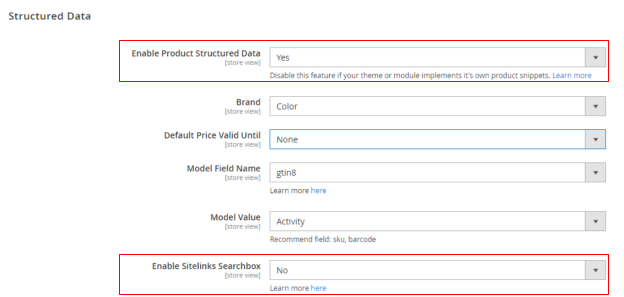
Out of the box, Magento 2 (using the Luma theme) includes Microdata for products and breadcrumbs.
- Pros: Requires zero configuration; works immediately.
- Cons: It is often incomplete (missing GTIN, Brand, or FAQ). Because it is Microdata, it is hard-coded into the .phtml templates, making it difficult to customize without overriding files. It also tends to break if your theme developer changes the HTML structure.
Option 2: Use Magento Extensions
For most merchants, using a dedicated SEO or Structured Data extension is the best balance between cost and performance.
- Key Features to Look For:
- Automatic JSON-LD Generation: Replaces the clunky default Microdata.
- Field Mapping: Ability to map Magento attributes (like manufacturer) to Schema fields (like brand).
- Support for GTIN/MPN: Crucial for Google Shopping and advanced product identification.
- Review Integration: Compatibility with third-party review platforms (Trustpilot, Yotpo, etc.).
- Note of Caution: When installing an extension, ensure it disables the default Magento Microdata. Having both Microdata and JSON-LD for the same product can sometimes confuse search engines or lead to “Duplicate Field” errors.
Want a faster, safer, and fully SEO-optimized setup?
Consider using a reliable Magento 2 SEO module with built-in structured data support. It automatically generates valid JSON-LD, keeps your schema up to date, and helps your store qualify for rich snippets — without any manual coding.
Option 3: Manual Custom Implementation
If you have a specialized frontend (like a PWA or a highly customized headless setup), a manual implementation via a custom module is ideal.
The Developer Approach:
- Layout XML: Use catalog_product_view.xml to inject a new block into the head.additional or content area.
- ViewModel/Block: Create a PHP class that gathers data from the current product object (name, price, final price, gallery images).
- Template (.phtml): Output the data as a JSON object inside a script tag.
JSON
<script type=”application/ld+json”>
{
“@context”: “https://schema.org/”,
“@type”: “Product”,
“name”: “<?php echo $product->getName(); ?>”,
“sku”: “<?php echo $product->getSku(); ?>”,
“offers”: {
“@type”: “Offer”,
“price”: “<?php echo $product->getFinalPrice(); ?>”,
“priceCurrency”: “USD”,
“availability”: “https://schema.org/InStock”
}
}
</script>
Validating Your Structured Data
Adding the code is only the first step. You must verify that Google can read it correctly.
Google Rich Results Test
This is the most important tool. You can paste a URL or a code snippet, and Google will tell you exactly which Rich Results are eligible. It highlights Errors (which prevent Rich Results) and Warnings (which are suggestions for improvement).
Schema.org Validator
While Google’s tool focuses on what Google supports, the Schema.org Validator checks your code against the full library of official schema types. Use this to ensure your syntax is technically perfect.
Search Console Enhancements Tab
Once your site is live, check the “Enhancements” section in Google Search Console. It provides a long-term report on your structured data health, showing you how many pages have valid schema and where errors are popping up over time.
Best Practices for Magento SEO
To ensure your structured data provides the maximum benefit without risking penalties, follow these industry standards:
| Practice | Why it Matters |
| Prefer JSON-LD | Easier to maintain, less prone to breaking during site redesigns. |
| Match Visible Content | The price/stock in your schema must match what the user sees. Mismatched data can lead to manual actions by Google. |
| Include Identifiers | Always include SKU, GTIN (EAN/UPC), and Brand. These help Google uniquely identify the product globally. |
| One Main Entity | Ensure there is only one “Primary” Product schema per page to avoid confusing search engines. |
| Automate Updates | Ensure your schema pulls the “Final Price” (including discounts) so your rich snippets reflect your actual sales. |
Avoiding Common Pitfalls
- Duplicate Markup: If your theme provides Microdata and your extension provides JSON-LD, you may end up with two sets of data. Disable the one you aren’t using.
- Hidden Reviews: Don’t include “AggregateRating” if you don’t actually have reviews visible on the page.
- Generic Data: Avoid using the same description for every product. Use the specific product’s short description for the schema.
Conclusion
Implementing structured data in Magento is no longer an “optional” SEO task; it is a requirement for any merchant serious about organic growth. Whether you choose to use the default theme capabilities, a robust third-party extension, or a custom-coded solution, the goal remains the same: provide search engines with the clearest possible picture of your catalog.
By focusing on high-impact areas like Product snippets, Breadcrumbs, and Organization schema, you can significantly increase your store’s visibility and click-through rate in an increasingly crowded digital marketplace.