Managing indexes is a critical part of maintaining a fast, accurate, and stable Magento 2 store. Every time products, prices, categories, or stock data change, Magento needs to reindex information so it can be displayed efficiently on the storefront. If indexing isn’t handled properly, your store may show outdated data, slow down, or even experience functional issues.
In this step-by-step Magento 2 Index Management tutorial, you’ll learn what indexing is, how indexers work, how to check their status, and how to run reindexing using both the Admin Panel and CLI. We’ll also cover best practices, indexing modes, and troubleshooting tips to help you avoid common problems and keep your store performing smoothly.
Nội dung bài viết
Understanding Magento 2 Indexing: Definition, Types, and Status
What Is Indexing in Magento 2?
Magento stores huge amounts of data across many database tables. If Magento had to calculate every product price, category mapping, or inventory status on the fly whenever a customer browsed the store, page load times would be slow and resource‑heavy. Indexing transforms this raw data into efficient structures optimized for lookups.
In simple terms:
- An index is a transformed snapshot of original data to optimize read performance.
- The dictionary is the source data you edit in the admin.
- An indexer is a Magento process that builds or updates an index.
For example, when you change a product price from $10 to $12 in the admin, Magento must update the price index so that the new price shows on the frontend. If the index isn’t updated, the store may still display the old price until a reindex happens.
Indexing Types in Magento 2
Magento supports two kinds of reindexing:
Full Reindex: This rebuilds all index tables completely and is usually needed after major changes like:
- Adding a new store view
- Creating a new customer group
- Bulk updates across products/categories
You can run a full reindex manually if needed.
Partial Reindex: Only updates the parts of an index that changed. For example, if only the price of one product changed, Magento processes just that data instead of rebuilding the entire index. This saves time for small updates.
Magento 2 Indexer Status Explained
Every indexer in Magento 2 has a status that tells you how up‑to‑date the indexed data is. Common statuses include:
- Valid (Ready): Data is synchronized; no reindex required.
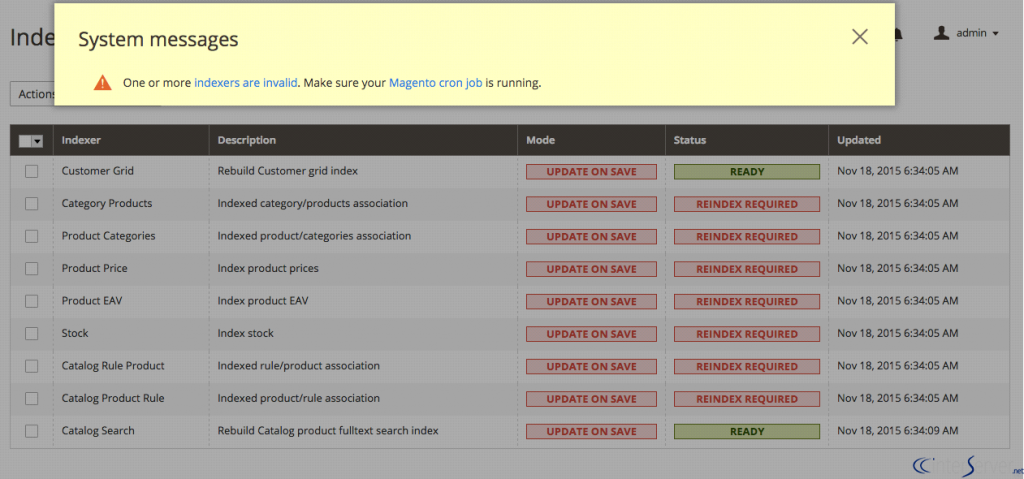
- Invalid (Reindex Required): Source data has changed; indexing must be run.
- Working (Processing): Indexer is currently running a reindex. +1
How to View Indexer Status
- Via Admin Panel
- Log in to Magento Admin.
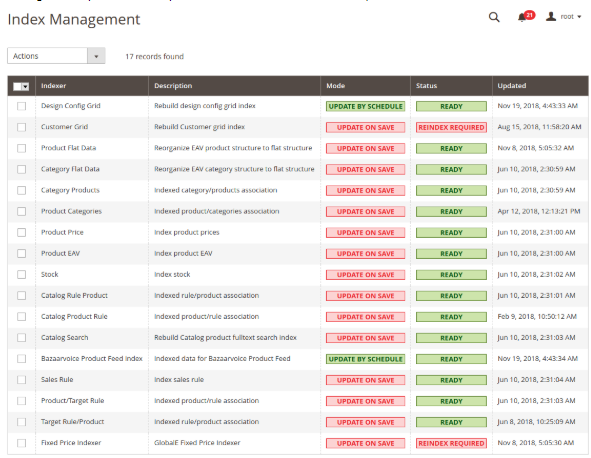
- Go to System > Tools > Index Management.
- You’ll see a list of indexes and their current statuses.
- Via CLI: Run the following command via SSH:
bin/magento indexer:status
This displays whether each index needs a reindex or is already up to date.
Magento 2 Index Management: Adjusting Indexing Modes
Magento 2 provides two indexing modes that determine when the indexes are updated:
Update on Save
Magento applies index updates immediately when data is saved in the admin. This ensures the frontend reflects changes instantly. However, in stores with many products or frequent updates, this can slow down saving operations because indexing runs constantly.
Update by Schedule
Instead of updating indexes immediately, Magento adds changes to a changelog and applies them later through a cron job. This improves backend performance and is generally recommended for stores with large catalogs.
You can change the mode either in the admin panel or via CLI.
In Admin Panel
- Go to System > Tools > Index Management.
- Select the indexers you want to change.
- From the Actions dropdown, choose the mode and click Submit.
Using CLI
To set Update on Save:
bin/magento indexer:set-mode realtime
To set Update by Schedule:
bin/magento indexer:set-mode schedule
You can also target a specific indexer:
bin/magento indexer:set-mode schedule catalog_product_price
This switches just the product price indexer to scheduled mode.
How to Run Reindex in Magento 2
Reindexing is usually required after major store updates such as bulk product imports, mass price or stock changes, or large category restructuring. It may also be needed after installing new modules that modify store data. Although Magento can automatically reindex when using Update by Schedule with a properly running cron, manual reindexing is still recommended when you need immediate accuracy or urgent updates.
Reindexing ensures your storefront displays the latest data after changes such as product updates, price changes, category assignments, or stock adjustments. Magento allows you to run reindexing in two main ways: via the Admin Panel (limited) and via CLI (recommended).
Reindexing in Magento 2 via Admin Panel
By default, Magento 2 does not allow full manual reindexing directly from the Admin panel like Magento 1 did. However, you can still:
- View indexer status
- Change indexer mode (Update on Save / Update by Schedule)
- Trigger reindex indirectly if using “Update on Save”
Steps:
- Go to Admin Panel → System → Tools → Index Management
- Select the indexers you want to manage
- Use the Actions dropdown to: Change Mode (Realtime or Schedule)
- Click Submit
Note: If your store is set to Update on Save, Magento reindexes automatically each time data is updated.
If you want a true “Reindex Now” button in Admin, you need an extension like Magento 2 Reindex from Backend.
Reindexing in Magento 2 Using CLI (Recommended)
Running reindex via SSH/CLI is the most reliable and fastest method, especially for large stores.
Connect to your server and navigate to your Magento root directory, then use the following commands.
✅ Check Current Indexer Status
Use this command to see which indexers need to be updated:
bin/magento indexer:status
It will show:
- Ready / Valid
- Reindex Required / Invalid
- Processing
✅ Reindex All Indexers
To reindex everything at once:
bin/magento indexer:reindex
Magento will process all indexers and confirm completion with messages like:
Design Config Grid index has been rebuilt successfully
Product EAV index has been rebuilt successfully
✅ Reindex a Specific Indexer
If you only need to update one indexer (faster and lighter), first list available indexers:
bin/magento indexer:info
You’ll see something like:
catalog_product_price
cataloginventory_stock
catalog_category_product
catalogsearch_fulltext
Then run:
bin/magento indexer:reindex catalog_product_price
This is useful when:
- Only prices changed
- Only categories updated
- Only search index updated
Reindexing with Scheduled Mode (Cron-Based Reindex)
If your index mode is Update by Schedule, Magento does NOT reindex immediately.
Instead, it queues changes and applies them via cron.
Make sure cron is set up:
bin/magento cron:run
If cron works, indexing happens automatically without manual intervention.
Note: For big catalogs, reindexing can affect performance. Recommended best practices:
- Prefer Update by Schedule mode
- Avoid running reindex during peak traffic
- Use specific index reindexing instead of global when possible
- Ensure server timeout is not too low
- Run reindexing on staging before production when applying major changes
Note: For large stores with frequent updates, consider using a Magento 2 SEO extension like the BSS Commerce SEO Suite to improve site crawlability and external indexation (e.g., XML sitemap, canonical tags), while using a dedicated indexing management extension to automate internal reindexing for store performance. Explore more feature of this extension here: https://bsscommerce.com/magento-2-seo-extension.html
Troubleshooting Indexing Issues in Magento 2
Even though Magento 2 handles indexing efficiently, issues can still occur, especially on stores with large catalogs, heavy data operations, or misconfigured cron jobs. Understanding the most common problems, why they happen, and how to fix them will help you maintain accurate storefront data and stable performance.
Indexers Stuck in “Processing” or Never Completing
This issue usually appears when Magento starts indexing but never finishes. You may notice that the storefront doesn’t reflect recent changes, or the CLI command runs endlessly without success.
Symptoms
- Indexer remains in Processing state for a long time
- bin/magento indexer:reindex does not complete
- Storefront data does not update
Common Causes
- Indexing was interrupted midway
- Indexer tables became locked
- Server timeout or resource limitations
Fix: Reset and rerun the affected indexer to release the lock and restart the process:
bin/magento indexer:reset
bin/magento indexer:reindex
If only one indexer is stuck, reset that specific indexer instead of all to avoid unnecessary processing.
“Reindex Required” Keeps Appearing Repeatedly
Sometimes Magento keeps asking for reindexing even after you’ve already done it. This usually indicates that automatic indexing isn’t working or your data changes too frequently.
Symptoms
- Index shows Invalid or Reindex Required continuously
- Data repeatedly goes out of sync
Causes
- Cron job is not running
- Conflicts between indexing modes
- Heavy and continuous data changes on large stores
Fix:
- First, check and run cron to ensure scheduled indexing works: bin/magento cron:run
- Then verify cron is configured correctly on the server. If cron is missing or misconfigured, Magento can never complete scheduled indexing automatically.
Permission or Ownership Errors in CLI
If Magento refuses to execute indexing commands, it’s usually a permission problem. This is common after migrations, server changes, or incorrect deployment setups.
Symptoms
- “Permission denied”
- “Operation not permitted”
- Unable to execute indexer commands
Causes
- Incorrect file or folder permissions
- Commands executed under the wrong user
Fix: Run commands as the correct Magento user (often the web server user). If needed, reset permissions for key directories:
chmod -R 775 var/ generated/ pub/static/
Avoid running Magento commands as root unless you fully understand the risks.
Indexing Takes Too Long or Affects Performance
On busy or large stores, indexing may consume significant server resources. This can slow the backend, cause CPU spikes, or make indexing last unreasonably long.
Symptoms
- Slow backend performance
- High CPU or memory usage
- Reindexing takes minutes or even hours
Causes
- Very large catalogs
- Weak or overloaded hosting
- Using Update on Save on high-activity stores
Fix
Switch to Update by Schedule so Magento handles indexing via cron instead of on every data change:
bin/magento indexer:set-mode schedule
For large stores, always plan reindexing during low-traffic periods to avoid performance impact and ensure search engines crawl your site efficiently by properly configuring Robots.txt for Magento 2 and submitting your Magento sitemap.
Frontend Showing Old Data After Updates
If your store displays outdated prices, incorrect categories, or wrong stock status even after changes, it’s usually due to indexing or caching delays.
Symptoms
- Prices stay outdated
- Categories do not update
- Stock status appears incorrect
Causes
- Index not updated
- Cache still storing old data
- Cron not running properly
Fix: Run reindexing and clear cache to refresh storefront data:
bin/magento indexer:reindex
bin/magento cache:flush
With these troubleshooting steps, most Magento 2 indexing problems can be identified and resolved quickly, helping your store maintain accurate data and smooth performance.
FAQs
- What does index management actually improve in Magento 2?
It ensures customers always see accurate data while allowing Magento to serve content faster instead of recalculating everything in real time. - When should I trigger manual reindexing?
Do it when major catalog changes occur, performance drops, or Magento notifies that reindexing is required. - Is full reindexing always necessary?
No. Magento often handles partial indexing efficiently. Full reindexing is mainly for structural or large-scale changes. - Can indexing affect checkout and pricing accuracy?
Yes. Outdated indexes can display wrong prices or availability, which can confuse customers and affect conversions. - Which indexing mode suits enterprise-level stores best?
Large stores benefit most from Update By Schedule to prevent constant live database stress.
Conclusion
Effective index management is essential for keeping Magento 2 fast, accurate, and reliable. By understanding how indexing works, monitoring indexer status, and knowing when to trigger reindexing, you can ensure your storefront always reflects the latest product, price, and category data. For most stores, using Update by Schedule with properly configured cron jobs is the safest and most efficient approach, while manual reindexing remains useful for urgent updates or troubleshooting.
If indexing issues occur, identifying symptoms early and applying the right fixes will help maintain stable performance and prevent data inconsistencies. With the best practices and troubleshooting steps covered in this guide, you’ll be better equipped to manage Magento 2 indexing confidently and keep your store running smoothly.