Magento is one of the most powerful eCommerce platforms in the world, especially for medium to large online stores. However, its complexity also makes it one of the trickiest platforms when it comes to technical SEO. If a Magento store is not configured properly, you may face duplicate content, crawling inefficiencies, index bloat, slow performance, or even missed organic ranking opportunities.
The good news is that most Magento technical SEO issues are well-known and completely fixable. In this guide, we will walk through the 10 most common Magento technical SEO problems, why they matter, and exactly how you can fix them step by step. Many of these problems stem from how search engines crawl Magento stores. Inefficient crawling caused by parameterized URLs, duplicate paths, or poor internal linking can waste crawl budget and prevent important pages from being discovered or updated in Google’s index.
Nội dung bài viết
- 1 Duplicate content from layered navigation and filter parameters
- 2 Duplicate product URLs across multiple categories
- 3 Missing or incorrect canonical tags
- 4 Weak or broken XML sitemap configuration
- 5 Slow page speed and core web vitals problems
- 6 Incorrect robots.txt configuration
- 7 Poor URL structure and non-SEO-friendly URLs
- 8 Pagination SEO mistakes
- 9 Missing structured data (schema markup)
- 10 Indexation issues from noindex and nofollow misuse
- 11 Lack of Hreflang Tags for Multi-Store Setups
- 12 Final thoughts
One of the most common Magento SEO challenges comes from layered navigation. When customers filter products by attributes such as color, size, or price, Magento generates parameterized URLs like:
- /men/shoes?price=100-200
- /women/dresses?color=red
- /electronics/phones?brand=samsung
From a user perspective, this is perfect. But from Google’s perspective, each of these becomes a unique page with similar or identical content. This causes duplicate content, index bloat, and dilutes ranking power.

How to fix it
- AJAX Navigation: Use an extension to load filters via AJAX so the URL doesn’t change for every minor click.
- Robots Meta Tags: Set filtered pages to NOINDEX, FOLLOW. This allows Google to discover products through the filters but prevents the filtered page itself from cluttering the index.
- Canonical Tags: Ensure every filtered page points back to the main category “anchor” page.
- Path: Stores > Settings > Configuration > Catalog > Catalog > Search Engine Optimization. Ensure “Use Canonical Link Meta Tag for Categories” is set to Yes.
The best approach is to prevent search engines from indexing these faceted parameter URLs.
Enable canonical tags:
- Go to: Stores → Configuration → Catalog → Catalog → Search Engine Optimization
- Enable:
- Use canonical link meta tag for categories
- Use canonical link meta tag for products
Robots Meta Tags: Set filtered pages to NOINDEX, FOLLOW. This allows Google to discover products through the filters but prevents the filtered page itself from cluttering the index.
Disallow: /*?price
Disallow: /*?color
Disallow: /*?dir
Disallow: /*?p=
This keeps layered navigation usable for shoppers but prevents SEO damage.
Avoid Index Bloat In Google Search Console
Go to:
- Google Search Console
- Settings → Crawl Stats
- Monitor excluded pages like:
- Duplicate without user-selected canonical
- Parameter URLs
- Duplicate without user-selected canonical
If Google still crawls them → Use URL parameters handling in older Universal Analytics properties or let Google learn over time in GA4 era via signals.
Note: Google does not index every URL it discovers. Instead, it evaluates signals such as canonical tags, internal linking, crawl budget, and page quality before deciding which Magento pages are actually indexed and ranked.
Duplicate product URLs across multiple categories
Magento allows a product to belong to multiple categories. While this is great for merchandising, it often leads to duplicate URLs like:
- /men/sneakers/product-name.html
- /sale/footwear/product-name.html
Search engines see the same product content under different URLs, which splits link equity and confuses indexing.
How to fix it
There are two main steps.
First, enable canonical tags for products so Google always knows which is the main product URL.
Second, control category path usage in product URLs.
- Go to: Stores → Configuration → Catalog → Catalog → Search Engine Optimization
- Set: Use categories path for product URLs = No (recommended for most stores)
This helps maintain a single consistent product URL across the entire store.
If URLs change, enable automatic redirects to prevents 404s and SEO drops.
- Stores → Configuration → Catalog → Catalog
- Set: Create Permanent Redirect for URLs if URL Key Changed = Yes
Even beyond layered navigation, canonical tags are essential for Magento SEO. Canonical tags tell Google which version of a page is the “primary” version when there are multiple similar pages.
Many Magento stores face these issues:
- no canonical tags at all
- self-referencing canonicals missing
- paginated pages incorrectly canonicalized to page 1
Without proper canonicalization, duplicate content becomes inevitable.
How to fix it
Magnento fortunately provides built-in canonical settings.
Go to: Stores → Configuration → Catalog → Catalog → Search Engine Optimization
Enable:
- Use canonical link meta tag for categories
- Use canonical link meta tag for products
Then ensure:
- Every page references itself correctly
- paginated pages have their own canonical version, not pointing only to page 1
This allows search engines to consolidate ranking signals correctly.
Weak or broken XML sitemap configuration
A properly configured XML sitemap helps search engines discover and understand your Magento store structure. However, many stores either forget to enable it, configure it incorrectly, or never submit it to Google Search Console.
Common issues include:
- sitemap not generated automatically
- too many URLs inside a single file
- missing important page types
- not updated regularly
How to fix it
- Configure Automatic Generation:
- Path: Stores > Configuration > Catalog > XML Sitemap > Enable Generation Settings. Recommended settings:
- Products: Update daily
- Categories: Update weekly
- CMS Pages: Update monthly
- Robots.txt Optimization: Ensure you are not blocking your /pub/ or /static/ folders. Google needs access to these to render the page.
- number of URLs per sitemap does not exceed 50,000
- each sitemap file remains under recommended size limits
- Path: Stores > Configuration > Catalog > XML Sitemap > Enable Generation Settings. Recommended settings:
- Submission: Ensure the path to your sitemap is included at the bottom of your robots.txt file: Sitemap: https://www.yourdomain.com/sitemap.xml.
Slow page speed and core web vitals problems
Magento is powerful, but heavy. Without optimization, many Magento stores suffer slow loading speeds, poor Core Web Vitals, and high bounce rates. This not only hurts user experience but also affects rankings.
Common causes include:
- render-blocking JavaScript
- large unoptimized images
- slow hosting or server
- lack of caching
- unused third-party scripts
How to fix it
- Varnish Cache: Never rely on Magento’s built-in “Built-in Cache.” It is significantly slower than Varnish. Ensure Varnish is configured at the server level and enabled in Magento under Stores > Configuration > Advanced > System > Full Page Cache.
- Image Optimization (WebP): Magento 2.4.x supports WebP. Convert all images to this format to reduce file size by 30% without losing quality.
- Advanced JS Bundling: Standard Magento JS bundling actually makes the site slower because it creates huge files. Use a modern approach like “Magepack” or manually configure bundling to ensure only necessary scripts load on the initial page view.
- Production Mode: It sounds simple, but many stores are accidentally left in “Developer” or “Default” mode. Run bin/magento deploy:mode:show and ensure it says production.
Incorrect robots.txt configuration
Your robots.txt file controls what search engines can and cannot crawl. Unfortunately, many Magento stores either restrict too much by mistake or fail to block harmful sections.
Typical mistakes include:
- blocking essential category or product pages
- allowing checkout, search results, or internal user pages to be crawled
- missing sitemap directive
How to fix it
A good Magento robots.txt example looks like this:
Disallow: /checkout/
Disallow: /customer/
Disallow: /wishlist/
Disallow: /catalogsearch/
Disallow: /*?*
Allow: /pub/media/
Sitemap: https://yourstore.com/sitemap.xml
Always test settings with Google Search Console URL inspection tool before finalizing changes.
Poor URL structure and non-SEO-friendly URLs
Clean, readable URLs improve user experience and SEO. However, Magento can generate long or parameter-heavy URLs if not configured correctly.
Bad examples:
- /product?id=982173
- /category/index/view/id/92/
- URLs full of unnecessary numbers or symbols
How to fix it
First ensure SEO-friendly URLs are enabled.
- Go to: Stores → Configuration → General → Web
- Set: Use Web Server Rewrites = Yes
Then follow best practices:
- keep URLs short and descriptive
- avoid frequent URL changes
- include relevant keywords naturally
- avoid uppercase or special characters
A good Magento product URL should look like:
- /mens-running-shoes
- /4k-smart-tv-55-inch
This not only helps SEO but also increases trust and click-through rates.
Pagination SEO mistakes
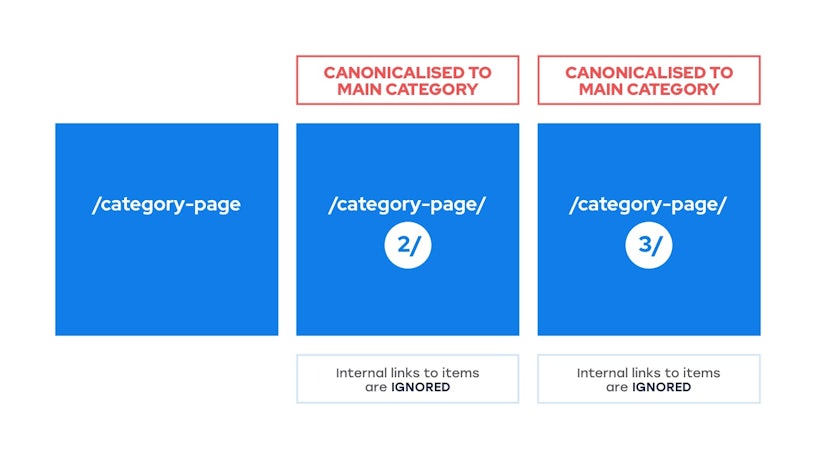
Most Magento stores have large category pages with hundreds or thousands of products. Pagination is necessary, but when implemented incorrectly, it can confuse search engines.
Common issues include:
- all paginated pages canonicalized to page 1
- lack of clear signals about page sequence
- weak internal linking between pages
This can lead to index inefficiency and lost ranking value.
How to fix it
- Unique Titles: Use an SEO extension to append ” – Page 2″ to the title tags of paginated pages.
- Canonical Links: The canonical tag for page=2 should point to page=2, not to the first page. Pointing everything to page 1 tells Google that the subsequent pages have no unique value, which prevents the products on those pages from being discovered efficiently.
- Remove “All” View: Unless your catalog is very small, disable the “View All” option, as it creates a massive, slow-loading page that bots struggle to process.
Missing structured data (schema markup)
Structured data helps search engines better understand your store content and enhances your listings with rich results such as price, reviews, rating stars, and availability. These visual enhancements significantly increase CTR.
Magento’s default Schema is often based on older “Microdata” standards. It frequently misses critical fields like Availability, PriceValidUntil, or Brand. When Google detects these missing fields, it displays errors in Search Console and may refuse to show Rich Snippets (stars, price, stock status) for your listings.
How to fix it
- Switch to JSON-LD: JSON-LD is Google’s preferred format. Use a dedicated Magento SEO extension to disable the default Microdata and inject clean, comprehensive JSON-LD into the head of your product pages.
- Validate: Use the Google Rich Results Test to check a variety of products (simple, configurable, and grouped) to ensure all fields are firing correctly.
Indexation issues from noindex and nofollow misuse
Another very common Magento SEO mistake is misusing noindex and nofollow tags. When applied incorrectly, they can cause important pages to disappear from search results.
Examples include:
- accidentally marking important categories noindex
- using nofollow on internal links
- blocking Google from crawling critical sections
- large numbers of “Excluded” pages in Google Search Console
How to fix it
Regular SEO audits are essential.
- check meta robots tags for important templates
- review coverage report in Google Search Console
- remove nofollow attributes from internal navigation links
- ensure valuable pages are crawlable and indexable
A healthy indexation strategy ensures Google focuses on the right pages, not unnecessary duplicates or system pages.
Lack of Hreflang Tags for Multi-Store Setups
If you are running a multi-language or multi-regional store (e.g., a US store and a UK store), you must use hreflang tags.
Without hreflang, Google may see your US and UK sites as duplicate content because the language (English) is the same. This can lead to the US site ranking in the UK search results, causing currency confusion and lost sales.
How to fix
- Cross-Store Mapping: You need an extension or custom code that maps Product A in the US store to Product A in the UK store.
- Implementation: The tag should look like this in the <head>: <link rel=”alternate” hreflang=”en-us” href=”https://site.com/us/product.html” /> <link rel=”alternate” hreflang=”en-gb” href=”https://site.com/uk/product.html” />
- Global Logic: Ensure every version of the page lists all other versions, including itself (self-referencing).
Final thoughts
Technical SEO plays a critical role in Magento performance. Because Magento is such a flexible and feature-rich platform, small misconfigurations can easily snowball into significant SEO issues such as duplicate content, crawling inefficiencies, slow performance, and loss of ranking opportunities.
The good news is that every issue we discussed above is completely fixable with the right configuration and ongoing maintenance. By solving these common Magento technical SEO problems, you can:
- improve crawl efficiency
- enhance search visibility
- strengthen organic rankings
- deliver faster and better user experience
- increase conversions from organic search
Technical SEO is not a one-time task. It requires continuous monitoring, auditing, and fine-tuning. But with a strong Magento SEO foundation, your store can scale sustainably, support growing product catalogs, and maintain strong visibility in competitive markets.